Showing posts with label GDS2. Show all posts

2025/03/13

VXDIAG GDS2 Cannot Diagnose Captiva 2021 Chinese Model?

Problem:

How can I diagnose a Chinese 2021 Chevrolet Captiva? The VXDIAG VCX NANO GM and GDS software I use does not support the Chinese Version of Captiva.
Is there any other version for that or a different Software?


Here is the clue.

They stopped with the Captiva in the China release in 2017.

Captiva 2021 is a totally Chinese model. It is actually a re-badged MG Hector.

It needs a Saic vdi diagnostic system. SAIC Motor OEM diagnostics scan tool that works with the MG SAIC Software diagnostics application running on a PC to diagnose All SAIC MG Cars vehicles. MG SAIC Software and VCI are used under license from SAIC MG.

Saic vdi diagnostic system


2024/10/11

VXDIAG GM GDS2 Win10 PC Software Installation Error Solution

Problem:

One of our customers was trying to run vxdiag vcx nano GM GDS2 software 2024.05.08 on Windows 10, GDS2 failed to connect with vehicle and reported a PC software installation error.

VXDIAG GM GDS2 Win10 PC Software Installation Error 1

Some others also have the same error on a Win7 system. We recommend changing the system to Win10 as GDS2 is not friendly on Win7.

If you had this error on Win10 system, this engineering file is missing.

VXDIAG GM GDS2 Win10 PC Software Installation Error 2

Download GDS2 2024.05 software and install this file, the problem will be solved.

2024/08/27

VXDIAG GM GDS2 and Tech2win AU Holden Car List

Here comes the Australian Holden vehicle list of VXDIAG VCX NANO GM or other VXDIAG VCX GM scanners (take 2024.05 version GDS2 as an example).


GDS2: supports 2010-2020 Holden vehicles 


2020 Holden
Acadia
Astra
Colorado
Commodore
Equinox
Spark
Trailblazer
Trax

VXDIAG GM GDS2 AU Holden Car List 1

2019
Acadia
Astra K
Astra Sedan NB4
Barina
Colorado
Commodore
Equinox
Spark
Trailblazer
Trax

VXDIAG GM GDS2 AU Holden Car List 2

2018
Astra J
Astra K
Astra Sedan NB4
Barina
Captiva
Cascada
Colorado
Commodore
Equinox
Spark
Trailblazer
Trax

VXDIAG GM GDS2 AU Holden Car List 3
2017
Astra J
Astra K
Astra Sedan NB4
Barina
Caprice
Captiva
Cascada
Colorado
Commodore
Insignia
Spark
Trailblazer
Trax

VXDIAG GM GDS2 AU Holden Car List 4
2016
Astra J
Barina
Caprice
Captiva
Cascada
Colorado
Colorado 7
Commodore
Cruze
Insignia
Spark
Trax

VXDIAG GM GDS2 AU Holden Car List 5

2015
Astra J
Barina
Barina Spark
Caprice
Captiva 5
Captiva 7
Cascada
Colorado
Colorado 7
Commodore
Cruze
Insignia
Malibu
Trax
Volt

VXDIAG GM GDS2 AU Holden Car List 6

2014
Barina
Barina Spark
Caprice
Captiva 5
Captiva 7
Colorado
Colorado 7
Commodore
Cruze
Malibu
Trax
Volt

VXDIAG GM GDS2 AU Holden Car List 7
2013
Barina
Barina Spark
Caprice
Captiva 5
Captiva 7
Colorado
Colorado 7
Cruze
Malibu
Trax
Volt

VXDIAG GM GDS2 AU Holden Car List 8

2012
Barina
Barina Spark
Captiva 5
Captiva 7
Colorado
Cruze

VXDIAG GM GDS2 AU Holden Car List 9

2011
Barina Spark
Captiva 5
Captiva 7
Colorado
Cruze

2010
Barina Spark
Cruze


Tech2win: 1999-2013 Holden models

2005-2013 Caprice/Lumina
2003-2004 Lumina/Utility/Statesman/Caprice
2001-2002 Lumina LHD/Caprice LHD/Lumina RHD/ Statesman RHD/Utility RHD
2000 Middle East Export Lumina/Caprice
1999 Middle East Export Lumina


Select Holden Export package

VXDIAG GM tech2win AU Holden Car List 1

VXDIAG GM tech2win AU Holden Car List 2

VXDIAG GM tech2win AU Holden Car List 3

VXDIAG GM tech2win AU Holden Car List 4

VXDIAG GM tech2win AU Holden Car List 5

VXDIAG GM tech2win AU Holden Car List 6

www.vxdiagshop.com

2024/05/29

Tips to Install VXDIAG GDS2 T2W and Techline Connect on 1 PC

It is recommended to install Passthru driver only when connecting vxdiag vcx nano gm and Techline Connect SPS2. Install GDS2, Tech2win on a separate laptop.

Install VXDIAG GDS2 T2W and Techline Connect on 1 PC

One of our customers find a way to use both Techline Connect and the free-to-use software on the same machine. Just for sharing purpose.


“On vx manager once you have the VXDIAG VCX Nano GM firmware updated, and clicked the license to get that installed, Need to install the Cracked Tech2win, to be able to load the VX manager passthrou, GDS2/T2W/ SGM RDS apps.

If the game plan is to just run TDS software from the start, then only load the above.

When you install the TDS SPS software, it will over right the Cracked GM MDI software in window, and the first time you use SPS, going to get the pop up for Tech2win. MDI, and J2534 drivers, so download and install them as well.

This should have everything ready for TDS SPS software, as well as the needed driver loaded as well. Hence pass through in VX manager gets that ready for the SPS wrapper, and the needed driver part for the laptop for sps, is the SGM RDS driver apps.

Note here, can go into windows uninstall and delete the cracked GM MDI software, before you install the TDS software.

Now when you are done with TDS, and want to go back to the cracked programs, need to go into windows uninstall, and delete all the GM software that TDS over wrote with that software, and reinstall the cracked version again
So uninstall in windows,
GM MDI software
Tech2win

Now reinstall the cracked Tech2win (which will install its cracked version of GM MDI software as well), go back and check VX manager, then delete and re install the VX manager apps in VX, passthrou, GDS2/T2w/ SGM RDS.
If you have cracked GDS2 installed, then delete it and Java in windows uninstall, then reinstall cracked GDS2 as well.

Hence the cracked software is for the VCX Nano so you don’t have to pay for it from TDS since it is covered under the VX licensees in a gray area kind of way, and the TDS software versions overrides the cracked software back to normal, so you would have to pay to use it instead.

Yes, it’s kind of clunky this way, but it is the cheapest game in town to be able to use both TDS and the free-to-use software, on the same machine.

Since if you don’t want to have to play the back and forth game, then load up a machine to use the cracked software, then on your every day machine, can load just enough for TDS in VX manager, install the software TDS software use if for TDS.

Note on TDS, although the subscription is for 24 months, it really not that, but being able to flash each module on the car ocne, for the 24 months.
I bring this up, since if you have a bad BCM module, get another bad BCM module that you try to use TDS to flash it, will need to buy another subscription for TDS most of the time to flash in anther BCM to the Vin that the subscription is on. Some times if you call TDS in a day or two of the first replacement module flash, then may reset your account so you can reflash another replacement BCM, but if your talking a few months of a second reflash, then your back to paying another $45 again for the same vin.
Hence the reason that if possible, the car is 2008 or older, prefer to just use TIS2000, which is unlimited in the the amount of times you can (re) flash modules,and on as many vins as well.”


www.vxdiagshop.com

2024/05/20

How to Install VXDIAG GM GDS2 2024.5.8 Tech2win?

Here vxdiagshop.com shows you how to install VXDIAG VCX NANO GM GDS2 2024.5.8 and Tech2win software on Windows 10 (64 bit) system.
 

Check software and download the information in the previous post

Main steps:

Install GDS2

Install DPS patch

Install Tech2win

Install VX Manager

Run Software


Procedure:

1.

Download and unzip software folder
Open GDS2 folder
Install GDS2AutoInstall.exe until completed

Install VXDIAG GM GDS2 2024.5.8 software 1

Install VXDIAG GM GDS2 2024.5.8 software 2

Install VXDIAG GM GDS2 2024.5.8 software 3

2.

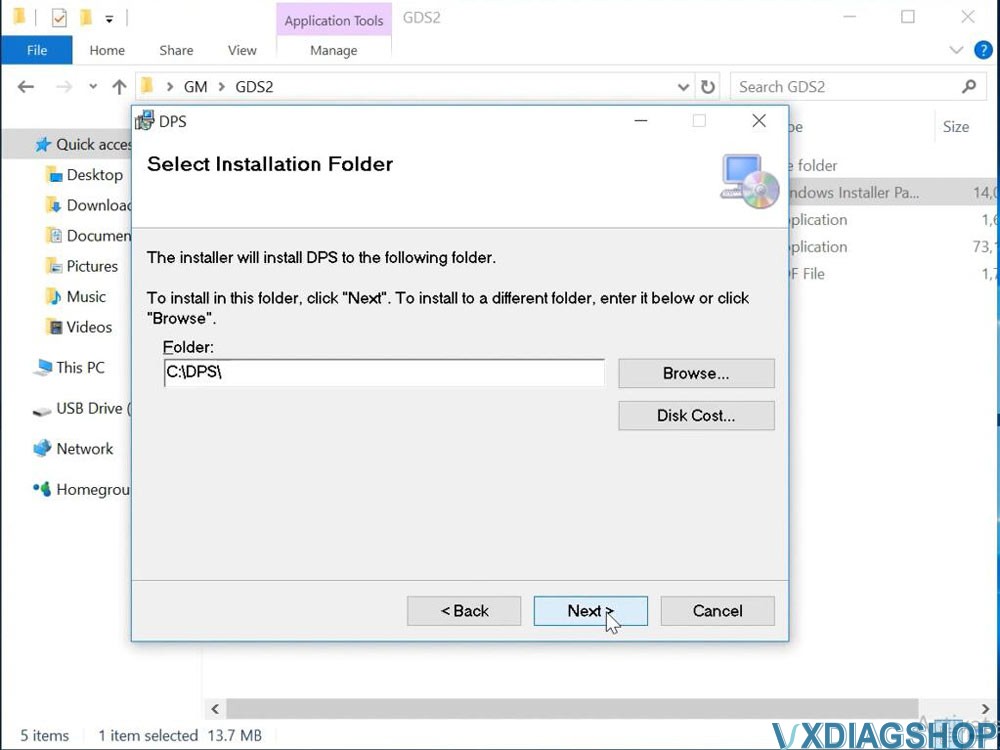
Install 2.gm_installer.exe to install DPS patch

Then delete DPS shortcut on desktop.


NOTE: The gm_installer.exe here is used as DPS patch for GDS2.

If not installed the DPS patch, system will report PC Software Installation Error when running GDS2.

You can also install DPS 4.52 software but it will ask for license. Need to purchase license from official. If don’t want to purchase license, change date to 2023 or use this dps patch.

Install VXDIAG GM GDS2 2024.5.8 software 4

Install VXDIAG GM GDS2 2024.5.8 software 5

Install VXDIAG GM GDS2 2024.5.8 software 6

3.

Run Tech2win folder
Install AutoInstall.exe
If Windows asks to install virual com port driver
Press Install
Tech2win Install OK

Install VXDIAG GM GDS2 2024.5.8 software 7

Install VXDIAG GM GDS2 2024.5.8 software 8

Install VXDIAG GM GDS2 2024.5.8 software 9

Install VXDIAG GM GDS2 2024.5.8 software 10

4.
Install VX Manager 1.8.9

Connect vxdiag vcx nano gm scanner and check device is well-connected

Install VXDIAG GM GDS2 2024.5.8 software 11

Install VXDIAG GM GDS2 2024.5.8 software 12

Go to Diagnostic, Install GM GDS2/T2W driver

Install VXDIAG GM GDS2 2024.5.8 software 13

Update firmware and license to latest version.


5.

Run GDS2 from patch on desktop

Install VXDIAG GM GDS2 2024.5.8 software 14

Start diagnosis

Install VXDIAG GM GDS2 2024.5.8 software 15

Install VXDIAG GM GDS2 2024.5.8 software 16

www.vxdiagshop.com