Showing posts with label VXDIAG Subaru SSM3. Show all posts

2025/03/07

VXDIAG SSM3 Failed to Connect Subaru Forester 2006 Solution

Problem:
The VXDIAG VCX SE Subaru SSMIII software failed to communicate with a 2006 Forester, displaying the error: "Communication initialization error occurred."

VXDIAG SSM3 Failed to Connect Subaru Forester 2006 1

Solution:
After a TeamViewer diagnostic session, an engineer from Vxdiagshop.com discovered that the issue was caused by a virus infection on the user's computer system.

VXDIAG SSM3 Failed to Connect Subaru Forester 2006 2

Feedback:

Switching to a different laptop resolved the issue, and the software now works perfectly.

VXDIAG SSM3 Failed to Connect Subaru Forester 2006 3

2024/05/21

VXDIAG SSM3 Cannot Connect 2010 Subaru Impreza?

One of vxdiagshop.com‘s customers had a problem connecting 2010 Subaru Impreza using vxdiag vcx se Subaru SSM3 software.


Our engineer did a Teamviewer check and resolved the problem.

VXDIAG SSM3 Cannot Connect 2010 Subaru Impreza?

Here are the tips.


The customer only got SSM4 software shortcut on desktop.

Usually, if you run SSM4, when connecting with Subaru 2010 (or other models require SSM III), it will directly switch to SSM3 software.

But if it fails to switch to SSM3, you should find SSM3 software separately from the installation root directory.

Then run SSM3 software.

2023/11/29

VXDIAG Subaru SSM3 Error Code 2 Solution

Problem:

I tried to run VXDIAG Subaru SSM III software from patch, but it gave an error

“Failed to update the CF application version. ErrCode=2”

How to fix it?

VXDIAG Subaru SSM3 Error Code 2

Solution:

Just press ‘OK’ button to proceed. Ignore this error message.

 VXDIAG Subaru SSM3 Error Code 2 solution

www.vxdiagshop.com

2022/02/08

V2022.01 VXDIAG Subaru SSM3 SSM4 Software Download

2022 newer version V2022.01 Subaru diagnostic tool software has been tested and verified working without issue.


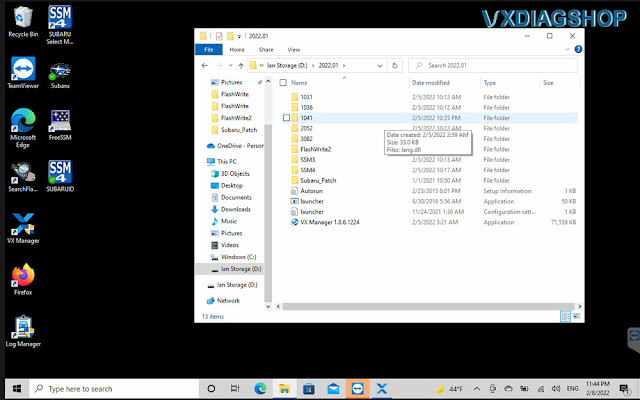
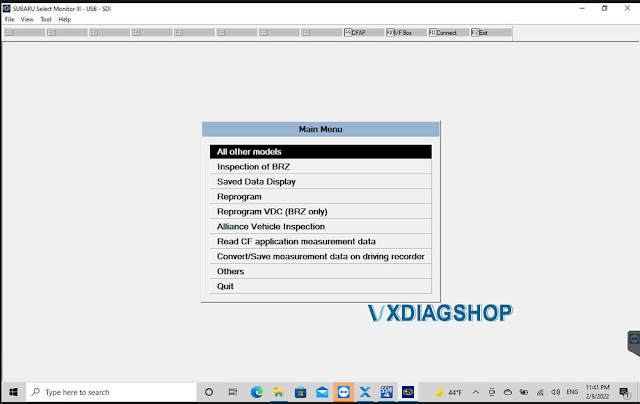
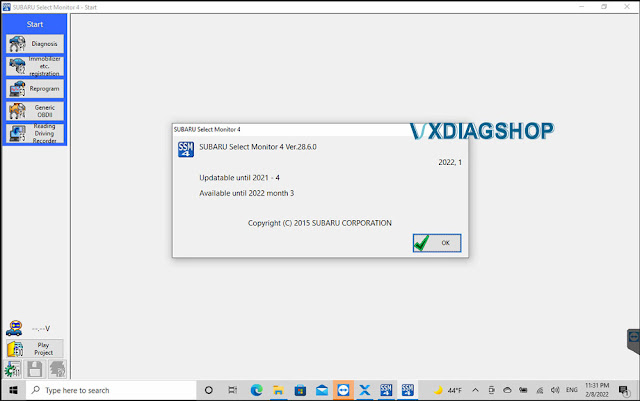
Software version: SSM3 2021.01; SSM4 V28.6.0; FlashWrite2 V1.3.9

Operating system: Windows 7, Windows 8 and Windows 10

Compatible device: VXDIAG Subaru Multi Tool, VXDIAG VCX SE Subaru

Language: English, German, Spanish, French, Italian


Free Download VXDIAG Subaru SSM3 SSM4 2022.01 Software

https://mega.nz/folder/ucIEhR7J#QUGAbagyLLsCslE585Fu2Q/folder/KcIiBThY

Contains: SSM3 2022.1; SSM4 V28.60; FlashWrite2

Free Download Subaru SSM4 Patch (Required)

https://mega.nz/folder/zJASHJ6b#FgXQQluqoFyVSKkQ2k5KMw

File including:

V2022.01 VXDIAG Subaru SSM3 SSM4 1

SSM3 V2022.01

V2022.01 VXDIAG Subaru SSM3 SSM4 2

V2022.01 VXDIAG Subaru SSM3 SSM4 3

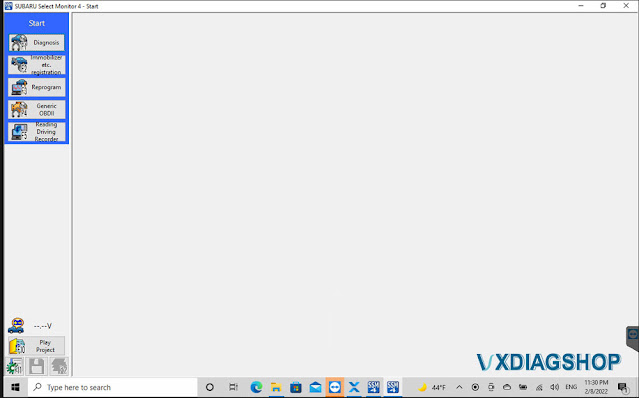
SSM4 V28.6.0

V2022.01 VXDIAG Subaru SSM3 SSM4 4

V2022.01 VXDIAG Subaru SSM3 SSM4 5

Installation Steps:

Install FlashWrite setup

Install SSM3 setup

Install SSM4 setup

Install VX Manager

Run Patch


Software installation guide is the same as the previous 2020 version, check

http://blog.vxdiagshop.com/2021/01/06/install-2020-7-vxdiag-subaru-ssm3-ssm4-on-windows-7/

Read more:

How to Change VXDIAG Subaru SSM3 and SSM4 Software Language?

VXDIAG Subaru SSM4 License Verification Failed Solution

VXDIAG VCX SE Subaru vs. VCX Plus Subaru

2022/01/23

How to Set up VXDIAG VCX SE Subaru SSM3?

Here comes the unbaised review of the vxdiag vcx se subaru diagnostic scanner.

'I purchased this unit to do one thing, register my H001SAL002 remote start installation on a 2018 Outback. It will only register via SSM3 and only under the Denso option when prompted, SSM4 will not present you the option to register the OEM remote start unit. After 2 weeks of messing around, I finally got everything to work correctly and got the remote starter activated. The cost was worth every penny, some mouthbreathing small brain tech wasn't in my wife's car butchering anything and now I have to ability to directly interact with the ECU as I should be.

When everything works correctly, it does exactly what it needs to do, one star lost for having to mess around with the software, VXdiag really needs to figure out a better process to make everything work correctly without tricks.vxdiag-vcx-se-subaru-review
Here are some steps to get everything working the first time:

1. Use a laptop that you don't care if you have to reset it, in fact I encourage starting with a fresh flash, DO NOT use your daily tuning laptop! You will be disappointed if you do bad things to your computer and have to start over, you've been warned.

2. DISABLE WINDOWS DEFENDER!!! If you can't do this, stop now and return this unit, DO NOT PROCEED. If you have a third party antivirus, turn it off. You only get one shot to do this right, DO NOT reboot the computer unless you have an exception setup for the patch.

3. Set your system clock to 1-1-2018, if you fail to do this, SSM4 will not install. If you change the clock later, SSM4 will lock you out and you have to reflash the system. If you dont do this, SSM4 wont even install and you need SSM4.

4. Only use the 2020.7 ISO, do not try to use the older 2018 build, it will work but will not work right.

5. ONLY install the programs from the Launcher, work from the bottom up

6. The Subaru.exe patch must be placed in and executed from c:\. If your system deletes it, you failed to follow instructions and should stop.

7. Install VXManager last, start it first.

8. Connect to the OBD interface, make sure the license updates before starting SSM3. Update SSM3 if needed before launching

9. Run Subaru SSM3 from the launcher only, it will not recognize the interface if you try to start it externally.

10. Try to scan the vehicle first, if you cant connect you wont be able to do anything else. If you made it this far you will be able to figure it out from here. Have fun.'

2021/12/15

Subaru XV 2016 CVT Learning with VXDIAG SSM3

Car model and year: Subaru XV 2016 with TR580 transmission


What I did:

Replace CVT fluid according to the repair manual.


Confusion:

I have drained only 5.5 liters of fluid (and filled with the exact amount). I’ve read somewhere that people drained 8-9 liters.

Drained hot, filled cold, but hot and cold fluid were mixed inside transmission when gears were shifted P-R-N-D and backwards, and after that added missing oil, shifted through all gears again and then drained all excess oil till it started dripping slowly through fill hole… So it should be fine based on repair manual.


Good to know:

Some models have the CVT fluid cooler which means the hold a lot more fluid. It’s a reasonably serious process to change CVT fluid. Got to get the temperature right to get the level right.


Finally, got the VXDIAG and hook it up!

There is a very specific temp the fluid need to be checked at. Not just hot or cold. I have VXDIAG SUBARU SSM-III SSM3 SSM4 Diagnostic Tool to track the temp, but they are making nuclear science of something fairly simple…
And yet, engine oil change is done without temperature checking.

Subaru XV 2016 CVT Learning with VXDIAG SSM3

Well I am pretty sure that it has some quantity tolerance, as there is no way to measure quantity with 100% precision without using the machine for replacing fluid (there is 10°C difference between lowest and highest fluid temp when replacing, so that is the first thing that change quantity)…

But anyway, I have replaced fluid, everything works fine.


www.vxdiagshop.com

2021/11/14

How to Solve VXDIAG Subaru SSM Error 53?

Problem:

I had an error 53 when installing the vxdiag subaru ssm3 software. Any idea how to fix it?

vxdiag-subaru-error-53

VXDIAGSHOP Solution:

The error may be caused by the wrong file directory.

Delete SSM software and download software again.

Don’t change the default installation root directory.

Download & Install 2020.7 VXDIAG Subaru SSM3 SSM4 on Windows 7

2021/10/12

Will VXDIAG Subaru SSM do CVT Learning?

Question: 

I’ve been looking to purchase an interface for Subaru and I’m looking for a machine with all the functionality of the OEM interface units. Does vxdiag subaru ssm scanner do gearbox or CVT learning? The learning control needs to be performed when the TCM is reprogrammed or replaced.
 
Answer:
Yes, vxdiag ssm will do CVT relearn.  Tested working by vxdiag technician and many Subaru device owners.
Better provide detail Subaru model and year to confirm
.
Working experience  1: 
I have a vxdiag subaru diagnostic tool. We don’t get many suby here. When I do it has worked fine. I have done a couple CVT learns and some collision related stuff. I would buy a new one to upgrade without much hesitation. For what it costs and what it does I am happy. It runs the OE software.
 
Working experience  2: 
 
 
CVT Learning Procedure from Subaru Service Bulletin
Step 1: Reprogram the TCM using the SSM4 following the normal FlashWrite procedure.
Step 2: Using the SSM4, clear the AT Learning Data using the following procedure:
• Start > Diagnosis > Vehicle Selection > Each System > Transmission > Work Support > Clear AT Learning Data.
• Click “YES” and when “Execute Clear AT Learning” is displayed, click “YES” again.
• Turn the ignition OFF, wait at LEAST 30 seconds then turn the ignition back ON. At this point, the AT Temp light will start blinking; 4 times in 2 seconds to signify the Clear AT Learning procedure has completed successfully. If the AT Temp light does not flash as described, repeat Step 2 again from the beginning.
Step 3: Using the SSM4, perform the AT Learning Control following the procedure outlined Service Manual excerpt supplied below:
1. PREPARATION FOR LEARNING:
1. Warm up or cool down until the ATF temperature displayed on the Subaru Select Monitor is
40-65°C (104-149°F).
2. After stopping the vehicle, shift the select lever to “P” range.
3. Fully apply the parking brake.
4. Raise the vehicle.
CAUTION:
While working, be sure to keep the lower edge of the tires 30 cm or more above the ground as vehicle will vibrate.
5. Connect the Subaru Select Monitor to data link connector.
6. Turn the ignition switch to ON.
7. Turn off all switches causing an electrical load, e.g. headlights, A/C, seat heater and rear defogger, etc.
2. SIMPLE LEARNING:
NOTE: Simple learning is performed with the vehicle lifted, without actually running the
vehicle.
CAUTION: Do not turn the power of the Subaru Select Monitor OFF during work, and do
not disconnect the data link connector.
1. Select {Work Support} in the «Transmission Diagnosis» display screen of the Subaru Select
Monitor.
2. Select {Compulsory learning mode} in the «Work Support» display screen of the Subaru
Select Monitor.
3. Follow the messages displayed on the Subaru Select Monitor screen when working.
NOTE: During AT learning in progress, AT OIL TEMP light in the combination meter
starts flashing at 2 Hz and the learning operation starts. The following message is displayed
on the screen when the AT OIL TEMP light which was flashing at 2 Hz turns off.
4. When «AT learning normally ended.» is displayed, simple AT learning is completed.
NOTES:
• If a communication error occurs during learning, retry the “AT learning mode” from
the beginning.
• If the message «Execute AT learning again after fixing troubles of the vehicle» appears
during learning, select [OK] and display the DTC list. After repairing the locations
indicated by the DTC, start the “AT learning mode” over from the beginning.
• When a communication error occurs during learning, select lever does not shift
occasionally. If select lever does not shift, turn the ignition switch to OFF before
operating the select lever.
• If the message «AT learning ended abnormally.» is displayed, start the “AT learning
mode” over from the beginning. List of Main Causes for Abnormal Termination:
Fault is detected during AT learning.
The accelerator pedal is depressed during AT learning.
An unspecified operation was performed during AT learning
ATF temperature becomes out of specification during AT learning.
Battery voltage is low.
Malfunction indicator light illuminates.
Hybrid fail lamp illuminates.
Parking brake not applied strongly enough.
Brake pedal is not fully depressed.
Abnormal idle speed increase, etc.
IMPORTANT: The NEW Calibration Identification number (CID) for any newly-installed
programming (as confirmed from the actual control module AFTER installation) MUST be noted on
the repair order as this information is required for claim submission

2021/09/01

VXDIAG Subaru SSM3 Review on 2009 OBXT

Symptom:

My 2009 OBXT VDC off light is staying on after finishing up a full LGT suspension/subframe/transmission swap. The first time I started it the light was not on, but everytime after that it has stayed on. I have bled the brake twice due to some sediment that was coming out of the system.

I might try to scan it will the FreeSSM or SSM3 scan tool  on a laptop or tablet.


Updated:

I was pretty sure I centered the rack as I counted lock to lock and then found the rough center before putting the steering shaft back on and the tie rod ends. BUT maybe I did not get it perfect.

My steering angle sensor is out of calibration. I noticed that the clock spring sounds like it is clicking when I turn the wheel sometimes, My steering wheel might have gotten turned while we were trying to attach it to the steering rack. Thus what it thinks is centered is no longer center.


I ordered a subaru SSMIII compatible device that is in the mail and I will try to calibrate it etc myself. As I also have an airbag fault that will not go away. I tend to like to do things myself rather than pay a dealership.

I ordered an interface that is compatible with my car and the Subaru SSM3.

https://www.vxdiagshop.com/wholesale/vxdiag-subaru-ssm-iii-multi-diagnostic-tool.html

That is the one I bought, had it shipped from the US. It should be here Saturday hopefully. I just need to get Windows 7 running on an old laptop. I guess SSM3 does not play nice with Windows 10 or something weird.


Why VXDIAG not other devices?

The VXDiag is an emulator box that allows communication from the car to the SSM3 software.

The Tactrix cable has the right chip but from what I can find on the tactrix cable it is not programmed to send data to the ecu correctly. (I did a bunch of googling on this and found a few people tried with no luck) I did not try the tactrix cable however…. but the SSM3 software is listed on that link on the first page. If you have the cable you could give it a try. I ended up using a Windows 10 laptop and it all seems to be working now… I think. but I will only be using that device for the VXDiag stuff and some PDFs on my car and the program.

For the calibration I had to refer to the FSM ala Vacation pics pdf. And I managed to find an old pdf for the ssm3 software that explains some of the methods the FSM asks you to complete. Sadly it did not say how off it was, but there is a section in the FSM that talks about aligning the steering angle sensor. There is a little sight hole on the back and the hash mark on the wheel inside has to line up with the secondary wheel on the inside. I explained that horribly so sorry, but if you look in the FSM it will make a little more sense. The clockspring has the alignment steps printed on it actually. I did not realize that until I was installing my bran-used one last week.

Now I have to figure out how to get cruise control and the menu buttons working with an aftermarket steering wheel…. why do I do these things to myself lol.

I tried using FreeSSM with the vcds cable and the Tactrix cable and it did not do anything for me. I had to use the SSM3 with that box I bought.


Result:

I found part of my issue was the steering angle sensor not being lined up correctly with the marks on the inside of the sight hole and the clockspring was actually broken.

VXDiag Subaru SSM3 worked! I had to use another laptop and I guess that will be the designated SSM3 laptop cause I had to disable all the anti virus and everything cause it is not an official version of SSM3 I guess?

But either way I solved my issue. Aligning the angle sensor, replacing the clock spring and calibrating the VDC system did it. Now to figure out what else I can do with SSM3.

It looks like I might be able to turn off the pesky TPMS light and maybe the Seatbelt warning? Keep updating.


Read more: How to Install 2020.07 VXDIAG Subaru SSM3 and SSM4?