Showing posts with label Mazda MDARS. Show all posts

2025/04/29

Mazda MDARS Not Detect VXDIAG VCX Nano Solution

Problem:

How to set up Mazda MDars and VXDIAG VCX Nano Mazda scanner and make it work together? I got MDars software installed and subscription activated, VCX software installed, but it does not recognize VCX Nano.


Possible solution:

To use MDARS with vcx nano, you need to delete IDS vci driver, install Passthru driver in Vx Manager.

Select device as Passthru instead of vxdiag.

VXDIAG VCX FD for Ford/Mazda is recommended, because the VCX NANO does not support CAN FD protocol. It may not connect with the latest models even if you have an MDARS subscription.

Mazda MDARS Not Detect VXDIAG VCX Nano

MDARS is used on Mazda 7th generation vehicles starting with the following all new models:

2025- CX-70

2023- CX-50

2021- CX-5

2024-CX90

2022-2023 MX-30

2020- CX-30

2024- MX-5

2021-2023 CX-9

2019- Mazda3

2024/09/08

VXDIAG IDS V131 Failed to Connect 2020 Mazda3?

Problem:

VXDIAG VCX NANO Mazda and IDS 131 cannot auto detect a 2020 Mazda 3 model, try manual input VIN still no luck. Any clue?

mazda 3 2020 ids 1

mazda 3 2020 ids 2

Solution:

For 2019- Mazda3, you need Mazda MDARS software instead of Mazda IDS software.

MDARS software is required when you diagnose following models:

2025- CX-70

2023- CX-50

2021- CX-5

2024-CX90

2022-2023 MX-30

2020- CX-30

2024- MX-5

2021-2023 CX-9

2019- Mazda3

mazda MDARS vehicle coverage

VCX NANO Mazda/VCX SE/VCX FD can be used as J2534 passthru device for MDARS.

Here is an example:

How to Reprogram New Mazda PCM with MDARS?

www.vxdiagshop.com

2022/10/14

Free Download Mazda IDS 127 and MDARS Software

Mazda IDS software is only for 6th-generation vehicles and earlier. MDARS (Mazda Diagnostic and Repair Software) is needed for 7th-generation vehicles.

starting with the following all new models:

2019 to present Mazda3
2020 to present CX-30
2021 to present CX-5
2021 to present CX-9

Free Download Mazda IDS and MDARS Installer

https://mega.nz/folder/QeoWhZAT#dQYBVzXtHCY9TV-rH_nLcA

FREE NO PASS
Setup File only

1 MADRS login costs 25 USD MADRS license account about 1300 USD 1 year.


Compatible devices:
Mazda VCM II – Ford VCM 2 -3 , J2534 Passthru (VXDIAG VCX SE, VCX NANO Mazda), CarDaq3 , Bosch Mastertech II ….
Software support programming, diagnostic, Immobilizer Program
Software work online program

Free Download Mazda IDS 127 and MDARS Software 1

Free Download Mazda IDS 127 and MDARS Software 2

Free Download Mazda IDS 127 and MDARS Software 3

Free Download Mazda IDS 127 and MDARS Software 4

you can change from language from Setting

Free Download Mazda IDS 127 and MDARS Software 5


2021/10/10

How to Reprogram 2019 Mazda 3 PCM with MDARS?

Here is the new 7th generation Mazda PCM reprogramming procedure with MDARS (Mazda Diagnosis and Repair Software).


Model example: 2019 Mazda3


What you will need:

MDARS subscription (check more information here)

J2534 passthru that compatiblew ith MDARS, i.e vxdiag vcx nano for Mazda


Service Caution for reprogramming:

  • After the reprogramming, verify the calibration file name with the chart below at screen of the (PCM) FILENAME.
  • Clear the DTC and turn the ignition off and get out of the car.
  • Close and lock the door.
  • Wait for ten minutes or more. IF YOU DON’T WAIT AT LEAST 10 MINUTES YOU WILL HAVE A COMMUNICATION ERROR WITH THE FORWARD SENSING CAMERA. DTC U2120:00 is stored and i-ACTIVSENSE AMBER warning light is illuminated
  • Verify the repair by starting the engine and making sure there is no MIL illumination or abnormal warning lights present.
  • Poor connection between the vehicle and MDARS and/or low voltage may result in abnormal termination and/or data corruption.

NOTE: • If the calibration file is with the suffix in the table or later, the PCM already has the modified calibration.

PCM File Name Note
PX05-188K2-J AT, 2WD,PYUD,Melco
PX07-188K2-L AT,4WD,PYUD,Melco
PX58-188K2-H MT,2WD,PYUD,Melco
PX13-188K2-D AT,2WD,PYUD,Melco
PX06-188K2-J AT,2WD,PYUD,Denso
PX08-188K2-L AT,4WD,PYUD,Denso
PX59-188K2-H MT,2WD,PYUD,Denso
PX14-188K2-D AT,2WD,PYUD,Denso


Preparation:

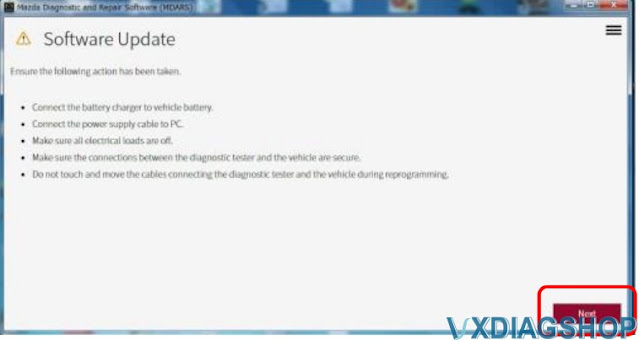
a. Make sure that the following connections are firmly connected, and then do NOT touch the VCM and DLC cable to prevent from causing noise and poor connection.
– Between the vehicle-side connector and the DLC cable
– Between the PC-side connector and USB port of PC

b. Connect AC adapter to the PC in order to stabilize voltage fluctuation during reprogramming
Do NOT use vehicle battery outlet as power source for the PC.

c. During reprogramming, connect battery charger (charge current maintained within 10 to 15A) to the vehicle to stabilize voltage fluctuation.


Before reprogramming, pay attention to the vehicle condition and PC environment.


a. Turn off all the electrical loads, especially pay attention to A/C (blower), audio, rear defogger and headlights.
b. Perform self-test and verify no DTC is stored. If any DTC is stored, fix the concern and delete the DTC.
c. Disconnect all non-genuine aftermarket accessories.
d. Terminate all programs other than MDARS on the PC. This may extend reprogramming,
PC may freeze or it may cause other problems.
e. Perform reprogramming under proper Internet environment. Especially when using wireless network, make sure the connection is strong.
f. Make sure to keep proper free space on the PC’s hard disc. Insufficient free space (less than 1 GB) may result in PC freeze during reprogramming.


PCM Reprogramming Procedure:

1. Log in to the MDARS and select “Launch M-MDS” button.

Reprogram 2019 Mazda 3 PCM with MDARS 1

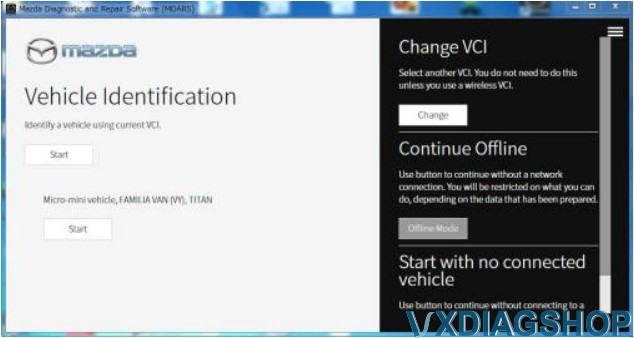
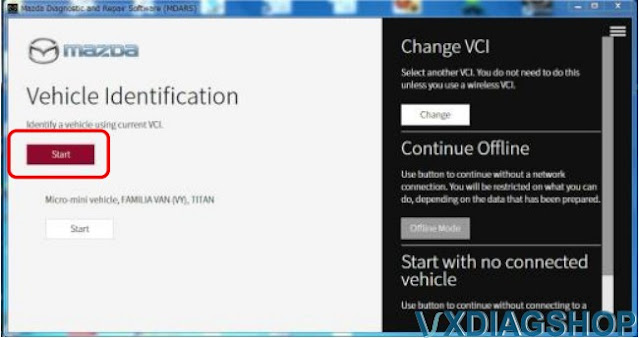
2. Ignition on the vehicle and select “Start” and wait

Reprogram 2019 Mazda 3 PCM with MDARS 2

Reprogram 2019 Mazda 3 PCM with MDARS 3

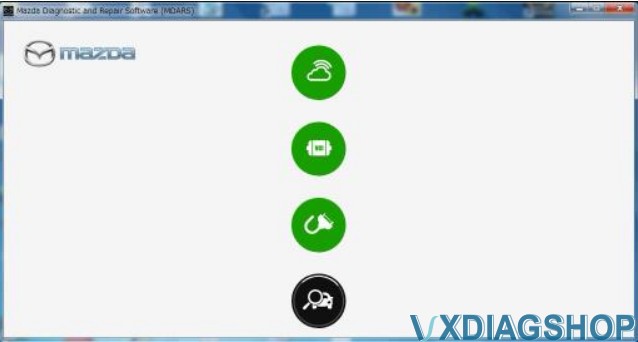
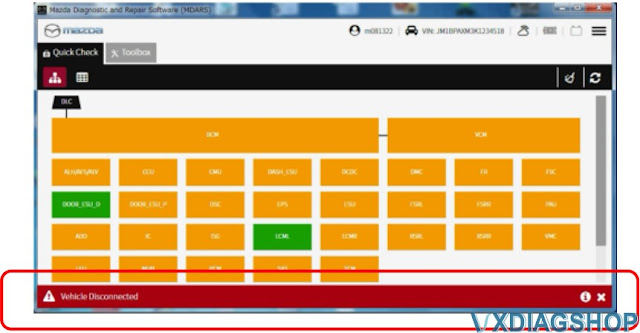
The deployment modules are displayed after the vehicle identification was completed.

Note: “Vehicle Disconnected” is displayed at the time of communication error.

Reprogram 2019 Mazda 3 PCM with MDARS 4

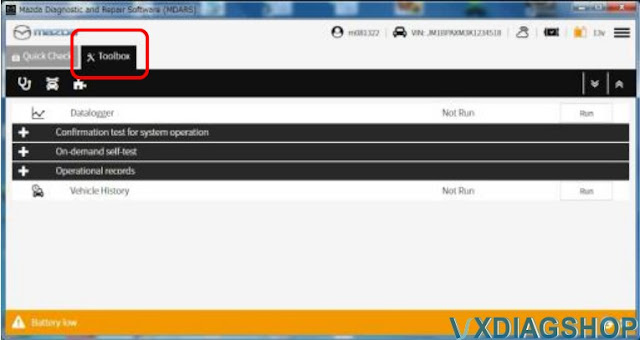
Select “toolbox”

Reprogram 2019 Mazda 3 PCM with MDARS 5

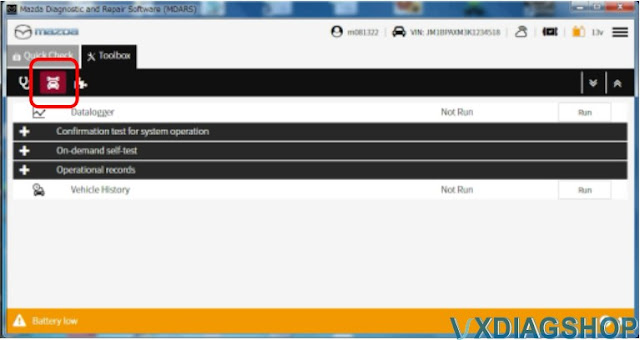
Select the following icon.

Reprogram 2019 Mazda 3 PCM with MDARS 6

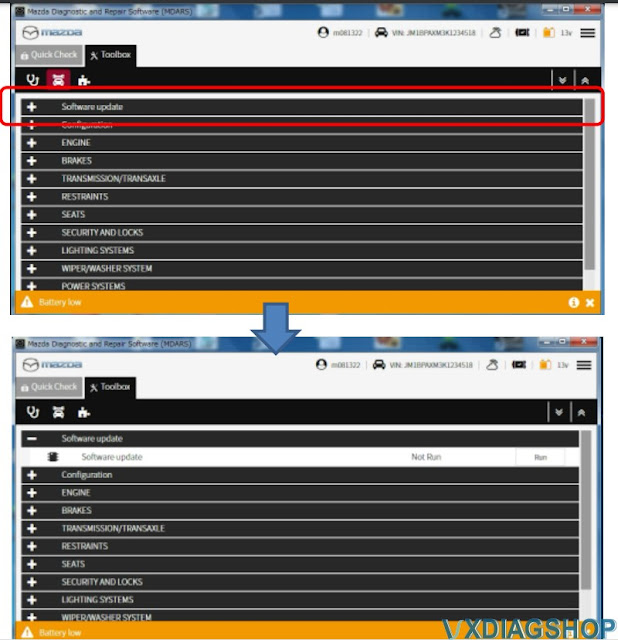
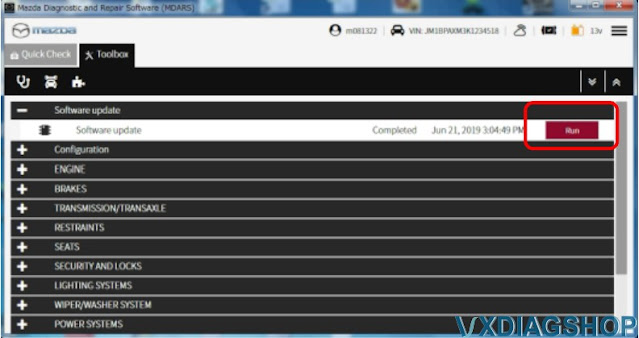
Select “Software update”.

Reprogram 2019 Mazda 3 PCM with MDARS 7

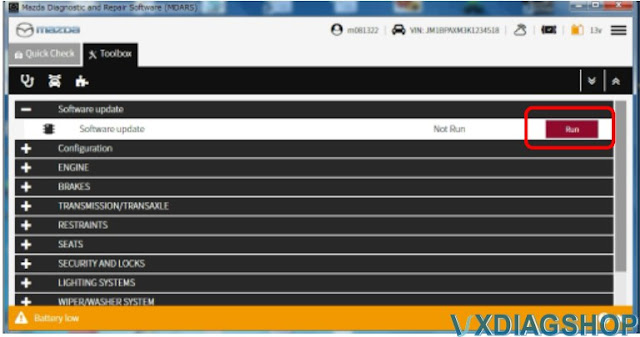
Select “Run”.

Reprogram 2019 Mazda 3 PCM with MDARS 8

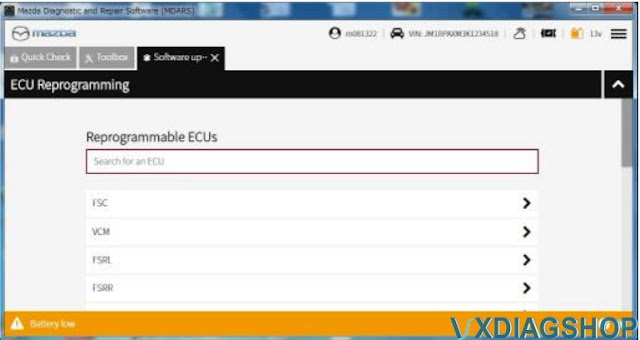
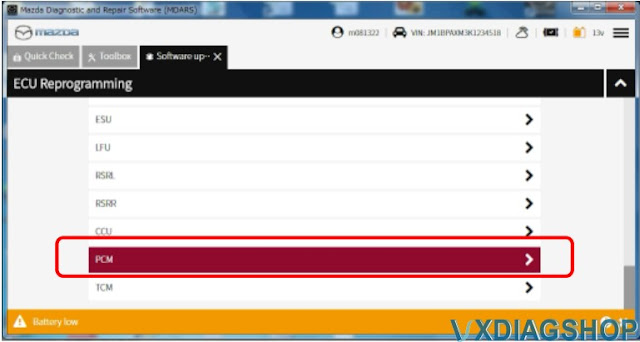
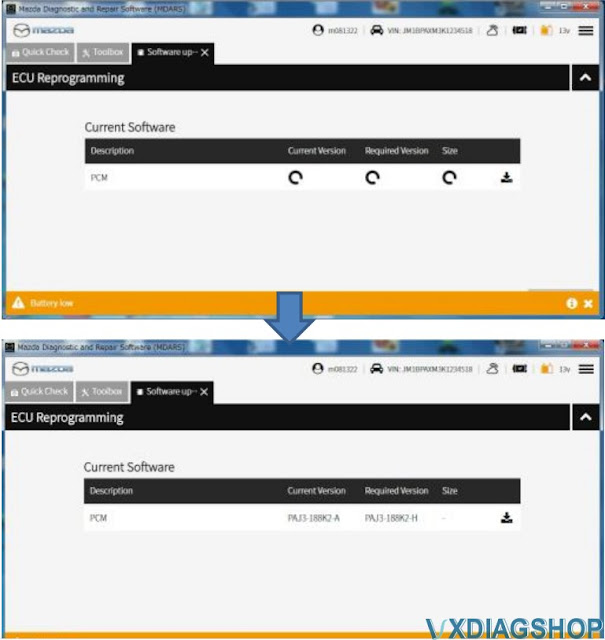
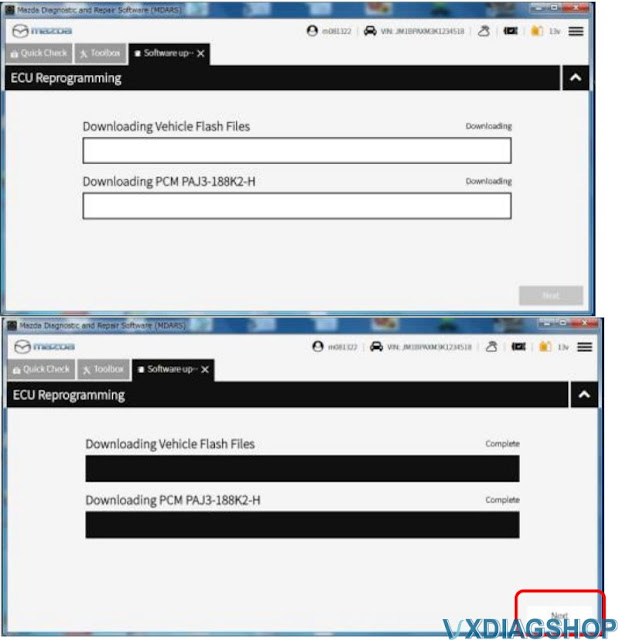
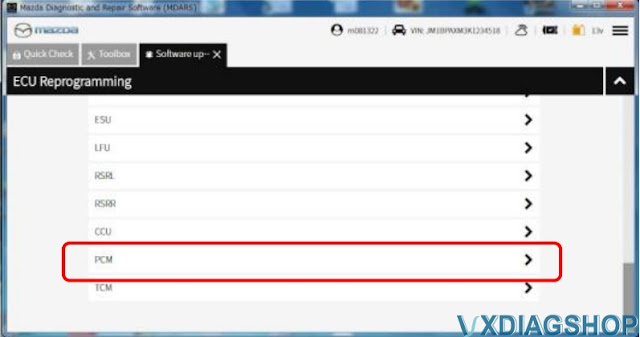
Scroll the screen, Select “PCM”. Wait and press Next

Reprogram 2019 Mazda 3 PCM with MDARS 9

Reprogram 2019 Mazda 3 PCM with MDARS 10

Reprogram 2019 Mazda 3 PCM with MDARS 11

Reprogram 2019 Mazda 3 PCM with MDARS 12

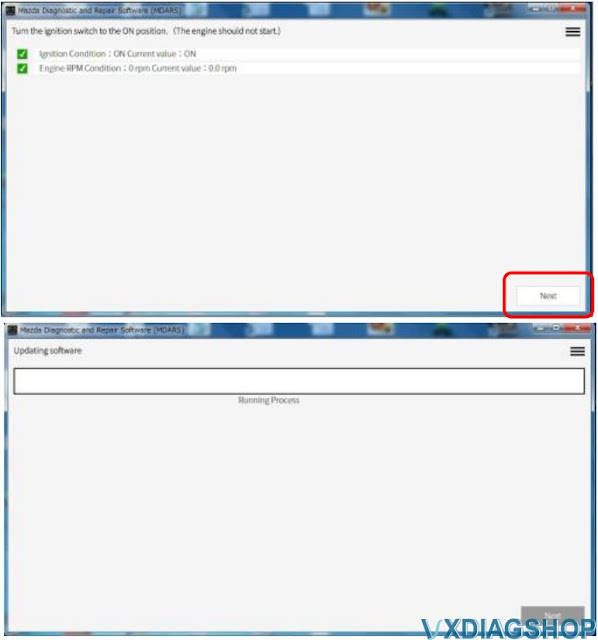
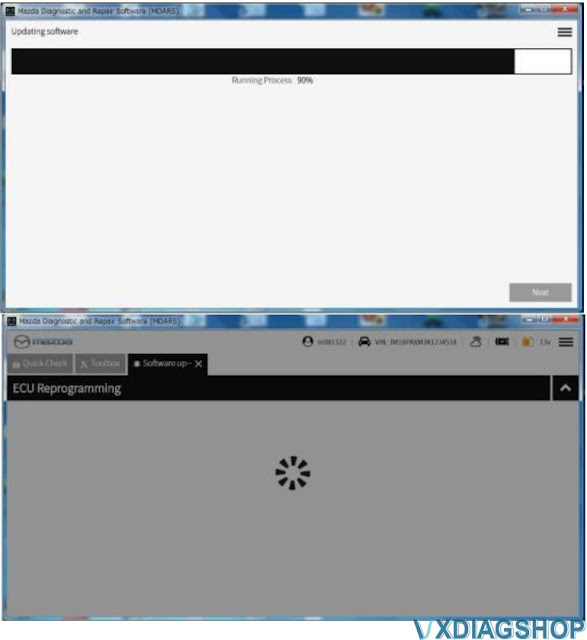
Read the screen instructions and select “Next”

Reprogram 2019 Mazda 3 PCM with MDARS 13

Reprogram 2019 Mazda 3 PCM with MDARS 14


Reprogram 2019 Mazda 3 PCM with MDARS 15

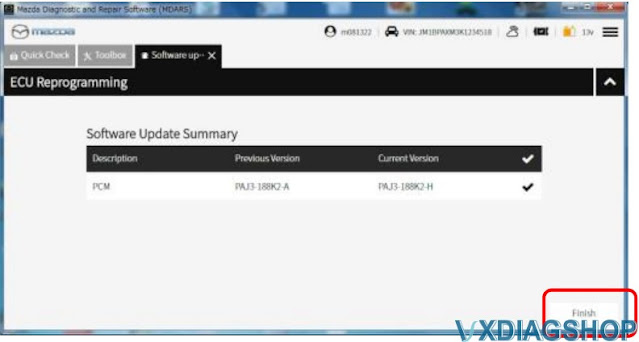
Capture the screen of filename and select “Finish”.

Reprogram 2019 Mazda 3 PCM with MDARS 16

Select “Run” “-PCM”

Reprogram 2019 Mazda 3 PCM with MDARS 17

Reprogram 2019 Mazda 3 PCM with MDARS 18

Confirm the filename after reprogramming and select “Finish”.

Reprogram 2019 Mazda 3 PCM with MDARS 19

Finish PCM reprogramming.

www.vxdiagshop.com

https://www.vxdiagshop.com/service/mazda-pcm-reprogramming-with-vxdiag-and-mdars.html