Showing posts with label VXDIAG Toyota Techstream. Show all posts

2023/10/10

VXDIAG VCX NANO Toyota GR Yaris UK model Review

Here comes the vxdiag vcx nano toyota scanner unbiased user review on Toyota GR Yaris, UK model.


I got a VXDIAG OBD adapter to work using the supplied Techstream V17 software supplied by them (with a ‘crack patch” to defeat dealer licence info I assume).

I connect over Wifi rather than USB.

1. install the drivers by installing VX Manager, (latest version on the VXDIAG website), connect the VXDIAG by USB and upgrade the firmware & licence if required.
2. install Techstream V17.10.012 (or latest V18 version on the VXDIAG website)
3. copy the shortcut patch to the desktop
4. run Techstream from the original shortcut
5. fill out the registration by putting anything in the fields, select your region
6. if asked for a key on the next screen, just press cancel
7. at the main UI, select >Setup >VIM Select >change from TIS to Toyota … on the click down field, exit program
8. plug VXDIAG in the ODB2 port and connect via wifi through “Network and internet settings”
9. open Techstream via the shortcut patch on the desktop

I’ve finally got it working. I’ve made the lane-change indicators flash 4 times instead of 3, enabled the auto windows up & down from key fob and lock turn, and disabled ESE which I think I actually prefer – it now sounds like a car and not a computer game (a rather feeble car but I’m hearing a lot more of the dump valve which I do like, despite sounding like a mouse sneezing!)

www.vxdiagshop.com

2021/08/11

VXDIAG Techstream V16.00.023 and Patch Free Download

V16.00.023 Toyota Techstream software is verified working without issue with VXDIAG VCX NANO Toyota scanner.


Version: Toyota Techstream V16.20.023 (08/2021)

Language: Chinese, Spanish, German, French, English, Italian, Japanese

Operating System: Win7 or above

vxdiag-techstream-v16-20-003

Free Download Toyota Techstream V16.20.023

Free Download Techstream Patch

Password: NO PASS!!! With Patch does not require activation.


How to Install VXDIAG Techstream V16.20.023?

Install Techstream setup
Install VX Manager
Crack Techstream V16
Run software

For detail installation, it is similar to V15.

https://www.vxdiagshop.com/service/install-vxdiag-toyota-techstream-v15-00-026.html 

2020/06/28

Solved! VXDUAG Toyota Cannot Connect to Prado 2008

Problem:
My vxdiag vcx nano toyota techstream cannot connect with a Prado 2008 model year-engine code: 2TR-FE.
Here’s the procedure:
vxdiag-toyota-prado-2008-01
The vehicle is imported from Japan.
Start engine, connect vxdiag vcx nano Toyota via WiFi
The vx manager detected the vcx
vxdiag-toyota-prado-2008-02
Go to VIM select and choose VXDIAG Toyota VCI
Run Techstream, connect to vehicle, vxdiag cannot connect to car nor detect vehicle information
vxdiag-toyota-prado-2008-03
Also tried manual vehicle select, vxdiag still cannot detect vehicle
vxdiag-toyota-prado-2008-04
Solution:
For older Toyota models, you need to manual select vehicle information.
Don’t use Auto vehicle selection.

2020/06/17

How to Install VXDIAG Toyota TIS Techstream V15.00.026?

The latest version V15.00.026 Toyota techstream software has been tested and verified working perfectly on vxdiag diagnostic scanners, including VXDIAG VCX NANO ToyotaVCX ProVCX PLUS and VXDIAG Full.

Version: V15.00.026
Software language: Chinese, English, French, Italian, Spanish, German etc
Operating system: Windows 7 or above

Free Download VXDIAG Toyota Techstream V15.00.026 software and Patch
http://blog.vxdiagshop.com/2020/03/12/free-download-toyota-techstream-v15-00-026-for-vxdiag/


How to install VXDIAG Toyota Techstream V15.00.026?
Step 1: Install Techstream setup
install-vxdiag-toyota-techstream-v15-00-026-1
Run Techstream_Setup _V15.00.026
install-vxdiag-toyota-techstream-v15-00-026-2

Select setup language
install-vxdiag-toyota-techstream-v15-00-026-3

Install InstallShield wizard for Techstream
Accept license agreement
install-vxdiag-toyota-techstream-v15-00-026-4

Enter User Name: AADD and company name: 1
Press Install
install-vxdiag-toyota-techstream-v15-00-026-5

Install wizard completed. Press Finish.
install-vxdiag-toyota-techstream-v15-00-026-6

Install .NET Framework 4.7.2, accept license agreement, press Install
If prompt Framework 4.7.2 setup failed, just close the program to ignore
install-vxdiag-toyota-techstream-v15-00-026-7

install-vxdiag-toyota-techstream-v15-00-026-8

Open TechstreamPatch folder, copy and paste Toyota Launcher to  C://Program Files/Toyota Diagnostics/Techstream/bin folder

Step 2: Install VX Manager
Connect vxdiag vcx nano interface with laptop
install-vxdiag-toyota-techstream-v15-00-026-9

Windows doesn’t see detect driver, you have to install VX Manager driver first
Run VX Manager on desktop
install-vxdiag-toyota-techstream-v15-00-026-10

Select Toyota Techstream software to install
Install VX Manager driver success
install-vxdiag-toyota-techstream-v15-00-026-11

Windows will detect device driver and USB Port (COM4)
install-vxdiag-toyota-techstream-v15-00-026-12

Run VX Manager to check device information

Step 3: Crack Techstream V15
install-vxdiag-toyota-techstream-v15-00-026-13
Install Vxdiag Toyota Techstream V15 13
Go to C://Program Files/Toyota Diagnostics/Techstream/bin, open Toyota Launcher
install-vxdiag-toyota-techstream-v15-00-026-14

Select area: Other, press Next
install-vxdiag-toyota-techstream-v15-00-026-15

Select software language, press Next
install-vxdiag-toyota-techstream-v15-00-026-16

Complete Techstream configuration dealer information
Press OK

Step 4: Run Software
Run Techstream V15.00.026 software
install-vxdiag-toyota-techstream-v15-00-026-17

Connect to vehicle
install-vxdiag-toyota-techstream-v15-00-026-18

select vehicle information
Now you can diagnose, do Health Check, Customize setting, ECU reprogramming, CAN Bus check etc with the tis techstream v15
install-vxdiag-toyota-techstream-v15-00-026-19

install-vxdiag-toyota-techstream-v15-00-026-20

2020/03/11

Free Download V15.00.026 Techstream for VXDIAG Toyota

New version TIS Techstream software v15.00.026 is verified working with vxdiag vcx nano for Toyota and vxdiag multi tool.

Free Download VXDIAG Toyota Techstream V15.00.026
Free Download VXDIAG Toyota Techstream V15 patch
v15-vxdiag-techstream-toyota-1

v15-vxdiag-techstream-toyota-2

v15-vxdiag-techstream-toyota-3

v15-vxdiag-techstream-toyota-4
Year: 03/2020
Version: V15.00.026
Operating system: WINDOWS 7/8/8.1/10 x32/x64
Region: All regions.
Language: English, Spanish, Chinese, German,French etc
Compatible devices: all VXDIAG scanners, VXDIAG VCX NANO ToyotaVCX ProVCX PLUS and VXDIAG Full
(The software is not compatible with other Toyota diagnostic devices, mini vci, mangoose cable etc)

Note:
For patch, it may be detected as virus.  You need to close or delete your anti-virus software on your PC before use our patch.


Activation and installation:
No need registration key.  Install techstream software then run the patch.

2020/02/26

Techstream V12 Flash Calibration Update Failure Solution

Installing Techstream v12.10.019 to perform ecu reprogramming by running with VXDIAG vcx Nano cable, it fails to work, get message” error at Starting Flash Calibration Update”.
It says: Cannot change to reprogramming mode. Please confirm the Ignition was turn OFF for 10 seconds and then turned back to the ON position.
techstream-v12-flash-calibration-update

VXDIAG chief engineer replied:
Please install techstream V14.00.018, the problem will fix.

Here you can free download techstream V14.00.018

and patch here:
Password: no need
Security: 100% yes.
Tested working with VXDIAG VCX NANO Toyota diagnostic and programming tool.

2020/02/20

VXDIAG VCX NANO Toyota Test on Lexus LS430

I own a Lexus LS600hL & a LS430. I bought VXDIAG VCX NANO for Toyota as a WiFi & USB version two years ago and since then I am very satisfied, costs a little more than usual mini vci but can do a lot more,
https://www.vxdiagshop.com/wholesale/vxdiag-vcx-nano-for-toyota-wifi-version.html

I never tested wifi connection. I prefer the USB connection from the car with the laptop without losing connection. 
The vcx nano allows to teach TPMS sensors.
So far I have only read IDs and replaced the sensor with a weak battery with a new cloned one with the same ID, for the LS430 I programmed a key without any problems.
techstream-lexus-ls430
So the problem has probably been solved with IDs of the sensors, because that was not possible with the clone mini vci.

2019/04/02

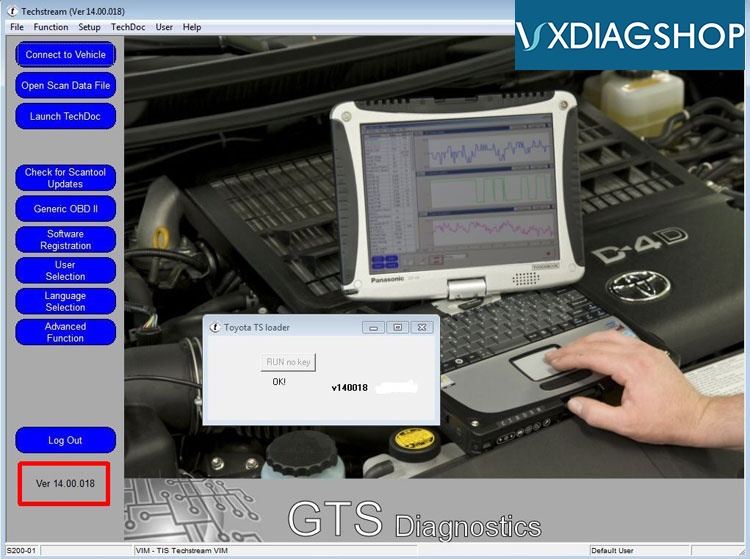
Free Download VXDIAG Toyota Techstream V14.00.018 and Patch

Allscanner VXDIAG scanners Toyota Techstream software update to V14.00.018 (02/2019). V14 supports Toyota models till 2019.


Free Download VXDIAG Toyota Techstream V14.00.018
https://mega.nz/#F!SAR3Qa7B!N61Ikd1HKEodTiwpODLXKQ
Free Download VXDIAG Toyota Techstream V14 patch
https://mega.nz/#F!7VZzBQgZ!wO9Fjk0gfZF-tfv6zQAqzw
toyota-techstream-14.00

Year: 02/2019
Version: V14.00.018
Operating system: WINDOWS 7/8/8.1/10 x32/x64
Region: All regions.
Language: English, Spanish, Chinese, German,French etc
Compatible devices: all VXDIAG scanners, VXDIAG VCX NANO Toyota, VCX Pro, VCX PLUS and VXDIAG Full
(The software is not compatible with other devices, mini vci, mangoose cable etc)


TIS techstream
TIS techstream is the replacement for the Diagnostic Tester. It combines the functionality of TIS and the scantool into a single portable device. With TIS techstream, technicians can simultaneously view/analyze on-board vehicle data, browse relevant TIS service documents, and reprogram vehicles all from the driver's seat via wireless connection to TIS.
Scantool Diagnostics
TIS techstream offers full support for 1989 current vehicles marketed in the United States. Periodic software updates will be available to support new models. TIS techstream provides quick and easy access to all available systems on the vehicle as well as a one touch vehicle status report (Health Check).
Activation and installation:
No need registration key.  Install techstream software then run the patch.
Similar procedure as Ford IDS native installation: https://youtu.be/QPWqh48wKUY