Showing posts with label VXDIAG Benz C6. Show all posts

2025/10/14

VXDIAG Benz Software Update to V2025.09

 Good news! The VXDIAG Mercedes-Benz Xentry diagnostic software update to a new version – 2025.09 in October 2025.


2025.09 VXDIAG Benz Software List:


Xentry/DAS : 2025.09
DTS Monaco V8.13, 9.02
Starfinder 2022 /2020/2008
WIS 2021.4
EPC 2018.11

Compatible with Zenzefi license (not included).


Compatible device: VXDIAG VCX SE Benz, VCX Benz C6 DoIP

Update by: new HDD/SSD

Contact www.vxdiagshop.com customer service if need a new version HDD/SSD.


This version requires latest VXDIAG Benz driver upgrade.

VXDIAG updated new Benz driver to support 2025.09 xentry diagnostic software on September 26th, 2025.

VXDIAG Benz Software Update to V2025.09 1

Sync VCI version to 202509.

VXDIAG Benz Software Update to V2025.09 2

2025/09/26

VXDIAG Update Benz C6 Driver for Xentry 2025.09

VXDIAG VCX DoIP and VCX SE Benz update Benz C6 driver to support 2025.09 Xentry software.


2025.09.26 3.2.6.250926
UPD: Xentry Diagnosis 09/2025 new version support

Update firmware.

Update Benz C6 driver in vx manager.

VXDIAG Update Benz C6 Driver for Xentry 2025.09 1

Sync VCI version to 202509.

VXDIAG Update Benz C6 Driver for Xentry 2025.09 2

*09/2025 Xentry software will be available on www.vxdiagshop.com soon.

2025/08/28

VXDIAG Benz 2025.03 XENTRY Initialization Failed Error Solution

Problem:

One of our customers downloaded Xentry XDOS 2025.03 from mhhauto forum.

He was using a VXDIAG VCX Plus with Mercedes License C6 on latest firmware (VCI 1.9.6.0, DoIP 1.9.2) and drivers (3.2.6.240827, VCI version 202409).

When starting XENTRY Diagnosis Cars AKT (rapid short test) everything works perfectly well, VIN gets identified and short test is performed.
When starting XENTRY Diagnosis Cars and trying to connect the Multiplexer to the car, he gets an error during Step 1 out of 6.

“Initialization of the Multiplexer has failed.

Possible causes and remedie:

– The connection between the multiplexer and the diagnostic socket has an open circuit.
– The link between the diagnostic unit and the multiplexer is interrupted. The power supply at the diagnostic socket (circuit 30 and (or) circuit 31) is faulty.”
VCX has a stable connection to the computer.

How to fix it?

VXDIAG Benz 2025.03 XENTRY Initialization Failed Error 1

Here is the clue:

VXDIAG VCX is compatible with 2025.03 xentry xdos.

For the Xentry software provided by VXDIAG:

This is a common communication issue, which may be caused by C6 driver or hardware.

In this case, VCX Plus has a stable connection to laptop which means the hardware has no problem.  The driver might be the problem.

Make sure you have installed the C6 driver in vx manager and keep it up-to-date.

VXDIAG Benz 2025.03 XENTRY Initialization Failed Error 2

For 3rd-party xentry software:

The cause is unknown. This is the customer’s feedback.

“I reset my windows and whole system and reinstalled XDOS 2025.03 using the new Fullfix of Samik 4.8.4 and now everything works as intended.

If someone else is experiencing that issue maybe the best is to reinstall the whole system instead of wasting time in error handling.”


We recommend using the xentry software from VXDIAG.

2024/12/29

VXDIAG Benz Xentry Wizard Interrupted Solution

If somebody has troubles while installing Xentry OpenShell software for VXDIAG VCX SE Benz/Benz C6 DoIP,

Error:

"InstallShield wizard completed
The wizard was interrupted before XENTRY Diagnostics OpelShell could be fully installed.
Your system has not been changed. To complete the installation at a different time, you must run the setup again."

 VXDIAG Benz Xentry Wizard Interrupted

Aborting of installation.

The solution is to change language settings in Windows.

To change language settings in Windows, go to Start > Settings > Time & Language > Language & region; from there, you can select your preferred language from the "Preferred languages" list, or add a new language by clicking "Add a language" and choosing the desired option from the list.

 VXDIAG Benz Xentry Wizard Interrupted  solution

The same issue can happens with VXDIAG VCX SE 6154 ODIS Software for Volkswagen. Setup is aborting an uninstall everything.

Solution is Uninstall VW Triber in VX Manager, restart PC and install ODIS.

Everything works fine. With preinstalled VW Triber ODIS allows not the installation.


www.vxdiagshop.com

2024/11/24

How to Configure VXDIAG Benz with DTS Monaco 9.02?

How to set up or configure DTS Monaco 9.02 with VXDIAG VCX SE Benz DoIP VCI?


DTS Monaco 9 vxdiag vcx se DOIP connection configuration

VCI Name: VCX_SE (VCX_DoIP if it is a Benz C6 VCI)
Bus System Interface: D-PDU API
D-PDU API Version: Bosch D_PDU_API_Bosch_MTS6532
Module Type: Module_Type_ID_MTS6532
Cable: Bosch_VCI_HD26_TO_J1962_DP_2


Or try this

VCI Name: VCX_SE (VCX_DoIP if it is a Benz C6 VCI)
Bus System Interface: D-PDU API
D-PDU API Version: Bosch D_PDU_API_Bosch_MTS6532
Module Type: Module_Type_ID_MTS6532
Cable: OBD_STDCABLE_ONLY

Same configuration steps goes to DTS 8.16.

Configure DTS Monaco 9.02 for VXDIAG Benz

If there is no MTS6532 option when configuring DTS 9.02 or 8.16, check the solution here:

VXDIAG DTS Monaco 8.16 and 9.02 Config No MTS6532 Solution

2024/09/29

How to Update VXDIAG Benz VCI for 2024.09 Xentry?

VXDIAG Benz C6 and VCX SE DoIP updated Benz driver and VCI firmware to support Xentry 2024.09 software. Here we will show how to update VXDIAG VCX VCI firmware and driver, then connect to Xentry 2024.09.

Procedure:

1. Update firmware 

Connect VXDIAG VCX SE Benz or Benz C6 VCI with laptop.

Update VXDIAG Benz VCI for 2024.09 Xentry 1

Run VX Manager

Go to Device tab

Update Firmware

Update VXDIAG Benz VCI for 2024.09 Xentry 2

VX Manager detected there is a new version 1.9.6.0, press Upgrade and update VCI firmware until finish.

Update VXDIAG Benz VCI for 2024.09 Xentry 3

Update VXDIAG Benz VCI for 2024.09 Xentry 4

Update VXDIAG Benz VCI for 2024.09 Xentry 5

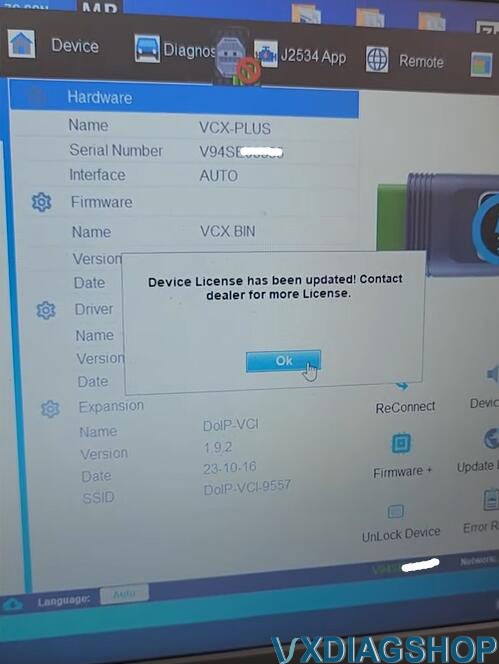
2. Update License

Update license

Update VXDIAG Benz VCI for 2024.09 Xentry 6

Update VXDIAG Benz VCI for 2024.09 Xentry 7

3. Update Benz C6 Driver

Go to Diagnostic Tab

Select Benz C6 drive

Update VXDIAG Benz VCI for 2024.09 Xentry 8

Uninstall old C6 driver.

Update VXDIAG Benz VCI for 2024.09 Xentry 9

Then install new C6 driver.

Update VXDIAG Benz VCI for 2024.09 Xentry 10

Update VXDIAG Benz VCI for 2024.09 Xentry 11

Update VXDIAG Benz VCI for 2024.09 Xentry 12

Disconnect VCX SE with laptop, then connect again.

Update VXDIAG Benz VCI for 2024.09 Xentry 13

Update VXDIAG Benz VCI for 2024.09 Xentry 14

VXDIAG VCX SE VCI is connected. Now you can use 2024.09 xentry software.


www.vxdiagshop.com

2024/09/26

VXDIAG Benz VCI Firmware Update to 1.9.6.0

VXDIAG Benz C6 and VCX SE DoIP updated both C6 driver and VCI firmware to support 2024.09 Xentry software.


Benz C6 Driver

2024.08.27
Update: Xentry Diagnosis 09/2024 new version support
NOTE: This update requires the latest VCI firmware V1.9.6.0

update vxdiag benz c6 driver

To use 2024.09 Xentry you must update both C6 driver and VCI firmware to V1.9.6.0.

VXDIAG Benz VCI Firmware Update to 1.9.6.0

Connect vcx se benz or Benz C6 VCI with laptop

Run VX Manager

Update firmware- Update VCI and DoIP

Go to Diagnostic tab, Update Benz C6 driver

After update C6 driver, run Xentry recovery tool on the desktop to sync Xentry VCI.

Update firmware/VCI-> Update C6 driver-> Sync VCI.


www.vxdiagshop.com