Showing posts with label VCX PLUS Multi Tool. Show all posts

2021/11/04

VXDIAG "Update License Failed Error Code:0” Solution

Here comes the working solution to vxidag multi vci (the big device) update license failure.

An error occurs when trying to update firmware and license. Error Update License Failed, Retry! Error Code:0″
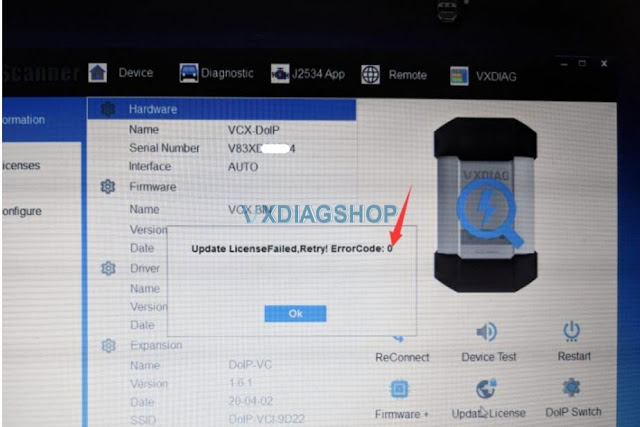
VXDIAG "Update License Failed Error Code:0 1

Vxdiagshop.com solution:

First of all, check your VCI and DoIP firmware version.
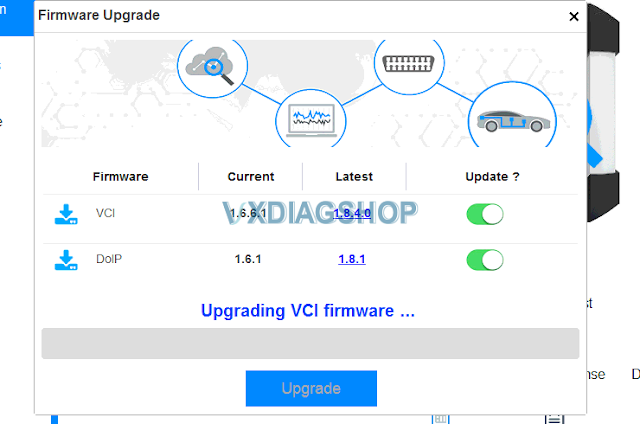
VXDIAG "Update License Failed Error Code:0 2

We see the VCI still use old version VCI and DoIP firmware version 1.6.  You have to update both versions to 1.8 (VCI 1.8.4.0 and DoIP 1.8.1).

Then update license.

If not working,  change network connection or another WiFi hotspot.

Contact us if all the above failed.

2021/04/13

VXDIAG VCX Multi Tool vs. VCX SE

VXdiagshop.com here provides table comparison between vxdiag vcx se and multi tool series scanner.  Hope it helps.


VXDIAG VCX SE SeriesVXDIAG VCX Multi Series
Photo
Item NO.SP361, SP341, SP304-C, SP355, SP367VX01-W, HKVX05-W, VX10, VX11, VX11-B, VX15, VX17-B
Supported Brands on Salefor Benz, for BMW, for Ford/Mazda, GM, VW 3 in 1 (Optional), for JLR, for Full brandsfor Ford/Mazda, GM, VW 3 in 1 (Optional), for Subaru, for BMW, for Benz, for JLR DoIP, for Full Brands
Reset ButtonVxdiag Vcx Reset 1Vxdiag Wlan Firmware Reset 1
Package ListVCI, USB cable


VCI, USB cable, OBD2 Cable, Lan Cable


Connection MethodUSB, WIFI, DONETUSB, WIFI, LAN, DONET (SN V52XP*** Not Support)
Weight0.5kg4.5kg
Serial NumberV94SE***, S94BM***, S94JL***V52XP***, V71XN***, V83XD***, V94XD***
Add LicenseV94SE*** can
S94BM*** & S94JL*** Only add DONET
All Can, But V52XP*** cannot Add Benz, BMW, DoIP and DONET license
DoIPYesV52XP*** Cannot ADD, Others Can
Software UpdateDownload Link & HDD (Benz, BMW software update by HDD)Download Link & HDD (Benz, BMW software update by HDD)
Firmware UpdateFree Online via VX ManagerFree Online via VX Manager

www.vxdiagshop.com

2019/12/06

VXDIAG VCX NANO License can be Transferred to VCX PLUS Multi Tool

Good news to vxdiagshop.com customers new and old! VXDIAG VCX NANO/VCX Pro (small devices) license can be transferred to VCX PLUS Multi Tool (big devices).
Vxdiag Nano License Transfer To Vcx Plus
Requirements:
1) Post your vcx nano/vcx pro and vcx plus with Serial Number in a same photo and send it to us
2) We need to confirm all are your devices, so we can help transfer license to vcx plus S/N.
i.e add vxdiag nano gm gds2/tech2win license to vcx plus (don't need to purchase GM license anymore)
3) Once the nano license is added to the multi tool, there will be no license in nano devices.
4) You cannot transfer vcx plus license into vcx nano because nano is a single make scanner.
5) After the nano license is transferred to the vcx plus, you can use the installed nano software as well. Only need to install corresponding passthru driver to vcx plus.

All rights reserved to vxdiagshop.com.

http://www.vxdiagshop.com/info/transfer-vxdiag-vcx-nano-license-to-vcx-plus-7088.html