Showing posts with label vxdiag mazda. Show all posts

2025/09/05

Free Download VXDIAG Mazda IDS V139 Software

The latest version of Mazda IDS software has been updated to v139 in September 2025. Download IDS V139 here for free.


Software version: Mazda IDS V139

Multi-language

Free Download VXDIAG Mazda IDS V139 1

Compatible devices:

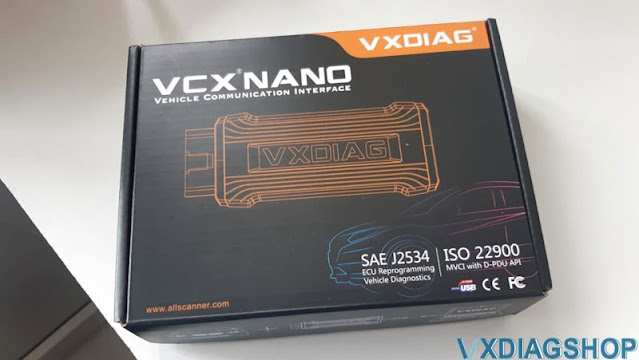
VCM2, VCM3, Autel, Launch, VNCI, Scanmatik, VXDIAG VCX NANO/VCX SE for Mazda, other Passthru J2534 devices


Operating system:

Windows 7/Windows 8/Windows 10


Free download Mazda IDS V139 software

Download LINK


How to Install Mazda V139 software?

1. Install mazdaids-***
2. Wait for mazdaids – * * * installation to complete and restart the computer
3. Install VX manager and IDS driver
4. Wait for VX manager and IDS driver installation to complete
5. Connect VCX device and install idspatch
6. Use idspatch to open IDs and start diagnosis.

Free Download VXDIAG Mazda IDS V139 2

Free Download VXDIAG Mazda IDS V139 3

Free Download VXDIAG Mazda IDS V139 4

Free Download VXDIAG Mazda IDS V139 5
 

2025/04/29

Mazda MDARS Not Detect VXDIAG VCX Nano Solution

Problem:

How to set up Mazda MDars and VXDIAG VCX Nano Mazda scanner and make it work together? I got MDars software installed and subscription activated, VCX software installed, but it does not recognize VCX Nano.


Possible solution:

To use MDARS with vcx nano, you need to delete IDS vci driver, install Passthru driver in Vx Manager.

Select device as Passthru instead of vxdiag.

VXDIAG VCX FD for Ford/Mazda is recommended, because the VCX NANO does not support CAN FD protocol. It may not connect with the latest models even if you have an MDARS subscription.

Mazda MDARS Not Detect VXDIAG VCX Nano

MDARS is used on Mazda 7th generation vehicles starting with the following all new models:

2025- CX-70

2023- CX-50

2021- CX-5

2024-CX90

2022-2023 MX-30

2020- CX-30

2024- MX-5

2021-2023 CX-9

2019- Mazda3

2024/11/17

VXDIAG Mazda IDS V136 Software Free Download

Allscanner VXDIAG released new Mazda IDS software on Nov. 16th, 2024.


Software version:
Mazda IDS V136


Operating system:

Windows 7/Windows 8/Windows 10


Compatible devices:
VXDIAG VCX NANO Ford/Mazda USB or WiFiVCX SE or VCX Plus Ford/Mazda

vxdiag mazda ids v136

Free download VXDIAG and patch

https://mega.nz/folder/xuNU3B7S#2L9p-GaRYEjFLJW1tikiCQ

No need to update Mazda driver in vx manager. Mazda IDS patch is included.


How to Install Mazda V136 software?

1. Install mazdaids-***
2. Wait for mazdaids – * * * installation to complete and restart the computer
3. Install VX manager and Ford IDS driver
4. Wait for VX manager and Ford IDS driver installation to complete
5. Connect VCX device and install idspatch
6. Use idspatch to open IDs and start diagnosis.


Ford IDS new version is not yet released. Keep an eye on www.vxdiagshop.com website or blog.

2023/12/18

VXDIAG Mazda IDS V131 Installation Guide

Mazda IDS V131 was tested and verified working fine with vxdiag scanners including VXDIAG VCX NANO Ford/Mazda USB or WiFiVCX SE or VCX Plus Ford/Mazda.


Here is the guide to install vxdiag Mazda IDS V131 software on Windows 10.


Software can be downloaded free here

Free Download VXDIAG VCX NANO Mazda IDS V131

Operating system: Windows 10 (free to test on Win7 and Win11)

NOTE: Don’t install both Ford IDS and Mazda IDS on the same operating system!!!


Procedure:

Mazda IDS installation is easier than Ford IDS. Mazda does not need to install VCI software driver.

Open Mazda IDS V131 software folder
Install MazdaIDS-131.00.exe setup

VXDIAG Mazda IDS V131 Installation 1

Install setup until completed
Reboot

VXDIAG Mazda IDS V131 Installation 2

VXDIAG Mazda IDS V131 Installation 3

Install VX Manager, install Passthru and Ford/Mazda IDS driver

VXDIAG Mazda IDS V131 Installation 4

VXDIAG Mazda IDS V131 Installation 5

Connect VXDIAG device with laptop
Run VX Manager
check device status

VXDIAG Mazda IDS V131 Installation 6

Copy and paste IDS_Patch to desktop
Run Mazda IDS from IDS_Patch on desktop
Software is ready to use

VXDIAG Mazda IDS V131 Installation 7

 VXDIAG Mazda IDS V131 Installation 8

https://www.vxdiagshop.com/service/install-vxdiag-mazda-ids-v131-on-win10.html

2023/01/02

How to Fix VXDIAG Mazda Not Found IDS Error?

Problem:

I got the vxdiag vcx nano Mazda IDS software installed and run IDS from patch. It failed me and said “Not found IDS”. Any solution?

VXDIAG Mazda Not Found IDS Error 1

VXDIAG Mazda Not Found IDS Error 2

Solution:

1. You have installed the Ford VCI 1.0.1.16 driver. Mazda does not need Ford VCI driver.

2. Don’t install Mazda IDS and Ford IDS on the same operating system.


Follow the correct procedure to install Mazda IDS software:

1. Install mazdaids-1**setup
2. Wait for mazdaids – 1** installation to complete and restart the computer
3. Install VX manager and IDS driver on VX manager “Diagnostic” Menu
4. Wait for VX manager and IDS driver installation to complete
5. Connect VCX device and install idspatch
6. Use ids patch to open IDs and start diagnosis.

2022/03/02

VXDIAG VCX NANO J2534 Works As Mazda Passthru

My check engine light was on, and my code reader said the likely solution was to update the PCM. I found the reflashing mdars software on Mazda’s website for $50 for a 72 hour subscription but needed a pass thru device.

I got the vxdiag vcx nano Ford/Mazda 1 in 1 J2534 passthru interface here

https://www.vxdiagshop.com/wholesale/vxdiag-vcx-nano-for-ford-mazda-2-in-1.html

The device works as Pass thru, just take your time installing it.

This wasn’t exactly easy to use. The software it runs wouldn’t work until I corrected a .dll file name that was different from what the .exe was trying to run. The software would not install the included Mazda IDS (which is OK because that isn’t why I got this). It had several errors connecting the device and having the software read it. However, after some patience and plugging and replugging, the Mazda software did recognize it and it worked! Updated PCM with Mazda Flashing software and it fixed my check engine light. Saved me a bunch of money/ or a trip to the dealer.

Based on previous reviews, I made sure to install an antivirus(Kaspersky) and it didn’t detect anything off with this program.

Good luck! Not the most user friendly thing, but it saved me a ton of money and time.

2022/01/16

VXDIAG VCX Mazda IDS Diagnose CX-5 2012

He saved and saved and saved. I was periodically tormented by a stupid error message about the charge optimization system on the Mazda CX-5 (1G) Engine 2.0 petrol (150 hp) 2012. Found the device a clone of the original official device IDS for relatively less money vxdiag vcx nano for ford/mazda.

VXDIAG VCX Mazda IDS Diagnose CX-5 2012 1

VXDIAG VCX Mazda IDS Diagnose CX-5 2012 2

VXDIAG VCX Mazda IDS Diagnose CX-5 2012 3

VXDIAG VCX Mazda IDS Diagnose CX-5 2012 4

There are official representatives, and there are sellers with Aliexpress. In the first case, they give all guarantees that the device is original + full support, but take a bit more than Ali. In the second case, it is cheaper, but you can get it without a guarantee and support. So i decided to order it from vxdiagshop.com. Download and install the Mazda IDS software, a patch, and drove it into the car.
Software took here www.vxdiagshop.com/info/download/
First I looked at the auto settings, parameters, went into programming, the program gave a message that there was a new pcm firmware version L, in fact, this was what I needed, I had G.

VXDIAG VCX Mazda IDS Diagnose CX-5 2012 5

Launched the firmware. Of course, it was scary to screw up the module, but everything went well, I waited for about 5 minutes. I will test and watch the battery charge.
There was no update on the box and the rest of the modules.

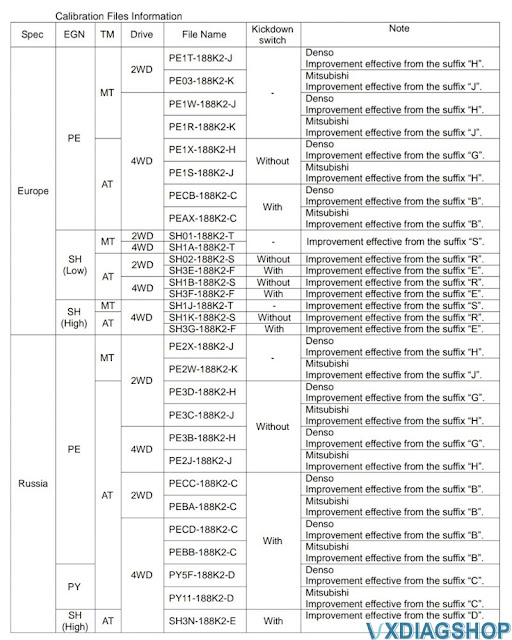
I am attaching a table from the bulletin on charge optimization.

VXDIAG VCX Mazda IDS Diagnose CX-5 2012 6