Showing posts with label vxdiag 2tb hdd. Show all posts

2025/11/13

VXDIAG 2TB Software List in November 2025

We are pleased to announce the successful testing of the VXDIAG 2TB software as of November 2025. Please find the latest software list below.


1. BMW ISTA-D 4.53.40, ISTA-P 68.0.800
2. BENZ Xentry/DAS: 2025.09
3. VW/AUDI ODIS Service V25.03, Engineering V19
4. JLR SDD V167, Pathfander V374
5. Piwis II V18.100.000
6. VOLVO 2014D
7. FORD IDS V130
8. MAZDA IDS V138
9. GM GDS2 2025.03 , Tech2win 23.002
10. TOYOTA Techstream V18.00.008
11. HONDA HDS V3.105.043
12. SUBARU SSM3 V1.57.71.8 (2019.4 ), SSM4 V28.6.0 (2022.1)
13. NISSAN v241
14. PEUGEOT v09.85
15. RENAULT v236
16. PIWIS 3 42.1

Update with new 2TB HDD or SSD.

2025/03/17

Does VXDIAG 2TB Software Include a GM DPS license?

Question: 

Does the VXDIAG 2TB Software HDD/SSD include a GM DPS license?


The VXDIAG 2TB HDD/SSD typically comes preloaded with diagnostic software and tools for various vehicle brands, including GM (General Motors).

The 2TB software hard drive or solid drive does include a GM DPS (Diagnostic Programming System) software 4.52. But the DPS license has expired. 


DPS 4.52.2000 license valid in 04/2024. Try to change the computer date/time to before April 2024.

If it is not working, better get the newer version.

The newer version, DPS 4.53, comes with a lifetime license. But it is not free. You have to buy it somewhere else.

DPS 4.53


2024/09/25

VXDIAG 2TB HDD All Software Installed or Not?

Question:

If I buy a 2TB VXDIAG hard drive is it supposed to have all the software brands on it?
all installed it set up and ready to be used?

VXDIAG 2TB HDD All Software Installed

Here is the clue.

Apart from Renault Clip, Ford and Mazda IDS software, all other software are pre-installed.

For GDS2, Toyota techstream, Subaru SSM4, Nissan Consult3 plus, Ford/Mazda IDS you need to start from patch.

GM GDS2/Tech2win: installed, but need to run software from patch

Toyota Techstream: installed, but need to run software from patch

Subaru SSM4: installed, but need to run software from patch

Honda HDS: installed, ready to use

VAG ODIS: installed, ready to use.

JLR SDD: installed, ready to use

Nissan Consult 3 plus: installed, but need to run software from patch

Ford/Mazda IDS: Not installed, need to install software and run from patch

Renault clip: Not installed, need to install software

PSA diagbox: installed, ready to use.


If you find software displays in Chinese, contact us to change language via Teamviewer.


Contact us if need 2TB software HDD or SSD only:

Skype:vxdiag.com
Email:sales@vxdiagshop.com
WHATSAPP:0086-18064450969

WHATSAPP: +12133760215

2024/06/24

VXDIAG 2TB HDD RDS3 in Chinese?

Problem:

There is an RDS3 software on the vxdiag full 2tb software HDD. One of our customers update the RDS3 online and program turns to Chinese, cannot change language.

Image attached:

VXDIAG 2TB HDD DRS3 in Chinese

Here is the clue.

RDS3 is a crack software. It is a bonus software.

You cannot update software online.

The software is corrupted after the upgrade.

Better subscripe the original RDS3 now.


www.vxdiagshop.com

2024/04/16

New VXDIAG 2TB HDD SSD Software Partition

Renault, PSA and Nissan software were added to the VXDIAG 2TB HDD/SSD software in April 2024.

Now it has 13 car brands software in the hard drive or solid drive.

Here is the partition of each software:

vxdiag 2tb new HDD

New 2TB HDD/SSD Software List:

  • Benz 03/2024 X-ENTRY 34.6.2.5, Engineering 8.13.029
  • BMW I-S-T-A+ 4.39.20, I-S-T-A-P 68.0.800
  • VW ODIS-S V23.01, ODIS-E V17.01
  • JLR SDD  V164
  • PW II  V18.100.000
  • VOLVO  2014D
  • FORD   V130
  • MAZDA  V131
  • GM GDS2 V2023.10.19, Tech2win 23.002,
  • TOYOTA V18.00.008
  • HONDA HDS V3.105.012
  • SUBARU 2022.1, SSM3 V1.57.71.8, SSM4 V28.60
  • Nissan Consult iii plus v226
  • Renault Clip V219
  • PSA Diagbox 9.85


If you got the older 2TB HDD or SSD (contains 10 car brands), here is the software partition:

vxdiag 2tb old HDD

Old 2TB HDD/SSD software List

  • Benz 12/2023 X-ENTRY, Engineering 8.13.029
  • BMW I-S-T-A+ 4.39.20, I-S-T-A-P 68.0.800
  • VW ODIS V14
  • JLR SDD  V164
  • PW II  V18.100.000
  • VOLVO  2014D
  • FORD   V130
  • MAZDA  V131
  • GM GDS2 V2023.10.19, Tech2win 23.002,
  • TOYOTA V18.00.008
  • HONDA HDS V3.105.012
  • SUBARU 2022.1, SSM3 V1.57.71.8, SSM4 V28.60


If need new HDD and SSD, contact www.vxdiagshop.com

2023/02/28

VXDIAG Full Brand 2TB HDD Using Tips

Here are useful tips for those who get the VXDIAG 2TB full-brand HDD or SSD.


Using Tips:

The disc is internal version, need to insert to laptop to use as system hdd internally. It is SATA Port, need to work on laptop with SATA Port, at least 8GB RAM, I7 PROCESSOR. Better using Lenovo, Windows system driver is more compatible.

The 2TB HDD/SSD includes 10 separate systems for the full 11 brands diagnostic software. When you boot laptop, would turn to this page to choose one software system to enter.

VXDIAG Full Brand 2TB HDD Using Tips 1

For the HDD Windows systems, most are windows 10, only WIN7 for Porsche, Volvo and GM Tech2win software.

Factory set the systems based on Chinese. So even we offer English systems, and change system language to English, there are still some windows prompts in Chinese, please kindly noted.

1. Need to check and install newest v1.8.9.0601 vx manager for all systems. Then enter each system, to open vx manager, install corresponding driver for the software. For example, for Benz xentry software system, need to install “Benz C6” driver on “diagnostic” menu of vx manager. etc. This process needs to connect device to PC, connect internet.

VXDIAG Full Brand 2TB HDD Using Tips 2

2. For each systems:

2.1. For Benz software system, if need wifi connection, need to install wifi driver for your laptop.

VXDIAG Full Brand 2TB HDD Using Tips 3

Check video guide here
After install benz c6 driver on vx manager, also need to update VCI to match device firmware and software version.

VXDIAG Full Brand 2TB HDD Using Tips 4

VXDIAG Full Brand 2TB HDD Using Tips 5

VXDIAG Full Brand 2TB HDD Using Tips 6

Check video here to update C6 driver

WIS/EPC Software:

EPC Should run from vmware. WIS can run on regular windows system directly.

VXDIAG Full Brand 2TB HDD Using Tips 7

VXDIAG Full Brand 2TB HDD Using Tips 8

VXDIAG Full Brand 2TB HDD Using Tips 9

DTS Monaco 8.03 version is offered with patch, no need activation, can use directly. V9.02 version is also offered as a gift, but needs activation. If user is able to activate, can use it.

2.2. For BMW System, need to update firmware and license on vx manager first. Also need to install “BMW” driver on “diagnostic” menu of vx manager.

VXDIAG Full Brand 2TB HDD Using Tips 10

VXDIAG Full Brand 2TB HDD Using Tips 11

ISTA+ only includes English language, ISTA-P can support multi languages.

VXDIAG Full Brand 2TB HDD Using Tips 12

VXDIAG Full Brand 2TB HDD Using Tips 13

2.3. For VW system, install “vw 6154” driver on vx manager first.

For ODIS first time to open, need to finish loading update data first. This process may take about 1 hour. During the process, need to choose correct language you need, otherwise, unable to change any more.

VXDIAG Full Brand 2TB HDD Using Tips 14

For ETKA Software use, need to change PC System time to 2021.

2.4. For Ford system, software is only downloaded, but not installed, because it needs to install based on the laptop.
When receive it, please follow the steps to finish installation.

Ford IDS Installation:

1. Install Ford IDS-1**
2. Wait for the installation of Ford IDS – 1**, and restart the computer
3. Install the Ford original VCI software_ 1.0.0.10.exe
4. Install VX manager and IDS driver on VX manager “Diagnostic” Menu
5. Wait for VX manager and IDS driver installation to complete
6. Connect VCX device and install idspatch
7. Use idspatch to open IDs and start diagnosis.

VXDIAG Full Brand 2TB HDD Using Tips 15

2.5. For Mazda system, same as Ford, need to install additionally.

Mazda IDS Installation:

1. Install mazdaids-1**
2. Wait for mazdaids – 1** installation to complete and restart the computer
3. Install VX manager and IDS driver on VX manager “Diagnostic” Menu
4. Wait for VX manager and IDS driver installation to complete
5. Connect VCX device and install idspatch
6. Use idspatch to open IDs and start diagnosis.

VXDIAG Full Brand 2TB HDD Using Tips 16

2.6. For GM system, GDS2 Software is pre-installed with patch. After finish install “GM” driver on vx manager, need to connect device to run GDS2 Patch to open, otherwise, it will prompts no device found in Chinese.

VXDIAG Full Brand 2TB HDD Using Tips 17

For Tech2win software, it is in the same win7 sytem as Por-sche pw2 software. When using it, still need to install “GM” Driver first on vx manager diagnostic menu. When run tech2win software, need to choose area “North America” to get more models.

For GM system, no matter GDS2 or Tech2win software, there are options of MDI1, MDI2 or VXDIAG when select device. Please choose any one which can open successfully.

When using GDS2 or tech2win software, if not able to select device option, can uninstall “GM” driver on vx manager, then install again to try. And uninstall GM MDI Manager to reinstall.

2.7. For JLR System, JLR SDD software needs to run offline. So need to run offline patch (called JLR.SDD.Offline.patch) first, then use the username and password on txt file (called JLR SDD) to log in.

VXDIAG Full Brand 2TB HDD Using Tips 18

2.8. For Porsche system, need to install “PW2”  driver on vx manager. Software is old v18.1 version, unable to update, need to change PC System time to 2019.VXDIAG Full Brand 2TB HDD Using Tips 19
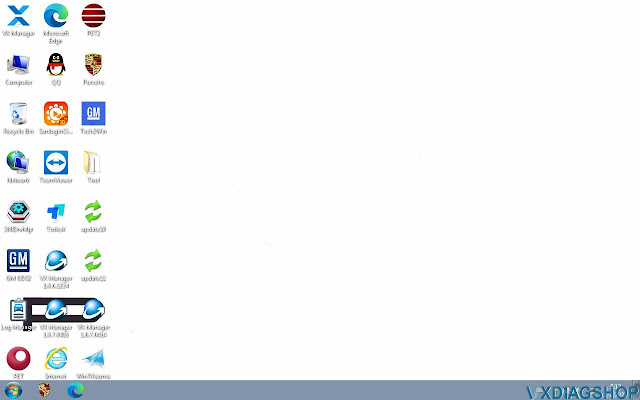
2.9. For Volvo System, need to install “volvo” driver on vx manager diagnostic menu. Software usname is admin. This system sometimes may need to install internet network driver first, otherwise, not able to connect internet.

VXDIAG Full Brand 2TB HDD Using Tips 20

2.10. For Subaru, Toyota & Honda system, need to install “Subaru”, “Toyota”, “Honda” driver on vx manager diagnostic menu. Subaru and Toyota software need to connect device & run patch to open software, no activation code need.

VXDIAG Full Brand 2TB HDD Using Tips 21

Technical support from https://www.vxdiagshop.com/service/vxdiag-software-disc-using-tips.html