Showing posts with label VXDIAG VCX NANO ODIS. Show all posts

2022/08/11

How to Choose VAG Project on ODIS-E?


Where I can find which ODIS-E project is for my car?   Do I need to have project for ecu flashing?  What info is ODX containing?


Here’s the clue.

There is a helo file in ODIS-E what project with what car goes.

ODX are the pojrect files you need to inport them in odis if they are in a zip file.


How to Choose VAG Vehicle Diagnostic Data on ODIS Engineering?

For ecu flashing with vas5054, vas 6154, vxdiag vcx se 6154 or others.


Method 1: searching from below vehicle list if you know vehicle model


Project List


Project List

AUDI:

AU21X: AU210/AU220(A1)/AU316(Q3)

AU35X: AU35X(A3AB2)/AU324/AU325(TTNF)/AU714/AU715(R8)

AU37X: AU37X(A3AB3)/AU334/AU335(TT3)

AU48X: AU48X(A4/A5 B8)/AU416(Q5)

AU56X: AU56X(A6 C6)/AU716(Q7)

AU57X: AU57X(A6/A7 C7)

AU64X: AU64X(A8D4) AU724: AU724(R8NF)

AU924: AU914/7(RSe)/AU924(R8e Tron2.0)

MLBEVo: MLBEVo/AU736(Q7 NF)/AU49X(B9)/AU246(Q5 NF)/AU651(D5)

MLBEVo_DolP: MLBEVo/AU736(Q7 NF)/AU49X(B9)/AU246(Q5 NF)/AU651(D5)

VW:

MQBAB: MQB-A/B

VN337E:E-Caddy

VN35X: Caddy

VN54X: Crafter NF

VN75X:T5

VN81X: Amarok

VW019:1-Liter Auto

VW120: Up! NSF

VW21X: Suran

VW23X: Gol

VW250CS: Polo China

VW2531CS:A-Entry China

VW2532CN: Jetta A2 NF China

VW25X: Polo

VW26X: Polo GP(MQBAO)

VW3111: Lavida China

VW3112CN: New Bora China

VW316C: Tiguan Lang China

VW32X: New Beetle

VW358C: Touran China

VW36X: Golf 6

VW36XCN: Golf 6 China

VW37X: Golf 7

VW37XCN: Golf 7 China

VW37XCS:A+China

VW411:New Midsize Sedan

VW411CS:New Midsize Sedan China

VW46XCN:Passat B7 China Lang

VW47X:Passat B7

VW48X:Passat B8

VW51XCS:C-Modell Chian

VW526:Touareg

VW611GP3:Phaeton GP3

VW62X:Phaeton NF

VWVRTVPT:Konfigurationsdatei

SEAT:

SE25X:Ibiza

SE26X:SE26X

SE35X:Altea/Toledo/Leon/Freetrack

SE37X:PQ37

SE41X:Exeo

Lamborghini:

LB72X:LB724/LB725(Huracan)

LB83X:LB83X(Aventador)

SKODA:

SK25X: SK25X(A05-Fabia+Roomster)

SK25X1: SK25X1(A-Entry)

SK26X: SK26X(A06-Fabia ll)

SK35X: SK35X(A5-Octavia+Yeti)

SK37X: SK37X(A7-Octavia ll)

SK46X: SK46X(B6-Superb)

SK48X: SK48X(B8-Superb ll)

SKSVW: SKSVW(Skoda China)


Method 2: How to use ODIS choose vehicle model if you can not find model from above list.

Running ODIS, then click “Start Diagnostic”–”Diagnostic”

After diagnosis click “Report”—>”Save”–>”Long record”, then click “OK”

Save file

Open this file you saved via IE browser, check the name of ASAM project, AU48X is the data what we need.

Choose VAG Project on ODIS-E

2021/01/21

Fixed! VXDIAG VCX NANO ODIS License Invalid

Here share the solution to VXDIAG VCX NANO 5054 error reading the license file. Please look below:

Customer problem: I bought a VXDIAG VCX NANO 5054, but when I tried to install ODIS 5.1.6 on my WIN 7 computer, I got the error message “Error reading the license file: Could not parse certificate: java.io. IOException: Empty input. The license is invalid. ”

vxdiag-vcx-nano-odis-license-invalid

Solution:

  1. Better install vxdiag odis software on Windows 10 operating system
  2. Do not install ODIS with other diagnostic software, i.e Benz XENTRY.  Otherwise they may interfere ODIS from running normally.


www.vxdiagshop.com

2018/11/27

Free Download ODIS V4.4.10 for VXDIAG VCX NANO

VAG Audi VW ODIS 4.4.10 Crack Software with ODIS Engineering 8.2.3 postsetup free download for VXDIAG VCX NANO ODIS diagnostic scanner.


Free Download ODIS V4.4.1.0 and PostSetup 8.2.3
https://xhzdxhtbsteduau-my.sharepoint.com/:f:/g/personal/20130970_shanlin_club/EoK4JQ3uAB5FnL2we600LxkBaOuTfnDWIpaE0FWJyylcAA?e=fbVWjq
ODIS-4.4.10-software
Multi-language: English/Japanese/Portuguese/Romanian/Korean/Dutch/Polish/Turkish/Spanish/ French/Italian/Croatian/Danish/German/Swedish/Finnish/Slovenian/Czech/Russian/Greek/Chinese
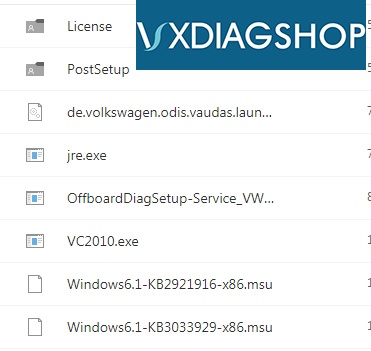
Software containing:
ODIS-4.4.10-software-1
ODIS-4.4.10-software-2
Computer Windows System Requirements:
 
WIN 7 32 bits/WIN 7 64 bits
System C: // have to be NTFS format
C: // need to have at least 40GB space for installing ODIS


VXDIAG ODIS 4.4.10 Software New Functions:
– Estimated remaining times are shown for ECU flash operations.
– Diagnostic protocol contains interruptions of GFF sessions, extended measurement values, improved ECU communication view, used diagnostic hardware, connection type of diagnostic hardware, operating system, the hotfix used and submissions of support requests
– The measured value display has been improved.
– Documents in GFF are displayed in separate windows.
– One message box will be shown at the beginning of the test drive mode.
– GFF hotfixes can be integrated during diagnostic sessions.
– Danger messages have been revised.
– Stopping of diagnostic sessions may be interrupted.
– Automatic deletion of autosave diagnostic protocols after successful transmission.
– Selection of PassThru diagnostic hardware has been


Odis 4.4.10 Windows 7 installation tips:
  1. Install Odis only WIN 7 32 or WIN 7 64! ! ! ! Do not restart at the end ! ! !2. Copy +Paste OffboardDiagLauncher.exe to “Program Files (X86) > Offboard_Diagnostic_Information_System”
    3 .Copy “de.volkswagen.odis.vaudas.launcher_4.44.1.jar “ to “Program Files (X86) > Offboard_Diagnostic_Information_System\plugins”
    4. For Win 7 32 . Extract “Odis 4.4.10 Program x86.rar “ to ! ! ! “PROGRAM FILES (X86)” ! ! !
    5. For Win 7 64 . Extract “Odis 4.4.10 Program x86.rar “ to ! ! ! “PROGRAM FILES (X86)” ! ! ! AND Extract “Odis 4.4.10 Prgram Files.rar “ to ProgramData
    6. RESTART
    7. Do not start Odis
    8. Start > Edic Conf. Manager with USB and with Bluetooth
    9. Is detected 5054 start odisEnjoy!
http://www.vxdiagshop.com