Showing posts with label vxdiag vcx se. Show all posts

2025/10/13

VXDIAG VCX Series OBDII Cable Pinouts

A customer asked us about the pinout of the VXDIAG VCX SE DB16 OBDII cable. Here vxdiagshop.com provides the pinout for the VCX NANO, VCX SE, VCX FD and VCX DoIP series OBDII cables.

VXDIAG VCX Series OBDII Cable Pinout

VXDIAG VCX NANO OBDII Cable Pinout

VXDIAG VCX NANO OBDII Cable Pinout

VXDIAG VCX SE OBDII Cable Pinout

VXDIAG VCX SE OBDII Cable Pinout

VXDIAG VCX DoIP OBDII Cable Pinout

VXDIAG VCX DoIP OBDII Cable Pinout 1

VXDIAG VCX DoIP OBDII Cable Pinout 2

VXDIAG VCX CAN FD OBDII Cable Pinout

VXDIAG VCX CAN FD OBDII Cable Pinout

2025/10/11

VXDIAG VDASH Clear Volvo ECM-2A50 Fault Code

Here comes the true user review on VXDIAG VCX SE and Volvo V50.

“I tried the VXDIAG VCX SE (without a Volvo license) + VDASH (free version) combination.

Many people on the website are reporting that VXDIAG doesn’t work with the VDASH program. I decided to check, and it turns out the program recognizes the adapter and connects to the car without any problems.

I only got one error, but it seemed like a nasty one: ECM-2A50 Particle trap. Defective signal.
There are no other notifications on the dashboard, no smoke, and the car runs like it should (well, it’s clear the 1.6 is a bit of a slug, but it runs fine, revving above 3k).

UPDATE: I replaced the differential exhaust gas pressure sensor with a Meyle 714 801 0001 , and the error went away.”

VXDIAG VDASH Clear Volvo ECM-2A50 Fault Code


2025/09/28

How to Solve VXDIAG Passthru Driver File Check Failed Error?

Problem:

Failed to install Passthru driver for VxDiag VCX SE on Windows 10 system. Error File check failed.  How to fix it?

VXDIAG Passthru Driver File Check Failed Error

Solution:

Exit vx manager.

Run vx manager and install passthru driver again. It should be fine.

2025/08/12

VXDIAG VCX SE No Device No WiFi Solution

Problem:

There is a problem with VXDIAG VCX SE device. No device in vx manager. No device detected in the computer device manager. Tried to connect via WiFi but failed. No WiFi connection.

Any idea?

VXDIAG VCX SE No Device No WiFi 1

VXDIAG VCX SE No Device No WiFi 2

VXDIAG VCX SE No Device No WiFi 3

Solution:

Insert the USB cable firmly into the USB port of the VCX SE (shown image below).

VXDIAG VCX SE No Device No WiFi 4

If not working, disconnect the VCX SE unit for 2 minutes, reconnect and try again.

If all fails, there is something wrong with the device hardware. You may need to send it back for repair.

2025/07/14

VXDIAG VIDA Volvo XC70 Oil Service Reset Review

Now that we’ve changed the engine oil on a Volvo XC70 D40, let’s find out how to reset the service interval using VIDA software (i.e VXDIAG VCX SE and VIDA 2014D)!

VXDIAG VIDA Volvo XC70 Oil Service Reset 1

VXDIAG VIDA Volvo XC70 Oil Service Reset 2

VXDIAG VIDA Volvo XC70 Oil Service Reset 2

VXDIAG VIDA Volvo XC70 Oil Service Reset 3

Volvo can do a service reset with VIDA. 

VIDA (Vehicle Information & Diagnostics for aftersales)

To reset the service, go to the menu below.

Select DIM module->Select Advanced tab->Reset Service Check Indicator (SRI)->Press Start and reset is complete!

VXDIAG VIDA Volvo XC70 Oil Service Reset 4

VXDIAG VIDA Volvo XC70 Oil Service Reset 5

VXDIAG VIDA Volvo XC70 Oil Service Reset 6

VXDIAG VIDA Volvo XC70 Oil Service Reset 7

VXDIAG VIDA Volvo XC70 Oil Service Reset 8


2025/07/09

VXDIAG Diagbox VMware Peugeot 5008 Review

Review: Using VXDiag VCX SE PSA and DiagBox via Vmware with Peugeot 5008.


The tool is tested via Diagbox in a VMWare virtual machine, providing insights into its performance, compatibility, and ease of use.


The process begins with launching DiagBox 9.129 (VMware version) in a virtual environment. After connecting the cable, the tool prompts the user to select the connection method—choosing “Box” establishes the link. The system initially defaults to Citroën, but switching to Peugeot allows for proper communication with the vehicle.

The tool successfully reads the VIN number, confirming a stable connection.

The tool scans the vehicle’s modules, identifying multiple control units.


Diagnostic Performance

Initially, the tool fails to locate the ECU but later identifies it during a full system scan.

Error Reading: The tool requires multiple ignition cycles (turning the key on/off) to fully read error codes and parameters. Checking error codes and live data for engine, transmission, and other systems.

User Interface: The updated DiagBox interface includes visual aids, making it more user-friendly for beginners.

The diagbox is optimized for Peugeot, Citroën, and DS vehicles, offering more accurate diagnostics than generic tools like LAUNCH or VCDS.


Weaknesses:

  • Slow Operation: The diagnostic process is time-consuming, requiring repeated ignition cycles.

  • Limited Advanced Functions: While suitable for basic diagnostics, the tool may not be ideal for advanced coding or programming tasks.


Conclusion

The VXDiag and DiagBox tool proves to be a reliable option for diagnosing Peugeot, Citroën, and DS vehicles, offering better accuracy than generic scanners. However, its slow operation and limited advanced features may deter professionals needing faster, more comprehensive solutions.

VXDIAG Diagbox VMware Peugeot 5008 Review 1

VXDIAG Diagbox VMware Peugeot 5008 Review 2

VXDIAG Diagbox VMware Peugeot 5008 Review 3

VXDIAG Diagbox VMware Peugeot 5008 Review 4

VXDIAG Diagbox VMware Peugeot 5008 Review 5

VXDIAG Diagbox VMware Peugeot 5008 Review 6

VXDIAG Diagbox VMware Peugeot 5008 Review 7

NOTE: We don’t provide Diagbox VMware software. You are at your risk.

2025/03/21

Does VXDIAG VCX FD Work with MG Saic VDS2 Software?

Question:

Has anyone been able to get MG or Saic Roewe VDS2 Diagnostic Software working with a VXDIAG VCX FD/VCX SE VCI with either Ford or GM license?


Answer:

No, Saic Roewe and MG use VDS2 (VEHICLE DIAGNOSTIC SYSTEM) software.

Interface support: VDI I, VDI II, VCM2 original, MDI 1, MDI2 original.

VXDIAG VCX FD or VCX SE is driven by license. VXDIAG does not have license for MG or SAIC motors.


2025/02/23

VXDIAG J2534 GM Techline Connect Error UEH101:null Solution

Problem:

Tried to use VXDIAG VCX SE GM with GM Techline Connect SPS2 for ECM programming.  TLC reported an error “UEH101:null”. Anyone gotten this error before?

VXDIAG J2534 GM Techline Connect Error UEH101:null

Solution 1:

Delete it and reinstall happened to some others.

If hit uninstall then redownloaded. Same problem. You have to uninstall everything that involved it’s. There’s like 15-20 different things that tie in to it. Have to go to add remove programs and remove it all.


Solution 2:

Had this happen not too long ago called tech support and 3 hours later they said it was my computer. New laptop. I was using google chrome to sign in to tds, but when I switched to Microsoft edge I worked and went through and working ever since. Hope you get it resolved!


www.vxdiagshop.com

2025/01/21

Use VXDIAG VCX SE with Launch Smartlink B Remote Diagnostics

The VXDIAG VCX SE is a powerful and versatile diagnostic tool that offers both local diagnostic and DoNET remote diagnostic capabilities, making it an indispensable solution for automotive professionals, fleet operators, and technicians.


Local Diagnostics:
The local diagnostic function of the VXDIAG VCX SE is designed for hands-on troubleshooting directly at the vehicle or system. By connecting the device locally to the vehicle’s onboard diagnostics (OBD) port, technicians can easily read fault codes, check system parameters, run component tests, and perform calibration or programming tasks. Local diagnostics are ideal for on-site inspections and immediate fixes, offering quick access to essential information and allowing technicians to make adjustments directly at the vehicle.

DoNET Remote Diagnostics:
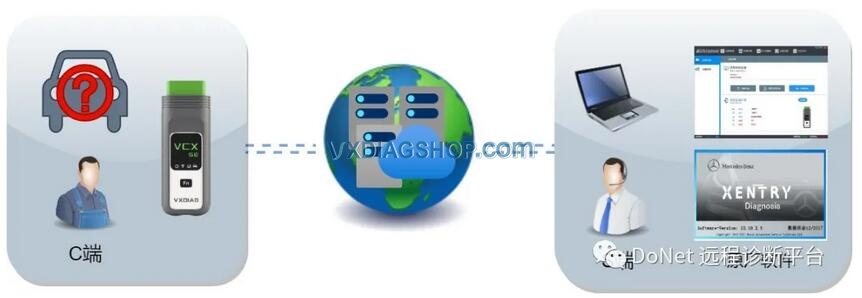
The super remote diagnostic capability takes the diagnostic process to the next level, allowing technicians to remotely access and control the system from any location. With this feature, the VXDIAG VCX SE enables full remote diagnostics, including advanced system analysis, error code interpretation, and detailed performance testing. Remote access minimizes the need for physical presence, reducing downtime and increasing efficiency by allowing technicians to diagnose and troubleshoot issues without being on-site. This mode is particularly useful for fleet management, remote diagnostics in the field, and off-site technical support.


VCX SE can be used as the C side or B side of remote diagnostics.

VXDIAG VCX SE with Launch Smartlink B 1 


Users are allowed to set up Allscanner’s DoNET remote diagnostics for the VCX SE.

It can also be used with other remote diagnostic equipment. For example, works with Launch Smartlink B VCI for diagnostic and programming through the Launch’s super remote diagnostics system.

You can use VXDIAG with JLR, Toyota, Honda, Volvo, Porsche, Peugeot, Citroen, BMW, Benz, Nissan, Subaru etc software (need to have license activated).

VXDIAG VCX SE with Launch Smartlink B  2

VXDIAG VCX SE with Launch Smartlink B 3

VXDIAG VCX SE with Launch Smartlink B 4

VXDIAG VCX SE with Launch Smartlink B 5

VXDIAG VCX SE with Launch Smartlink B 6

VXDIAG VCX SE with Launch Smartlink B 7

VXDIAG VCX SE with Launch Smartlink B 8

VXDIAG VCX SE with Launch Smartlink B 9