Showing posts with label WIS. Show all posts

2024/12/31

VXDIAG Benz WIS 2025 Patch Free Download

If your VXDIAG Benz WIS software does not show wiring diagram. The license has expired. Here is the solution.

VXDIAG Benz WIS 2025 Patch Free Download

We have provided WIS2024.exe patch before, but the 2024 patch expired on Dec. 10th, 2024.

Here download new WIS2025.exe patch. 


Put this patch on the desktop and run it.

2024/01/14

VXDIAG Benz WIS Failed to Lock File Solution

Problem:
I have a problem opening VXDAIG VCX SE Benz WIS/EPC software via VMware. Error failed to lock the file.
Any solution?

VXDIAG Benz WIS Failed to Lock File 1

Solution:

There is a WIS database in the C drive. Extract files and run again.

Extract WISpart.01.zip file will auto extract all part01-part08 files.

VXDIAG Benz WIS Failed to Lock File 2

VXDIAG Benz WIS Failed to Lock File 3

VXDIAG Benz WIS Failed to Lock File 4

If still not working, your laptop VM-support is disabled. Go to Bios and enable Secure Virtual Machine (SVM).  Then run WIS again.

VXDIAG Benz WIS Failed to Lock File 5

Or contact us to get the new WIS2024 patch for WIS, then run WIS2024 on the desktop directly without VMware (EPC still need to run thru VMware).


2024/01/11

VXDIAG Benz WIS Not Display Wiring and Repair Guide Solution

Problem:

VXDIAG VCX SE Benz WIS/ASRA is not displaying wiring diagrams and repair procedures, only parts catalog. Is possible for me to get that function back?

VXDIAG Benz WIS Not Display Wiring 1

VXDIAG Benz WIS Not Display Wiring 2

Solution:

The patch for WIS has expired.

Contact us to get WIS2024.exe new patch for WIS.

Skype:vxdiag.com
Email:sales@vxdiagshop.com
WHATSAPP:0086-18064450969

Put this file on the desktop and run it.

VXDIAG Benz WIS Not Display Wiring 2

Report:

I run it and it is working great.


https://www.vxdiagshop.com/service/vxdiag-benz-not-display-wiring-diagrams-solution.html

2021/11/10

How to Fix VXDIAG Benz WIS EPC “Unknown LAN ID”?

Here comes the solution to VXDIAG VCX SE Benz or Benz C6 DoIP WIS EPC software “Unknown LAN ID” problem.

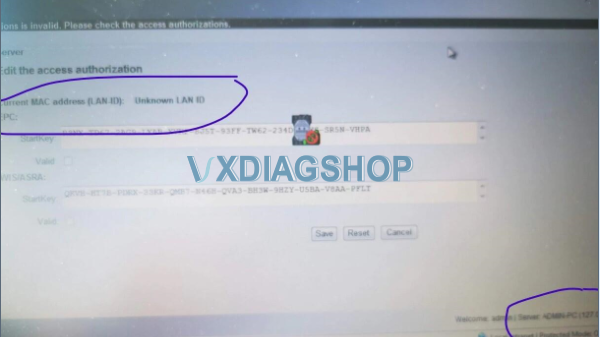
I need to get WIS EPC activated. But when ready to paste the LAN ID to generate license key (Startkey),  the page indicates “Unknown LAN ID” in the MAC address field,  and apparently the EWA net server cannot match it with the license key.

VXDIAG Benz WIS EPC “Unknown LAN ID 1

Solution:

1.Check NIC Driver.

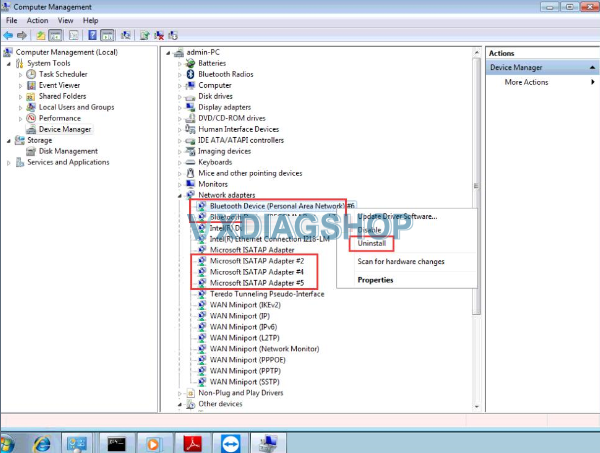
2. Open “Computer Management”

3. Right click “Device Manager” to select “Show hidden devices”

4. Delete All Tunnel Adapters “Microsoft ISATAP Adapters” (all virtual network card drivers with #) “Teredo Tunnering Pseudo-Interface”.

VXDIAG Benz WIS EPC “Unknown LAN ID 2

VXDIAG Benz WIS EPC “Unknown LAN ID 3

Or contact www.vxdiagshop.com technical support via Teamviewer.

Related video guide:

https://youtu.be/UuZmtWYY-1M

https://youtu.be/Qn-u1iNV9NY

2021/10/27

Free Download WIS EPC CarProKey Keygen for VXDIAG Benz

Since VXDIAG Benz Star diagnostic software 2020 version,  WIS/EPC has changed the activation keygen from ‘HP-EVA’ to ‘CarProKey’.  The activation procedure is slightly different from the old versions.


How to Activate V2020 and Later VXDIAG Benz WIS EPC Software?

The activation manual can be applied to vxdiag vcx se Benz, vxdiag benz c6, vxdiag vcx doip Benz, MB SD C4, MB SD C4 DoIP, MB SD C5 etc.

activate-vxdiag-benz-wis-epc-1

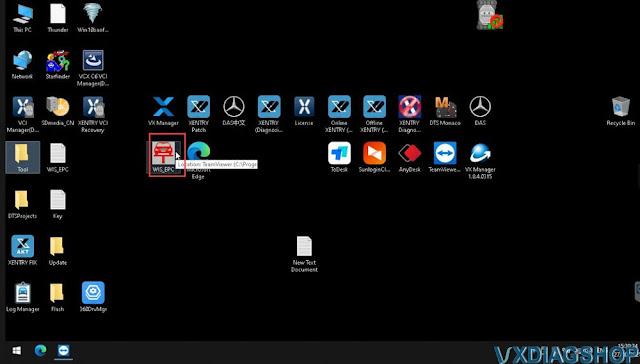
Run WIS-EPC shortcut on desktop

activate-vxdiag-benz-wis-epc-2

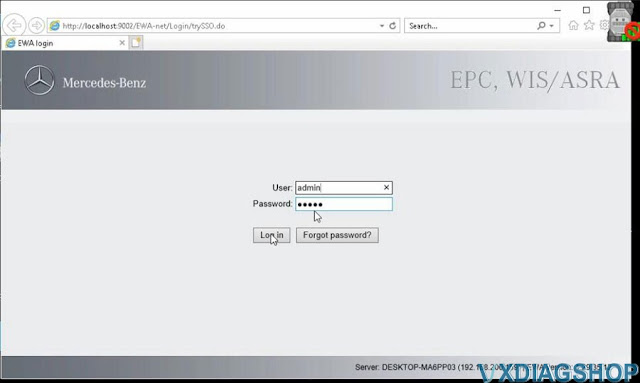
Login with User name (admin) and password (12345)
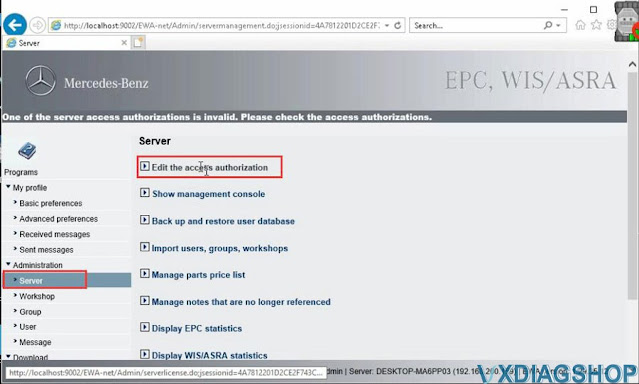
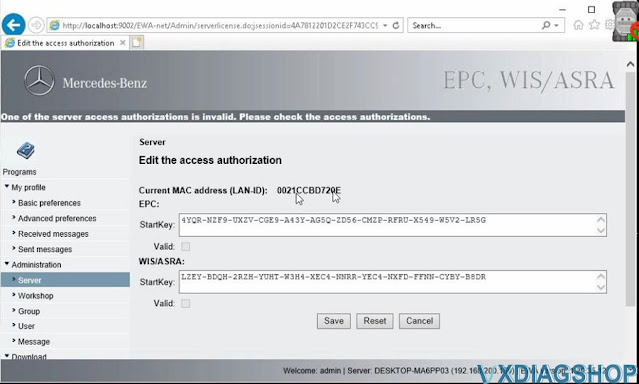
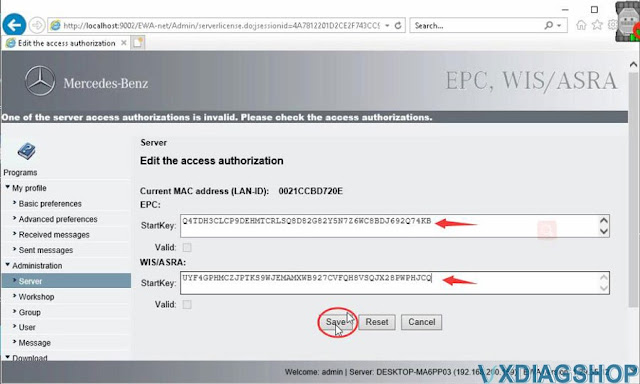
Then you go Administration- Server- Edit the access authorization

activate-vxdiag-benz-wis-epc-3

activate-vxdiag-benz-wis-epc-4

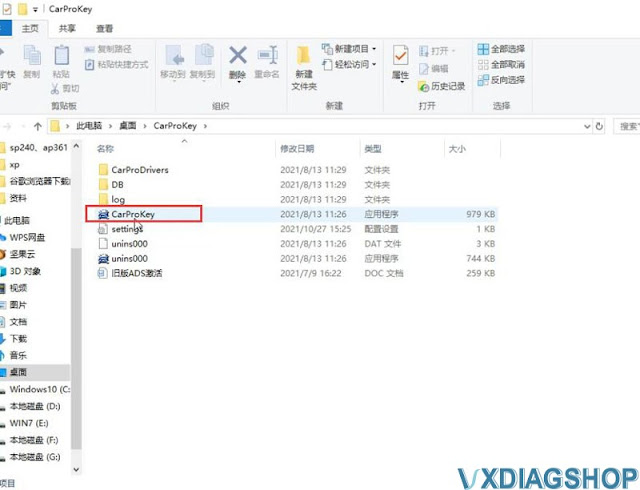
Copy LANID to CarProKey keygen in the Tool folder
if cannot find CarProKey keygen, download it here

Free download WIS EPC CarProKey keygen

activate-vxdiag-benz-wis-epc-5

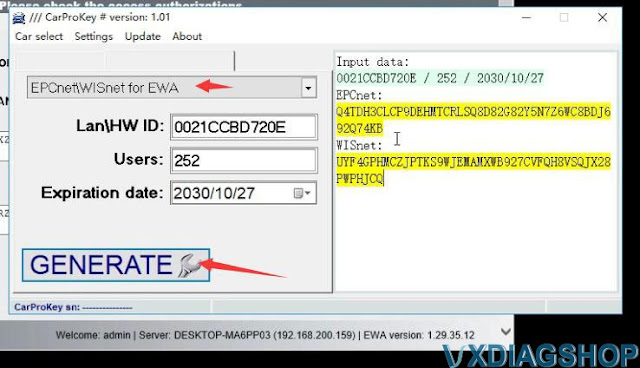
Run CarProKey keygen

Select EPCnet/WISnet for EWS, copy and paste LAN ID here, enter user name (252) and expiration date (You can set the date yourself.)

activate-vxdiag-benz-wis-epc-6

Press Generate
It will generate EPC and WIS Startkey
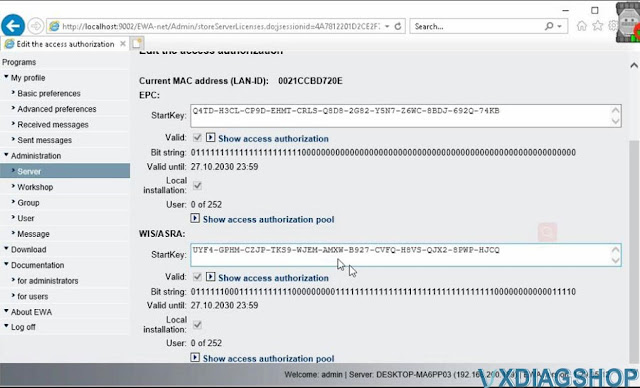
copy and paste 2 Startkey to corresponding area and save

activate-vxdiag-benz-wis-epc-7

activate-vxdiag-benz-wis-epc-8

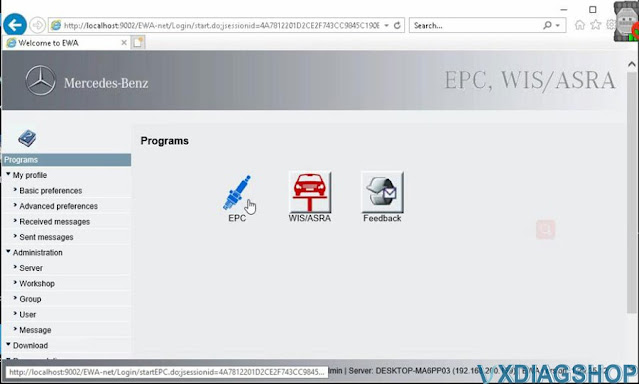
WIS and EPC have been activated.
Go to Programs- EPC

activate-vxdiag-benz-wis-epc-9


Accept the security warning and Run
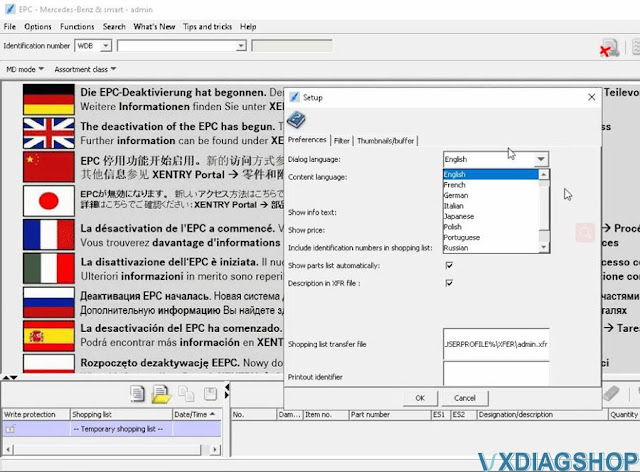
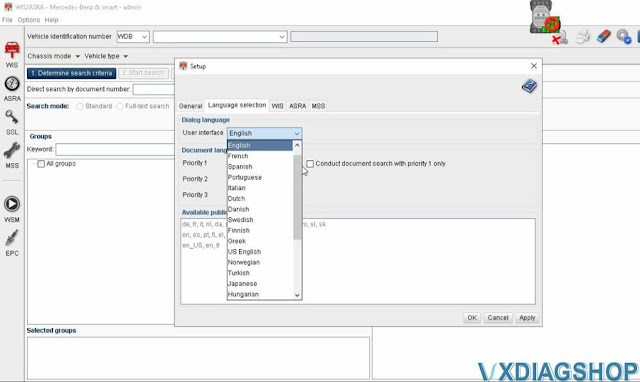
Go to Options tab- Setup F12- select software language you desired

activate-vxdiag-benz-wis-epc-10
Run WIS/ASRA
Accept the security warning and Run
Go to Options tab- Setup F12- Language selection, select language you desired.

activate-vxdiag-benz-wis-epc-11

If had a problem getting LAD ID, contact us and get technical support via Teamviewer.

www.vxdiagshop.com


Video reference:

2021/09/28

How to Use the Mercedes WIS online?

Here is the guide on using this Mercedes Benz WIS online (workshop repair manuals). We hope it can help some people.


Link: https://mbwis.net/

(click to enlarge images)

use-mercedes-wis-online-1

First of all, we choose its type: (example Class E W210)

use-mercedes-wis-online-2

Then, its engine: (example 320 CDI M613.961)

use-mercedes-wis-online-3

Then, we choose the section that interests us: (example, the air supply part with turbo [9])

We take the opportunity to select the language (on the menu at the top of the page) It’s easier to understand.

use-mercedes-wis-online-4

Then, the subsection: (example the turbocharger)

use-mercedes-wis-online-5

And finally, we specify: (example, removal, installation of the exhaust gas turbocharger)

We arrive at the desired file:

use-mercedes-wis-online-6

We even have the possibility to access, as we go, to shortcuts for intermediate stages in the procedure: (example: remove, install the lower parts of the soundproofing fairing)
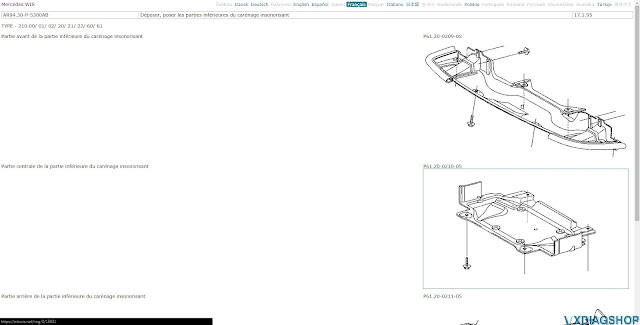
use-mercedes-wis-online-7
Enjoy.

www.vxdiagshop.com