Showing posts with label VXDIAG BMW Multi Tool. Show all posts

2020/07/14

How to Change VXDIAG BMW ISTA Software Language?

Here’s the guide to change ISTA+ (ISTA-D) and ISTA-P software language of VXDIAG BMW scanners (vxdiag vcx BMWvxdiag vcx se for BMWvxdiag full etc)

How to Change VXDIAG BMW ISTA+ software language?
Open ISTA+, click on Setting icon-> Client settings and select language you desired. Press OK to save language setting.
vxdiag-bmw-ista+-change-language
How to Change VXDIAG BMW ISTA-P software language?
VXDIAG BMW ISTA-P supports following language:
English, Chinese, Czech, Dutch, French, German, Indonesian, Italian, Japanese, Korean, Polish, Portuguese, Russian, Spanish, Swedish, Thai, Turkish
vxdiag-bmw-ista-p-change-language-1
Start ISTA-P, press i icon
Select Reset Settings 
vxdiag-bmw-ista-p-change-language-2
Restart ISTA-P software
Select Automatic Search 
vxdiag-bmw-ista-p-change-language-3
Select language you desired
vxdiag-bmw-ista-p-change-language-4
*Note: Do tick the Expert Mode, otherwise Expert Mode will fail to work.

https://www.vxdiagshop.com/service/change-vxdiag-bmw-ista-language.html

2020/06/18

VXDIAG BMW F25 Coding Process Terminated Error Solution

Problem:
I tried to perform BMW X3 F25 programming with VXDIAG VCX BMW under ISTA+ 4.18, it failed me and showed error:  “The process must be terminated.
Before starting a new process, disconnect and reconnect ICOM.” What can i do?
vxdiag-bmw-f25-coding-error
Vxdiagshop.com solution:

To perform F series programming or coding functions with vxdiag bmw, you should turn on the DoIP switch before operation.
vxdiag-bmw-turn-on-doip-1
Open VCXNet DoIP program on desktop
vxdiag-bmw-turn-on-doip-2
Press Connect VCX (make sure vxdiag vcx has connected with laptop)
vxdiag-bmw-turn-on-doip-3
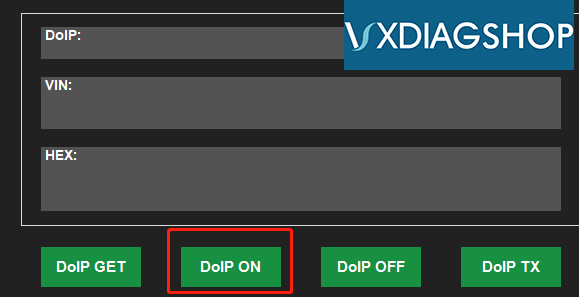
Press “DoIP ON” to turn on DoIP switch
vxdiag-bmw-turn-on-doip-4
DoIP has been automatically assigned IP.
Now you can do coding or programming.

Here’s a video BMW coding guide using VXDIAG BMW

2019/02/20

How to enable VXDIAG BMW Multi Tool F-series Programming Function?

Question:
How to enable BMW F-series programming function with ista-p? I have VXDIAG multi tool with BMW license.

Vxdiagshop.com solution:
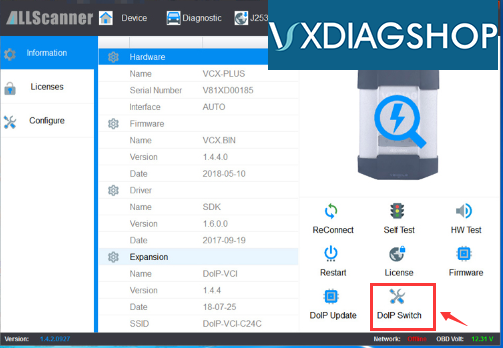
1.Open VX Manager-> DoIP Switch 
vxdiag-bmw-f-series-coding
Turn doip status to ON.
vxdiag-bmw-f-series-coding-2
Now F-series programming function is enabled.