Showing posts with label ODIS V23. Show all posts

2025/09/10

VXDIAG ODIS V23 ‘Software Component Not Detected’ Solution

Problem:

Failed to install VAG ODIS service 23.0.1 software for VXDIAG VCX SE 6154 device. System displayed an error “a software component has been detected. The current installation will be removed”.

Any solution?

VXDIAG ODIS V23 ‘Software Component Not Detected’

Solution:

Don’t install ODIS on a Home edition system.

Don’t install ODIS V23 with other diagnostic programs. Better install it on a clean system (Windows 10 is recommended.)

Uninstall odis 23 software completely. Then install software again.


Read also:

How to Install VXDIAG VCX SE 6154 ODIS-S V23?

2025/01/05

VXDIAG VCX SE ODIS-E Works ODIS-S No Connection Solution

Problem:

I have a vxdiag vcx se 6154 and I have this problem for odis service.

I first install odis e 17 and it works.

Then once ODIS service v23 is installed the interface is not recognized in ODIS service. Any solution?


Solution:

1). Uninstall and Reinstall VW 6154 driver in vx manager.

2). If not working, install ODIS-S PDU driver.


Contact www.vxdiagshop.com to download original ODIS-S PDU driver (VW D-PDU API 64bit).

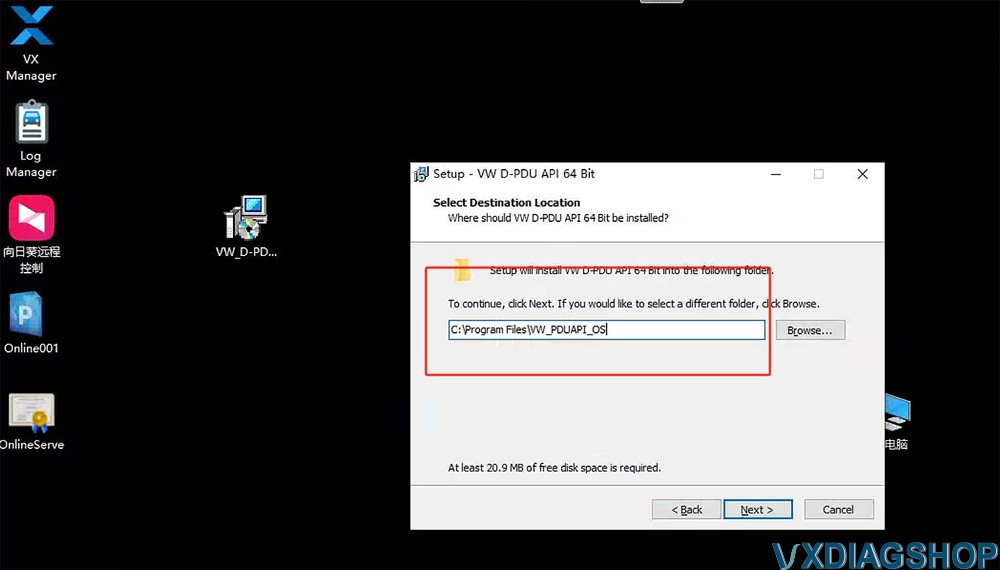
Double-click to install the VW D-PDU API 64bit driver setup. Choose the destination location as C:/Program Files/VW_PDUAPI_OS folder and wait until the setup installation is finished.

VXDIAG VCX SE ODIS-E Works ODIS-S No Connection

It should be fine. Run ODIS-S software again. Select VCI type as VAS 6154.

2024/12/18

VXDIAG VCX SE 6154 ODIS V23 No VCI Selection Solution

Problem:

Got the ODIS-S 23.0.1 software installed and activated on Win10 laptop. VX Manager detected the VXDIAG VCX SE 6154 interface but no VCI (no VAS 6154 and others) selection in ODIS-Seriver software. Any solution?

VXDIAG VCX SE 6154 ODIS V23 No VCI Selection 1

Solution:

The original 6154 driver is lost or hacked by virus.

Contact www.vxdiagshop.com to download original ODIS-S PDU driver (VW D-PDU API 64bit).

Double-click to install the VW D-PDU API 64bit driver setup. Choose the destination location as C:/Program Files/VW_PDUAPI_OS folder and wait until the setup installation is finished.

VXDIAG VCX SE 6154 ODIS V23 No VCI Selection 2

It should be fine. Run ODIS-S software again. Select VCI type as VAS 6154.

2024/03/24

How to Solve VXDIAG ODIS 23 VCX VW Crash Error?

Problem:

I got the ODIS V23 installed and vxdiag vcx se 6154 interface connected to car, when run odis and start diagnostic, it threw an error vcx vw crash. Any solution?

VXDIAG ODIS V23 VCX VW Crash Error

Solution:

Driver issue. VX Manager is corrupt.

Install vx manager driver again.

Make sure the 6154 driver is installed.


www.vxdiagshop.com

2024/03/06

How to Solve VXDIAG ODIS V23 Error Software Components Detected?

Some users had problems installing ODIS-S V23 software for vxdiag vcx se 6154. They delete software and install it again, still had the same error,

“An error with one of the software components was detected. The current installation will be removed. ”

VXDIAG ODIS V23 Error Software Components Detected 1

Here comes the solution from vxdiagshop.com engineer.

1. Install ODIS-S V23 or ODIS-E V17 on a clean system. That will avoid many installation troubles.

2. Completely remove old software. Download and install software again.

If you have deleted software and install it again, but will have the same error, the software is not removed completely.


How to Uninstall ODIS software Completely from Windows PC?

Go to Apps & features

Uninstall the following files (images attached).

VXDIAG ODIS V23 Error Software Components Detected 2

VXDIAG ODIS V23 Error Software Components Detected 3

VXDIAG ODIS V23 Error Software Components Detected 4

VXDIAG ODIS V23 Error Software Components Detected 5

VXDIAG ODIS V23 Error Software Components Detected 6

NOTE:

If you have other software installed, contact us for technical support via Teamviewer. Otherwise, deleting files accidentally will also cause software failure.


For technical support and aftersale service, purchase exclusively from WWW.VXDIAGSHOP.COM ONLY.

 https://www.vxdiagshop.com/service/vxdiag-vw-software-error-software-components-detected.html

2024/03/05

How to Solve VXDIAG ODIS V23 Error Handling License?

Some vxdiag vcx se or nano 6154 users reported that they failed to activate ODIS-S V23 after getting the activation license key.

“Error handling the license. The license is invalid”

VXDIAG ODIS V23 Error Handling License 1

Solution:

That’s because they didn’t replace these two files to the correct folder.

Copy plugins and OffboardDiagLauncher files in 2.Patch & License folder

VXDIAG ODIS V23 Error Handling License 2

Copy two files and replace them on Win11ProW X64/Program Files/OS folder

VXDIAG ODIS V23 Error Handling License 3

It should be fine.

 https://www.vxdiagshop.com/service/vxdiag-6154-error-handling-license-solution.html


2024/01/28

VXDIAG ODIS Error in A Software Component Detected Solution

Problem:

I was trying to install odis-s v23 for vxdiag vcx se 6154 interface. It fails me. It’s Windows 10 system.

Error ‘An error in a software component has been detected’.

Any idea?

VXDIAG ODIS Error in A Software Component Detected 1

VXDIAG ODIS Error in A Software Component Detected  2

VXDIAG ODIS Error in A Software Component Detected  3


Solution:

Install ODIS software separately on a clean Win10 system.
Don’t install ODIS with other programs, Renault etc.

VXDIAG ODIS Error in A Software Component Detected  4

Don’t install ODIS on a Home edition system. It will not work.

If still not working, uninstall the vehicle connection (VW MCD, PDU).
Contact www.vxdiagshop.com customer service if all no luck.

Or get an ODIS U disk instead of downloading software on mega.


2023/11/06

How to Solve ODIS V23 Crashes After Install VXDIAG 6154 Driver?


Problem:

ODIS Service 23 and Engineer V17 crash after Vxdiag VAS6154 driver gets installed. It stops and disappears from the screen after a few seconds after starting Odis-S 23.0.1 or Odis-E 17.0.1 when the VW Odis 6154 driver is installed in VX Manager? I mention that if I only put passthru drivers, everything is ok. I use a VXDIAG VCX SE with full licenses. vx manager is up to date.

Any clue?


Here is the possible reason:

If use 3rd party ODIS-S V23/ODIS-E V17, install it and use it as a passthru device.

It is the license. Crack license won’t work with vxdiag. With a good crack or genuine VXDIAG license works for sure (ODIS-S V11 and ODIS-E V14 HDD work fine as OEM emulator, and have VXDIAG license).

VXDIAG 6154 driver is not ready for the ODIS V23 license. So use it as a passthru device at present.

If works in passthru mode, but software closes, it can be solved by reinstalling VX manager.

2023/10/30

How to Solve VXDIAG ODIS V23 Missing Car Models?

Problem:

I download odis 23.0.1 for vxdiag vcx se 6154 and install it without Problems.

but for the Brand Skoda i missing some Cars.

How to solve the problem?

VXDIAG ODIS V23 Missing Car Models

Solution:

You used wrong license.txt file in your installation, you used for China market and not for Europe market.
So you must uninstall and to reinstall and this time use the correct license.txt file.

For example (DE) who is for Germany and is ok for any European country.


www.vxdiagshop.com