Showing posts with label VXDIAG Porsche. Show all posts

2025/08/05

How to Save VXDIAG Porsche PIWIS 3 Coding Data?

Tutorial: how to save and back up VXDIAG Porsche PIWIS III coding data.

Guide:

Go to System Settings.

Save VXDIAG Porsche PIWIS 3 Coding Data 1

Select System-Diagnostics configuration for 911,981,918.970,Cayenne from 2011,Macan.

Change mode E (Engineering Mode), SAVE and exit.

Save VXDIAG Porsche PIWIS 3 Coding Data 2
Back to diagnostic interface.
Identify vehicle information.

Save VXDIAG Porsche PIWIS 3 Coding Data 3
Go to Coding Programming.

Save VXDIAG Porsche PIWIS 3 Coding Data 4
Select Manual coding without rules.
Select all options.

Save VXDIAG Porsche PIWIS 3 Coding Data 5
Hit F12 and continue.

System will read all coding data of the module.
Hit F10 to save coding data.

Save VXDIAG Porsche PIWIS 3 Coding Data 6
Select value and hit F12 to read value selected.

Save VXDIAG Porsche PIWIS 3 Coding Data 7
Then hit F12 to save.

Save VXDIAG Porsche PIWIS 3 Coding Data 8
Click F10 Logs- Working Logs.
Now you can see coding data was saved. You can edit the coding file name.

Save VXDIAG Porsche PIWIS 3 Coding Data 9

Remember where the file is saved. To view the coding file, open it using a web browser.

Save VXDIAG Porsche PIWIS 3 Coding Data 10

2024/12/11

VXDIAG PIWIS3 No Circuit Diagram for Porsche 2019+?

Problem:

Cannot find the circuit diagram for Porsche Cayenne 2020 9YA in piwis iii V41.600.000 software. The VCI is VXDIAG VCX SE with Porsche license. Any idea?

VXDIAG PIWIS3 No Circuit Diagram for Porsche 2019 1

VXDIAG PIWIS3 No Circuit Diagram for Porsche 2019 2

Solution:

Offline circuit diagram only supports Porsche till 2018.

To check circuit diagram for 2019 and onwards Porsche models, you need online access.

Starting in 2019, Porsche circuit diagrams need to log in to the dealer’s online account for inquiries.


How to view the circuit diagram of the Porsche for pre-2018 models in piwis 3 diagnostic software?


check Circuit Diagram in porsche piwis3 1

check Circuit Diagram in porsche piwis3 2

check Circuit Diagram in porsche piwis3 3

check Circuit Diagram in porsche piwis3 4

check Circuit Diagram in porsche piwis3 5

check Circuit Diagram in porsche piwis3 6

2024/06/04

VXDIAG Porsche VCI Driver PT3G Not Installed Solution

Problem:

One of our customers set up OEM Porsche piwis iii software (not our HDD/SSD) with the VXDIAG VCX SE device. After install Porsche PT3G VCI driver in manager, the vcx se device cannot detect software,  vx manager reported an error “PT3G not installed”.

VXDIAG Porsche VCI Driver PT3G Not Installed

Here is the clue.

If use OEM or 3rd party Porsche piwis3 software, you also need to install original PT3G VCI driver.

We don’t provide OEM driver.  Need to find driver by yourself.

Or use our software SSD.


www.vxdiagshop.com

2024/05/11

VXDIAG PIWIS III Update Porsche Battery After Change Out

Instruction: Updating your Porsche vehicle Battery with VXDIAG Porsche PIWIS III.


The PIWIS software is a bit odd and not always straight forward, so we share how to update the battery after changing it out.

Opening screen – select Diagnostics

VXDIAG PIWIS III Update Porsche Battery 1

you can manually select your car or wait for the auto-detect

VXDIAG PIWIS III Update Porsche Battery 2

once selected, the software will start communicating with the car.

VXDIAG PIWIS III Update Porsche Battery 3

you can just hit F12 at this point

VXDIAG PIWIS III Update Porsche Battery 4

VXDIAG PIWIS III Update Porsche Battery 5

after a couple minutes this screen will appear, you can just hit F11(no) as it is only necessary warranty repairs

VXDIAG PIWIS III Update Porsche Battery 6

once this screen comes up, select “Energy Management”

VXDIAG PIWIS III Update Porsche Battery 7

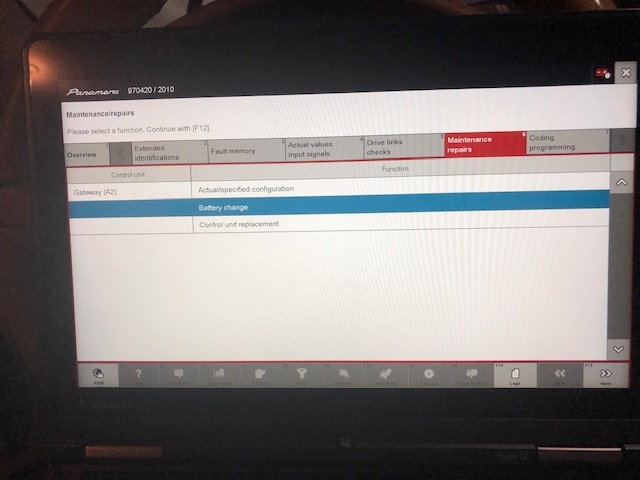
then select the Maintenance / repair Tab

VXDIAG PIWIS III Update Porsche Battery 8

things get more straight forward at this point, select Battery Change and hit F12

VXDIAG PIWIS III Update Porsche Battery 9

VXDIAG PIWIS III Update Porsche Battery 10

you can now select the battery typre, size and manufacture

VXDIAG PIWIS III Update Porsche Battery 11

VXDIAG PIWIS III Update Porsche Battery 12

VXDIAG PIWIS III Update Porsche Battery 13

as noted elsewhere you can simply enter Zero’s for the serial number and part number, once you’ve entered both hit any of the write (pencil) buttons and you are done.


www.vxdiagshop.com

2023/08/01

VXDIAG Update Porsche PT3G Driver in July 2023

VXDIAG released new Porsche Driver Update on July 31st, 2023.


2023.07.31 V3.2.1 PT3G Driver

Fix receiving data incomplete when diagnosing new Taycan
Optimize the parsing and fault tolerance of MDF files.


Update VXDIAG Porsche PT3G driver in vx manager.

VXDIAG Update Porsche PT3G Driver


2023/07/11

VXDIAG iCarsoft Autel or Xtool for 2018+ Porsche?

What is a the preferred OBD2 scanner and service reset tool for 2018 Panamera 4 and newer cars?

Here is the clue:

iCarSoft Pro 2.0: $270. It is not compatible with (model 971) of newer Panamera, it works fine with older Panamera models (model 970) up to 2017.

No coding capabilities, but does a fine job at reading and erasing MIL codes, diagnostic information, and oil change interval resets.


Durametric: it does not support any Porsche past 2015.


Autel MX808: is not compatible with new Panamera


Autel MP808:  unfortunately the car was not supported by this scanner. The funny thing that, the unit shows Porsche car model and was able to read the car VIN. There was only two items to choose from “odomoter support” and “Oil rest”, both items did not work and not able to do any thing with this scanner. It has many more function and items for other cars but not meant for Panamera or even Porsche. In addition, the unit will need an annual subscription for $350, for updates and only the first year is free once you register it.


Xtool D7/D8: The D8 picked up the vin automatically but identified the car wrong. Also pulled in some incorrect failures. The xtool support put me in touch with engineering and they released a patch right away to fix the incorrect model identifier but tool doesn’t support service reset needs and still some bugs reading all modules


VXDIAG Porsche MultiDiag: 

The best software of diagnosis definitely is PIWIS. But does cost some coin.

Solution is Piwis 3, which is now available for less.

It will be a little difficult for newbies.
If you need full system diagnosis and want to play coding, this is the better choice.

PIWIS iii works fine with both new and old Porsche models from 2005 to 2022/2023.

Paramera (971) 2018-
Caynenne (92A) 2018-
Macan (95B) 2018-
911 (991) 2018-
and other old models

VXDIAG Porsche MultiDiag:

www.vxdiagshop.com