Showing posts with label mdi2. Show all posts

2021/10/13

Can I use VXDIAG GM with Techline Connect SPS2?

GM has replaced the SPS (Service Programming System) for the SPS2. They came out with the software called Techline Connect. It is an all-in-one system. It has the GDS2 and SPS together.
New interface looks pretty decent and more modernized.  So does the vxdiag vcx nano GM support the new Techline Connect SPS2?


Yes.  Vxdiag engineer has confirmed it works.

Select the device type as MDI2 instead of VXDIAG when it ask to select a Passthru J2534 device.
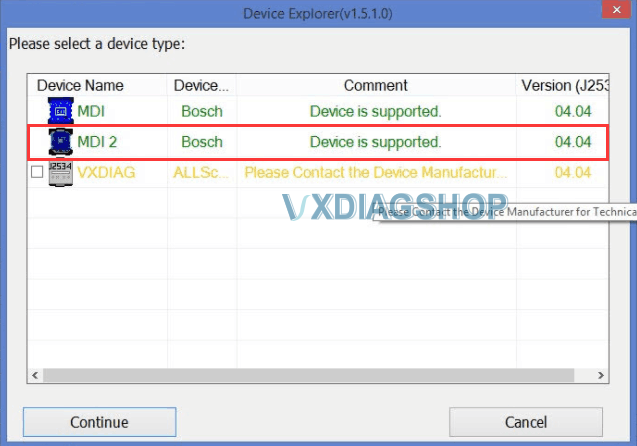
VXDIAG GM with Techline Connect SPS2 1

If select the device as VXDIAG, SPS2 may crash.

If select as MDI, it will not recognize the device.
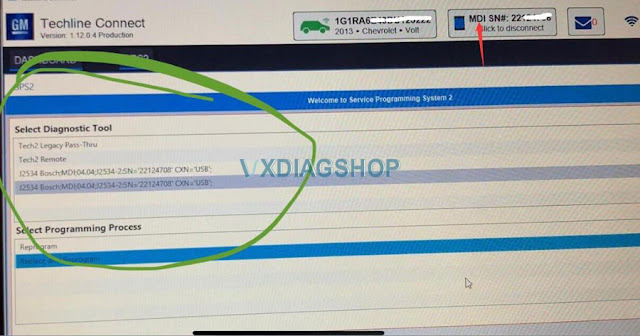
VXDIAG GM with Techline Connect SPS2 2


If still have problems after selecting MDI2, leave your device serial number and contact via to solve via Teamviewer.

www.vxdiagshop.com

2021/04/29

Solve GDS2 Crashes After Select VXDIAG Device?

Problem 1:
I got a problem when running gds2 software of the vxdiag vcx nano gm device. The software crashed after selected VXDIAG as the device type.

vxdiag vcx nano mdi2 device

Solution:

Select MDI2 device type instead of VXDIAG Allscanner to connect.


Problem 2:

It communicates with gm vcx nano by selecting MDI2 device. I got another error “J2534 DLL Patch-file not found”

vxdiag-vcx-nano-gds2-J2534 DLL Patch-file not found”


Solution:

Make sure Passthru and GM software are selected when install VX Manager driver.

If still not working, download and install the software again.

https://www.vxdiagshop.com/info/vxdiag-diagnostic-software-download-4048.html


VXDIAG VCX NANO GM & GDS2 Installation Manual