Showing posts with label VXDIAG GM. Show all posts

2025/09/23

Clear GM Fault Code P0AFA with VXDIAG or Xtool D7S?

It’s a 2014 GM Volt with fault code P0AFA. Car turns on but will not move, after a failed charge and ‘unable to charge’ message. How to solve this problem and clear fault code? Use the VXDIAG method with a laptop or Xtool D7S to clear the fault code. Many users say the xtool D7S can clear this code.

Clear GM Fault Code P0AFA with VXDIAG or Xtool D7S

Here is the clue:

Xtool D7S or D8/D9 indead will clear the P0AFA code. Autel MaxiSys scanners also capable.

Meth path:

HPCM2 module > Special Functions> Reset Functions>Hybrid/EV Battery Contactor Open Reasons Reset> Reset.

The tool will walk you through the process; there is a point where you need to shut off the ignition, open and close the drivers door and then wait a few minutes for the modules to go to sleep.

One of our customers used the Xtool d7s to clear the codes, and the car totally shut down, had to buy and install a new 12 volt battery. Do not recommend ‘Clear all DTC’s’.


Gettng VXDiag vcx nano gm adapter with 2 CAN buses support and need software (GDS2) is not that hard as you think. And it’s way cheaper, than buying a dedicated scanner, i.e Xtool D7S.


Read how to clear P0AFA fault code with VXDIAG GDS2:

How to Clear HPCM2 P0AFA DTC with VXDIAG GM GDS2?

VXDIAG VCX NANO or Topdon Rlink J2534 for GM Volt?

Got the SERVICE HIGH VOLTAGE CHARGING SYSTEM (aka SHVCS) in 2014 GM Volt; need to update the HPMC2 & BECM software.

Both vxdiag vcx nano gm and Topdon Rlink J2534 will accomplish the task. But which is better in clearing the SHVCS error?

Here comes the user review:

VXDIAG VCX NANO or Topdon Rlink J2534

Both devices are compatible with GDS2, Tech2win and DPS software.  The TopDon Rlink J2534 is a lot more expensive and doesn’t come with any car-interface software (eg, GDS2) (which isn’t needed for the reprogramming but means you’d have to pay a lot more for the diagnostics software).

Topdon now cracked the GDS2, but it is older software version than VXDIAG. What’s more, the topdon cracked GDS2 requires remote activation, which means it has a bad crack.

The vcx nano comes with newer crakced software. The software has to run under Admin authority.


The Topdon RLink because it is generally considered a low cost but professional-grade tool for ECU programming and reprogramming across multiple vehicle brands. It is also considered superior in robustness and compatibility. The example of not needing SPS2 inorder to use GDS2 for calibrations.

Based on our research, if you only need a portable, versatile, and cost-effective tool mainly for diagnostics, the VXDIAG VCX Nano would be a better choice.

The VCX NANO WiFi version also connects via WiFi. Rlink J2534 only connects via USB.

VCX NANO has many positive reviews in clearing GM Volt SHVCS error.

2025/08/21

Where to Get VXDIAG GM RDS3 Diagnostic Software?

Most newer 2019+ GM models manufactured by SAIC GM Motors should use RDS3 diagnostic software, including the new GL8.

VXDIAG (VCX NANO, VCX SE, VCX Multi Tool) is compatible with the RDS3 diagnostic software.

Where to get the RDS3 diagnostic software?

VXDIAG does not provide a separate download link for the software.

It is only included in the 2TB HDD hard drive.

RDS3 supported 2019+ SAIC GM vehicles:

Buick

  • Buick Encore

  • Buick Verano Pro

  • Buick Excelle

  • Buick Excelle GX (This is the wagon version of the Excelle)

  • Buick Velite 6 (This is the all-electric model)

  • Buick GL6

  • Buick GL8

  • Buick Excelle (An older, different model also used the Excelle name)

  • Buick GL8 Century

Chevrolet

  • Chevrolet Cavalier

  • Chevrolet Trax / Tracker

  • Chevrolet Cruze

  • Chevrolet Orlando (Note: The Chinese-market Orlando is different from the previous global MPV model.)

  • Chevrolet Sail

  • Chevrolet Lova RV

VXDIAG GM RDS3 Diagnostic Software

VXDIAG GDS2 Failed to Read 2019 Buick Encore VIN Solution

Problem:

This is a 2019 Buick Enclave, Chinese model. The VXDIAG VCX NANO GM GDS2 software is unable to automatically detect the vehicle’s VIN. Manual selection still fails to recognize the VIN.

Any solution?

VXDIAG GDS2 Failed to Read 2019 Buick Encore VIN 1

VXDIAG GDS2 Failed to Read 2019 Buick Encore VIN 2

VXDIAG GDS2 Failed to Read 2019 Buick Encore VIN 3

VXDIAG GDS2 Failed to Read 2019 Buick Encore VIN 4

Solution:

The antivirus software must be turned off, otherwise the cracked software and device drivers will be deleted.

Most newer GM models manufactured by SAIC GM Motors should use RDS3 diagnostic software, including the new GL8.
It is recommended to use the VXDIAG VCX SE along with a 2TB hard drive HDD.

The RDS software is included in the hard drive.

2025/08/01

VXDIAG GM Tech2win Saturn Sky Review

Here comes the review on VXDIAG VCX NANO GM scanner (July 2025):

” The order came without a box, instruction booklet or USB cable.

Found a few online walkthroughs to help with order of software install. Once installed works exactly as it should.

Got this to work to program my Saturn Sky TPMS tire pressure placard table to turn off the warning light!

The default menus in Tis2Win did not have the action that I needed for my car.

However, I found older versions of the tool (.bin) files online that did have the previous menus for the scanner software which is exactly what I needed.

With the older version of the virtual scanner tool, I was also able to program another key fob.

If you are having electrical problems with your vehicle, you need this. The capabilities of this unit are exceptional for its price. Handles the “big boy” problems without spending thousands of dollars. Needs a little research and tweaking, but “dealer level” repairs are possible with this unit. If you don’t like getting ripped off by your local dealer or shop, check this out. ”

VXDIAG GM Tech2win Saturn Sky Review


2025/07/07

VXDIAG Tech2win Not Allow to Run Solution

Problem:

The VXDIAG VCX NANO GM Tech2win software is not allowing me to run… here was my original message as well:
My GM module in VX Manager shows installed, but the “Run” button is disabled. Tech2Win gives “license expired” error.
My firmware is v1.9.4.2 and GM license shows Available, but clearly Tech2Win bridge is not activated.
How to fix it?

VXDIAG Tech2win Not Allow to Run 1

VXDIAG Tech2win Not Allow to Run 2

Solution:

1. Better install Tech2win on Win7 32bit system. Don’t install T2W on Home edition system.

2. Update firmware first, then update license.

3. Don’t start Tech2win from vx manager. Run software from patch.

2025/06/18

Install VXDIAG VCX NANO GM on Win7 32bit Review (June 2025)

Here comes the user feedback on VXDIAG VCX NANO GM software Win7 32bit installation.


“It took me quite a while to get it working, and had to use a number of different instructions to figure it all out. What worked for me:

First, don’t connect the device to the computer until after you’ve installed everything.

Windows 7 32-bit (the driver did not work on 64-bit and required re-installing to 32-bit).
Windows 7 Service Pack 1, and the “Visual C++ 2015 Redist” from Microsoft.
(SP1 is a requirement for the C++ redistributable, and that is a requirement for the software or else it throws errors about missing .dll files)
Turn off User Account Control from Control Panel -> User Accounts.
Allow unsigned driver installation (search internet for instructions using gpedit.msc)

Using the flash drive included with the purchase, install the following in this order:
Install Tech2Win (it will throw errors about unsigned drivers – accept those)
Install GIS2
Install VX Manager
Now connect the vcx nano device to your computer’s USB port.

Open Tech2Win, select North America. Wait for the initialization to complete.
Close the software.
Reboot computer.”

Once installed works exactly as it should. Can do all Tech2 functions on my 2002 Trans-Am.


Install VXDIAG VCX NANO GM on Win7 32bit Review (June 2025)

2025/05/29

VXDIAG GM GDS2 2025.03.24 Software Free Download

The latest GDS2 (Global Diagnostic Software 2) version 2025.03.24 is now available for free download at vxdiagshop.com.


Software version: GDS2 2025.03.24

Database version:
Saab V2025.03.29
Opel/Vauxhall V2025.03.29
GM Global V2025.03.24
GM China V2025.03.29

Compatible tools: VXDIAG VCX NANO GM USB/WiFi, VCX SE with GM License, VCX FD for GM

Operating system: Win7, Win10


Free download VXDIAG GM GDS2 V2025.03.24

VXDIAG  Patch

GDS2 2025.03 supports some 2025/2026 vehicles (such as 2026 Cadillac Lyriq, Cadillac Vistiq.), but not all. Refer to the software for detailed vehicle model and year compatibility information.

For newer CAN FD protocol models, you will need VCX CAN FD device. VCX NANO/VCX SE does not support CAN FD protocol.


VXDIAG GM GDS2 2025.03.24 Software 1

VXDIAG GM GDS2 2025.03.24 Software 2

VXDIAG GM GDS2 2025.03.24 Software 3

2025/03/31

Set up VXDIAG and Service Box for Opel HPCM2 Programming

Here is another review on Opel/Vauxhall HPCM2 module programming to get rid of the SHVCS errors.

Credit to Mr. Parsons from SpeakEV forum.


Problem:

It’s a Opel Ampera 2012 1.4L.  Got P0AA6, P1F0E (insulation) P1FFF (both for level and insulation) fault codes.

Using GDS2 if you have the loss of isolation this is what you should see in GDS2 using the vxdiag vcx nano gm scanner, note you will be able to clear all of these except for P1FFF as on a 2012 this is latched unless you have a failed coolant sensor.

Set up VXDIAG and Service Box for Opel HPCM2 Programming 1

Solution:

Reflashing HPCM2 will remove the P1FFF  error but in order to lower the chances of it re-appearing you need to reflash BECM as well.

The user was able to reprogram the HPCM2 in about 20 mins using VXDIAG GM J2534 and PSA Service Box.

Check how to set up PSA Service Box with VXDIAG and program HPCM2 module.


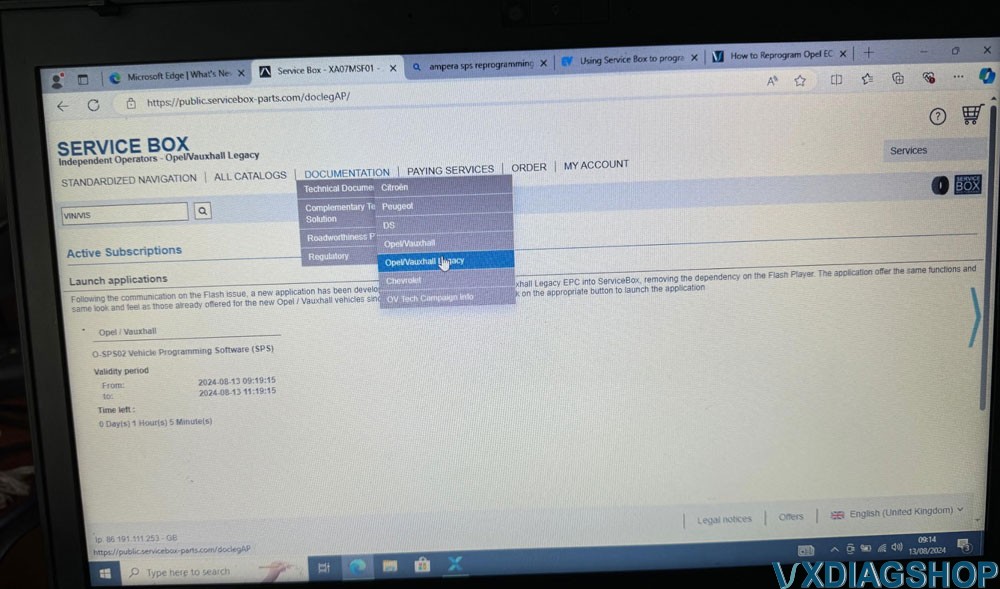
Once logged in select the box below to purchase the SPS software access for two hours.

Set up VXDIAG and Service Box for Opel HPCM2 Programming 2

Once you have the active subscription you can select it Opel / Vauxhall Legacy , it has a habit of sending you back to the login page after payment but your purchase is still listed
and can be listed below.

Set up VXDIAG and Service Box for Opel HPCM2 Programming 3

As soon as you press the Blue SPS button the countdown timer will start.

Set up VXDIAG and Service Box for Opel HPCM2 Programming 4

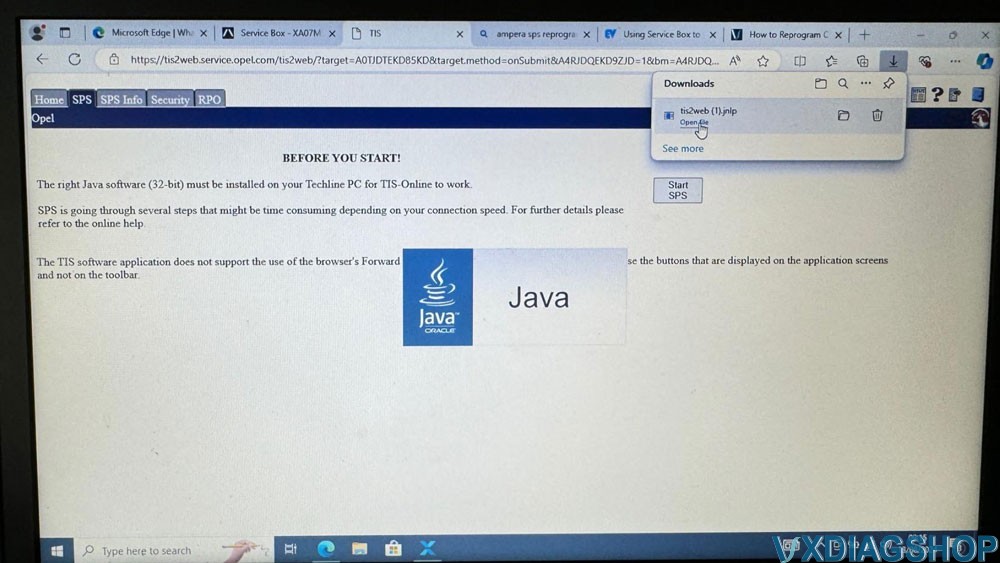
Selecting the SPS launches the Tech2Win.

Set up VXDIAG and Service Box for Opel HPCM2 Programming 5

Launch the Tis2Web which will launch Java and start the downloads and software installer this will take around 10 mins or so on a fast internet connection , you will need to approve
multiple installs , it may error and say no admin permissions however complete the install.

Set up VXDIAG and Service Box for Opel HPCM2 Programming 6

Service box install and launch.

Set up VXDIAG and Service Box for Opel HPCM2 Programming 7

Once the install is complete this is the last step.

Set up VXDIAG and Service Box for Opel HPCM2 Programming 8

SPS after Launch.

Select VXDIAG.

Set up VXDIAG and Service Box for Opel HPCM2 Programming 9

Connect the Car and tun on accessory mode (press the start button for 10 seconds without pressing the brake).
Set up VXDIAG and Service Box for Opel HPCM2 Programming 10
Set up VXDIAG and Service Box for Opel HPCM2 Programming 11

note at this time the car will go a bit funky and trigger theft deterrent system and a powerdown noise select the K114B HPC Module 2

Set up VXDIAG and Service Box for Opel HPCM2 Programming 12

Set up VXDIAG and Service Box for Opel HPCM2 Programming 13

Do not touch the car or laptop until the process above completes , it will give the option of clearing DTC’s at the end.

If your reprogramming the BECM as well you need to follow the guide linked above and below
Reprogram Opel ECU with VXDIAG and SPS via PSA Service Box – VXdiagshop.com