Showing posts with label mazda ids. Show all posts

2025/09/05

Free Download VXDIAG Mazda IDS V139 Software

The latest version of Mazda IDS software has been updated to v139 in September 2025. Download IDS V139 here for free.


Software version: Mazda IDS V139

Multi-language

Free Download VXDIAG Mazda IDS V139 1

Compatible devices:

VCM2, VCM3, Autel, Launch, VNCI, Scanmatik, VXDIAG VCX NANO/VCX SE for Mazda, other Passthru J2534 devices


Operating system:

Windows 7/Windows 8/Windows 10


Free download Mazda IDS V139 software

Download LINK


How to Install Mazda V139 software?

1. Install mazdaids-***
2. Wait for mazdaids – * * * installation to complete and restart the computer
3. Install VX manager and IDS driver
4. Wait for VX manager and IDS driver installation to complete
5. Connect VCX device and install idspatch
6. Use idspatch to open IDs and start diagnosis.

Free Download VXDIAG Mazda IDS V139 2

Free Download VXDIAG Mazda IDS V139 3

Free Download VXDIAG Mazda IDS V139 4

Free Download VXDIAG Mazda IDS V139 5
 

2024/11/17

VXDIAG Mazda IDS V136 Software Free Download

Allscanner VXDIAG released new Mazda IDS software on Nov. 16th, 2024.


Software version:
Mazda IDS V136


Operating system:

Windows 7/Windows 8/Windows 10


Compatible devices:
VXDIAG VCX NANO Ford/Mazda USB or WiFi, VCX SE or VCX Plus Ford/Mazda

vxdiag mazda ids v136

Free download VXDIAG and patch

https://mega.nz/folder/xuNU3B7S#2L9p-GaRYEjFLJW1tikiCQ

No need to update Mazda driver in vx manager. Mazda IDS patch is included.


How to Install Mazda V136 software?

1. Install mazdaids-***
2. Wait for mazdaids – * * * installation to complete and restart the computer
3. Install VX manager and Ford IDS driver
4. Wait for VX manager and Ford IDS driver installation to complete
5. Connect VCX device and install idspatch
6. Use idspatch to open IDs and start diagnosis.


Ford IDS new version is not yet released. Keep an eye on www.vxdiagshop.com website or blog.

2024/09/08

VXDIAG IDS V131 Failed to Connect 2020 Mazda3?

Problem:

VXDIAG VCX NANO Mazda and IDS 131 cannot auto detect a 2020 Mazda 3 model, try manual input VIN still no luck. Any clue?

mazda 3 2020 ids 1

mazda 3 2020 ids 2

Solution:

For 2019- Mazda3, you need Mazda MDARS software instead of Mazda IDS software.

MDARS software is required when you diagnose following models:

2025- CX-70

2023- CX-50

2021- CX-5

2024-CX90

2022-2023 MX-30

2020- CX-30

2024- MX-5

2021-2023 CX-9

2019- Mazda3

mazda MDARS vehicle coverage

VCX NANO Mazda/VCX SE/VCX FD can be used as J2534 passthru device for MDARS.

Here is an example:

How to Reprogram New Mazda PCM with MDARS?

www.vxdiagshop.com

2024/03/17

VXDIAG VCX NANO Mazda RX8 PCM Replacement

DIY tutorial: Mazda PCM/ECU replacement and reprogramming using vxdiag vcx nano Ford/Mazda scanner.

Model example: 2005 series 1 automatic rx8


Tools you will need:
current car pcm
Ford VCM obd scanner (vxdiag vcx nano ford/mazda is the one i use)
Mazda iDS (install guide and download link here)
incode by outcode app (Play Store Link FREE)
a used or new replacement pcm
2 key fobs


Procedure:

plug in the vxdiag vcx nano mazda scan tool to the obdII port under the steering wheel

VXDIAG VCX NANO Mazda RX8 PCM Replacement  1

Open iDS and select start new session>all other
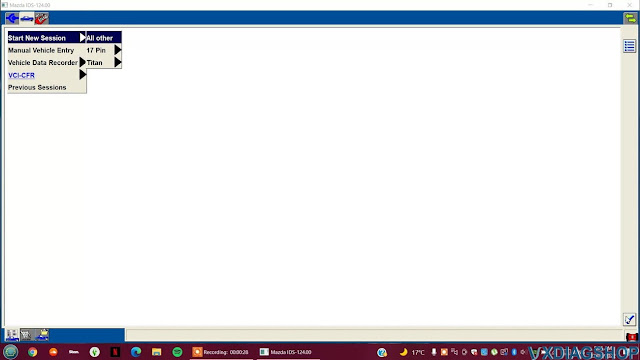
VXDIAG VCX NANO Mazda RX8 PCM Replacement  2

it will read your pcm and recognise your vehicle
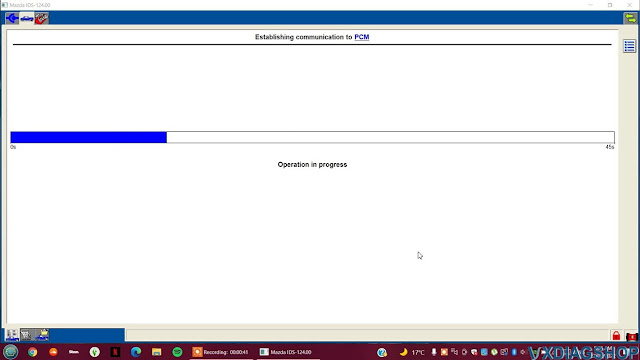
VXDIAG VCX NANO Mazda RX8 PCM Replacement  3

if you have dsc select yes

VXDIAG VCX NANO Mazda RX8 PCM Replacement  4

advanced keyless entry > select correct option for you

VXDIAG VCX NANO Mazda RX8 PCM Replacement  5

Check vehicle information and then continue

VXDIAG VCX NANO Mazda RX8 PCM Replacement  6

enter odometer reading if you want to (not required)
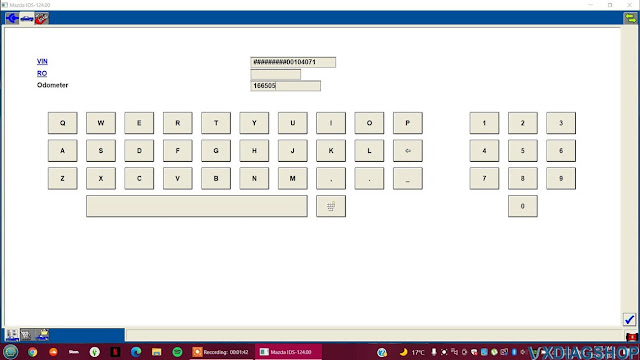
VXDIAG VCX NANO Mazda RX8 PCM Replacement  7

select module programming

VXDIAG VCX NANO Mazda RX8 PCM Replacement  8

select programable module installation > pcm

VXDIAG VCX NANO Mazda RX8 PCM Replacement  9

set ignition to on

set ignition back to off when prompted
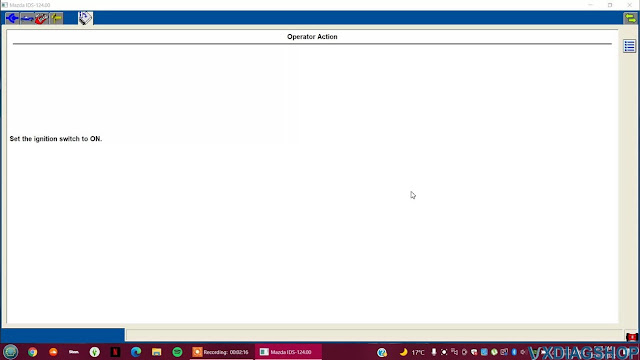
VXDIAG VCX NANO Mazda RX8 PCM Replacement  10

VXDIAG VCX NANO Mazda RX8 PCM Replacement  11

Install a new module in vehicle. when this prompt comes up unplug your pcm and plug in the replacement
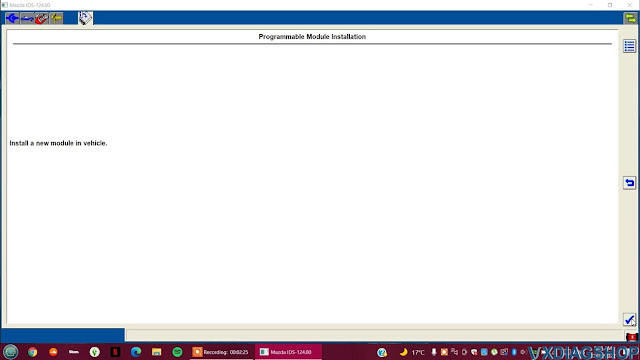
VXDIAG VCX NANO Mazda RX8 PCM Replacement  12

Take off the cover and undo all the bolts holding the pcm down. disconnect the air tubes at the front of the pcm
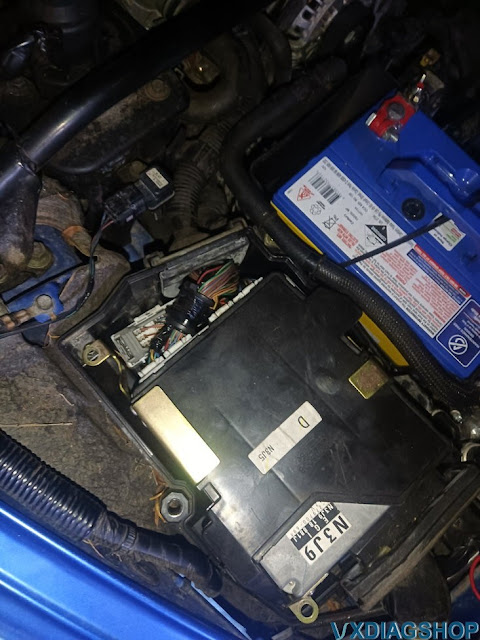
VXDIAG VCX NANO Mazda RX8 PCM Replacement  13

unplug these 4 connectors on the back of the pcm
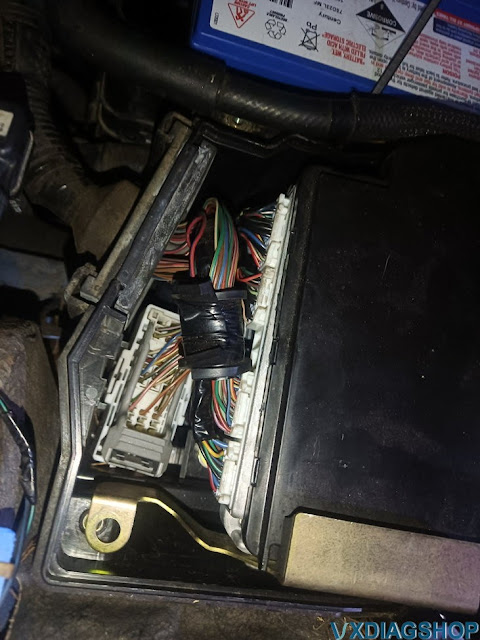
VXDIAG VCX NANO Mazda RX8 PCM Replacement  14

set ignition to on

set ignition back to off when prompted

VXDIAG Mazda IDS will rewrite the data on the new pcm from your old one

VXDIAG VCX NANO Mazda RX8 PCM Replacement  15

set ignition back to on

set ignition to off again

Programming complete. if you cannot crank your car now you will have to run the pats function.

VXDIAG VCX NANO Mazda RX8 PCM Replacement  16

Go to body>security>PATS

VXDIAG VCX NANO Mazda RX8 PCM Replacement  17

follow on screen instructions then set ignition to on
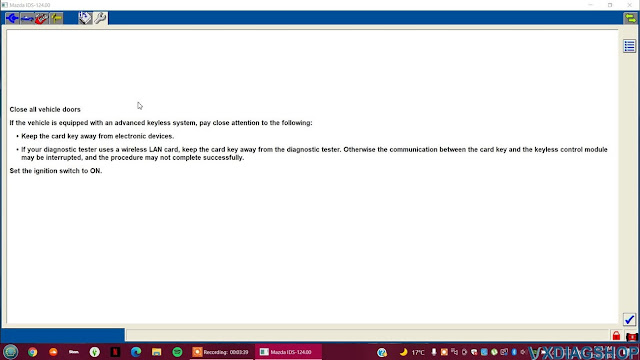
VXDIAG VCX NANO Mazda RX8 PCM Replacement  18

select ignition key code erase and reprogram

VXDIAG VCX NANO Mazda RX8 PCM Replacement  19

download incode by outcode on google play store

VXDIAG VCX NANO Mazda RX8 PCM Replacement  20

check that vin is correct before continuing

VXDIAG VCX NANO Mazda RX8 PCM Replacement 21

this page has the OUTCODE you need. put that code into the incode by outcode app then press next when the app gives you an incode
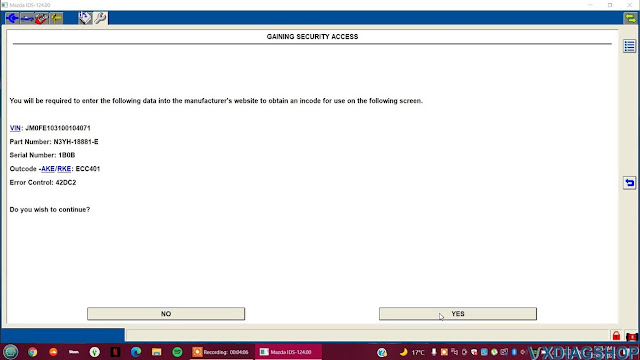
VXDIAG VCX NANO Mazda RX8 PCM Replacement  22

put that outcode into the incode by outcode app and get your incode
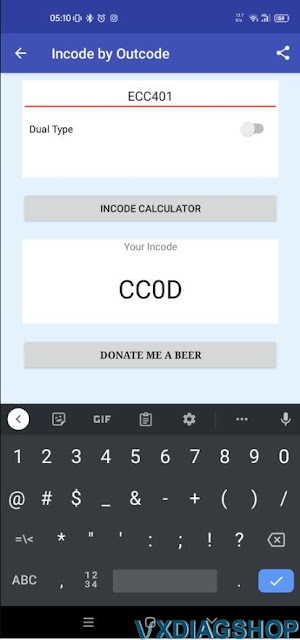
VXDIAG VCX NANO Mazda RX8 PCM Replacement  23

type in incode provided by app

VXDIAG VCX NANO Mazda RX8 PCM Replacement  24

if it worked you get this screen

VXDIAG VCX NANO Mazda RX8 PCM Replacement  25

You will need 2 keys to start vehicle. After this page its pretty simple. Just follow on screen instructions until complete then you will have a working rx8 with a new pcm installed.

 VXDIAG VCX NANO Mazda RX8 PCM Replacement  26

The tutorial might work on older Mazda, for newer models, you may need Mazda MDARS. The vxdiag vcx nano mazda can also be used as a J2534 passthru device with MDARS.

How to Reprogram New Mazda PCM with MDARS?