Showing posts with label Porsche PIWIS III. Show all posts

2025/08/05

How to Save VXDIAG Porsche PIWIS 3 Coding Data?

Tutorial: how to save and back up VXDIAG Porsche PIWIS III coding data.

Guide:

Go to System Settings.

Save VXDIAG Porsche PIWIS 3 Coding Data 1

Select System-Diagnostics configuration for 911,981,918.970,Cayenne from 2011,Macan.

Change mode E (Engineering Mode), SAVE and exit.

Save VXDIAG Porsche PIWIS 3 Coding Data 2
Back to diagnostic interface.
Identify vehicle information.

Save VXDIAG Porsche PIWIS 3 Coding Data 3
Go to Coding Programming.

Save VXDIAG Porsche PIWIS 3 Coding Data 4
Select Manual coding without rules.
Select all options.

Save VXDIAG Porsche PIWIS 3 Coding Data 5
Hit F12 and continue.

System will read all coding data of the module.
Hit F10 to save coding data.

Save VXDIAG Porsche PIWIS 3 Coding Data 6
Select value and hit F12 to read value selected.

Save VXDIAG Porsche PIWIS 3 Coding Data 7
Then hit F12 to save.

Save VXDIAG Porsche PIWIS 3 Coding Data 8
Click F10 Logs- Working Logs.
Now you can see coding data was saved. You can edit the coding file name.

Save VXDIAG Porsche PIWIS 3 Coding Data 9

Remember where the file is saved. To view the coding file, open it using a web browser.

Save VXDIAG Porsche PIWIS 3 Coding Data 10

2024/12/11

VXDIAG PIWIS3 No Circuit Diagram for Porsche 2019+?

Problem:

Cannot find the circuit diagram for Porsche Cayenne 2020 9YA in piwis iii V41.600.000 software. The VCI is VXDIAG VCX SE with Porsche license. Any idea?

VXDIAG PIWIS3 No Circuit Diagram for Porsche 2019 1

VXDIAG PIWIS3 No Circuit Diagram for Porsche 2019 2

Solution:

Offline circuit diagram only supports Porsche till 2018.

To check circuit diagram for 2019 and onwards Porsche models, you need online access.

Starting in 2019, Porsche circuit diagrams need to log in to the dealer’s online account for inquiries.


How to view the circuit diagram of the Porsche for pre-2018 models in piwis 3 diagnostic software?


check Circuit Diagram in porsche piwis3 1

check Circuit Diagram in porsche piwis3 2

check Circuit Diagram in porsche piwis3 3

check Circuit Diagram in porsche piwis3 4

check Circuit Diagram in porsche piwis3 5

check Circuit Diagram in porsche piwis3 6

2024/06/04

VXDIAG Porsche VCI Driver PT3G Not Installed Solution

Problem:

One of our customers set up OEM Porsche piwis iii software (not our HDD/SSD) with the VXDIAG VCX SE device. After install Porsche PT3G VCI driver in manager, the vcx se device cannot detect software,  vx manager reported an error “PT3G not installed”.

VXDIAG Porsche VCI Driver PT3G Not Installed

Here is the clue.

If use OEM or 3rd party Porsche piwis3 software, you also need to install original PT3G VCI driver.

We don’t provide OEM driver.  Need to find driver by yourself.

Or use our software SSD.


www.vxdiagshop.com

2024/05/11

VXDIAG PIWIS III Update Porsche Battery After Change Out

Instruction: Updating your Porsche vehicle Battery with VXDIAG Porsche PIWIS III.


The PIWIS software is a bit odd and not always straight forward, so we share how to update the battery after changing it out.

Opening screen – select Diagnostics

VXDIAG PIWIS III Update Porsche Battery 1

you can manually select your car or wait for the auto-detect

VXDIAG PIWIS III Update Porsche Battery 2

once selected, the software will start communicating with the car.

VXDIAG PIWIS III Update Porsche Battery 3

you can just hit F12 at this point

VXDIAG PIWIS III Update Porsche Battery 4

VXDIAG PIWIS III Update Porsche Battery 5

after a couple minutes this screen will appear, you can just hit F11(no) as it is only necessary warranty repairs

VXDIAG PIWIS III Update Porsche Battery 6

once this screen comes up, select “Energy Management”

VXDIAG PIWIS III Update Porsche Battery 7

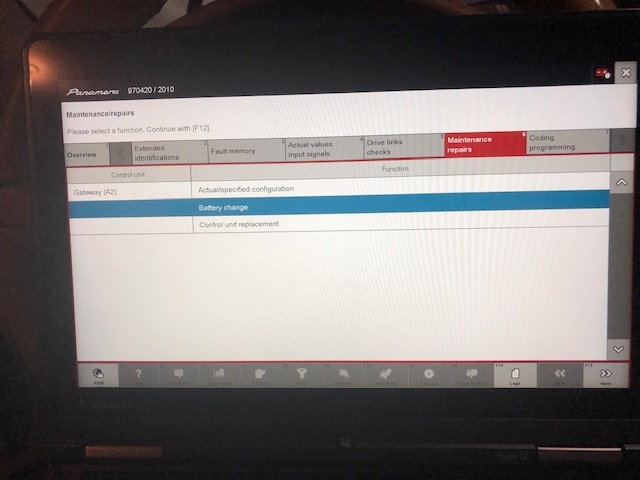
then select the Maintenance / repair Tab

VXDIAG PIWIS III Update Porsche Battery 8

things get more straight forward at this point, select Battery Change and hit F12

VXDIAG PIWIS III Update Porsche Battery 9

VXDIAG PIWIS III Update Porsche Battery 10

you can now select the battery typre, size and manufacture

VXDIAG PIWIS III Update Porsche Battery 11

VXDIAG PIWIS III Update Porsche Battery 12

VXDIAG PIWIS III Update Porsche Battery 13

as noted elsewhere you can simply enter Zero’s for the serial number and part number, once you’ve entered both hit any of the write (pencil) buttons and you are done.


www.vxdiagshop.com

2024/01/24

How to Disable Porsche TPMS by VXDIAG PIWIS III?

Tutorial: How to disable TPMS for Porsche using PIWIS III diagnostic software.

vxdiag porsche piwis iii

When you have the tires replaced, first you must actually disconnect the TPMS control unit so that the CAN Controller does not continue to recognize it.


The control unit is located in the front trunk next to brake fluid reservoir.

1. Remove and unplug the dome light on the cowling plastic. Remove all of the screws that hold this entire plastic panel in. There are a good number on top by the seal and one on each side by the bottom.

2: Now unplug the control unit it is part number 997 618 103 06, Do not remove it. This way you can always just plug it back it and use it again.

3. Reassemble the front trunk again.

4. Hook up the PIWIS tester to the car via the OBD2 port and do a complete check of all the control units.

5. Select “Gateway” and then “Coding” then “”Required Control Units List”. This will list all installed CAN units.

6. Now select “Tire Pressure Monitoring System” and change to ” Not Installed” and code it, then exit to the main screen again.

The next steps will code your instrument cluster and to do so will require that you have your engine number, so have it handy, you will find out why.

7. Select “Instrument Cluster” and then “Coding” then “Vehicle Variants”.

8. Now select your “Model Year” then “Model”, “Roof Version”, “Country” (02 is for USA, Puerto Rico). The next item will be “Versions” (553 is USA/Canada).

9. Select your “Individual and exclusive equipment” by highlighting each item that would apply such as: 454-Cruise, 023-Silver Colored Gauge faces etc. DO NOT select 423/483 TPM!!!! This is the TPMS for the cluster and must not be highlighted.

10. Move to the next screen and finish the “Audio and Communication ” by highlighting what applies to your car.

11. Next will be the “Wheel Size” and finally it will ask about your engine number.

12. Proceed forward and then Code with F8.

That’s it and now TPMS is removed.


www.vxdiagshop.com

2023/07/11

PIWIS III or Launch X431 for Porsche Coding?

What’s your take on Porsche Coding – PIWIS vs Launch x431?


Launch X431:

Price range: (CRP919E/CRP919 $370- $800-$1K+ tablets)

Easy to use, more often due to easy to use.

Language in X431 for coding is English. It is easier for English speakers.

Launch is fine if you have multiple different cars.

After your free period is over (one or two years) the yearly updates cost is expensive.

The X431 tool lacks some basic functionality. Example, the X431 can not read the DME data for total engine operational hours.


PIWIS: 

Price: grey market tool $599 hardware + $99 dual system SSD

A PIWIS will do everything the X431 will do, and more. But the coding is all in the Engineering menu, and is in German. Not insuperable, but a pain none-the-less.

For example: when swap Macan headlights from BiXenon to LEDs, headlight commissioning and module coding can only be done with PIWIS. When replace the air suspension compressor and rear suspension air bag, you can refill and recalibrate with PIWIS… would not trust X431 for that.

If you screw up coding with X431 and can’t go back, PIWIS module auto coding will fix it.

Safely stowed for the horsepower that X431 can’t provide.

PIWIS language is set to German when coding and hence more difficult if German is not a known language.

Launch doesn’t do what you need on Porsche 992 but depending on your needs.

It boils down to what you want or need to do. PIWIS is cheaper, updates are probably not needed and if you have a spare PC with Win10 the price is a fraction of Launch tablets.


In sum:

PIWIS will probably have more abilities than you will ever need, and do a few things that X431 will not.

X431 will still do all the basic maintenance functions that you will need, and then some.  X431 will also work on other makes, so if you also have need to do maintenance functions on other cars, X431 will work on them too.

Keep both Launch X431 and PIWIS. If don’t have budget for x431 tablets, get a CRP919 series instead. It has the same software and can do all the same stuff as tablet.