Showing posts with label VXDIAG VCX NANO Toyota. Show all posts

2025/04/08

VXDIAG Toyota Techstream Cannot Find Aygo 2023?

Question:

Cannot find Toyota Aygo 2023 in vxdiag vcx nano Toyota techstream 18.00.008 software. Does it support Aygo 2023?

VXDIAG Toyota Techstream Cannot Find Aygo 2023

Here is the clue.

Toyota Aygo is based on a PSA platform. Toyota Proace is a Peugeot 106 and Citroen C1. The Toyota Aygo was reincarnated into the Peugeot 106 and Citroen C1. So in common, all these shared mostly the same ECUs so had a better chance of talking to most systems.

So you will need PSA diagbox to diagnose.

Techstream v18 cannot diagnose this model.

Use diagbox or universal scanners, Launch X431 or Autel etc.

2024/11/18

VXDIAG Cannot Auto Identity New Toyota Tundra Solution

Problem:

When I tried to connect VXDIAG VCX NANO Toyota interface on two Toyota vehicles—a 2023 Toyota Tundra and a 2015 Toyota RAV4—I found that the device could not automatically identify the models. I have attached some photos of the issues below.

VXDIAG Cannot Auto Identity New Toyota Tundra 1

VXDIAG Cannot Auto Identity New Toyota Tundra 2

VXDIAG Cannot Auto Identity New Toyota Tundra 3

Solution:

This raised concerns for me, particularly regarding the compatibility of the new Tundra. To resolve the issue quickly, I contacted VXDIAG customer service. Their response was very prompt, and after a thorough inquiry, the representative suggested that I select the correct region in the software settings.

Following their advice, I accessed the settings menu and chose “North America” as the region. After saving the changes, I attempted to connect again. This time, the device successfully recognized the models and proceeded with the diagnostics. I look forward to its continued performance in the future. If necessary, I will provide updates on my experience, and I hope VXDIAG won’t let me down!

2024/07/17

Techstream No 2021 RAV4 Prime Option Solution

Customer question:

It is a 2021 Toyota RAV4 Prime. When choose a vehicle in Techstream V15 software it does not list the Prime as an option. Just the normal Rav4, Rav4 EV and Rav4 HV. Which option should I choose?


Here is the clue.

The early V15 didn’t cover all 2021 vehicles like the Rav4 Prime and the Venza HV, V15.20.021 was the first to include them. 

So you need version 15.20.021 and later. Choose either 2021 Rav4 or Rav4 HV.

Also have to choose a proper cable.


User feedback:

I updated Techstream to V15.30.026 and it gives the option of a Rav4 PHV and it works (using the vxdiag vcx nano toyota cable). I was able to address and clear the code and now all is good electronically with the car!

Techstream 2021 RAV4 Prime

FYI:

Our customers also tested version 18.00.008 and it knows about the 2023 RAV4 Prime. V18 is what people use and works on anything upto 2023.


2024/07/11

Disable Lexus GS400 ABS Light by VXDIAG Techstream

Here we post the troubleshooting steps below for the ABS Light always on condition as they are in the manual.


You will need a vxdiag vcx nano Toyota cable with Techstream software.  You can also rent Techstream for like $10/day from Toyota, after you get the OBDII VCX to USB/WiFi device.


DI-459 (page): ABS Warning Light Circuit
1. LEXUS hand-held tester: Check if the ABS “ON” and “OFF” are shown on the tester. OK: Check and replace ABS & BA & TRAC & VSC ECU. [Techstream will check the ECU’s, and report out their condition]

2. Repair the bulb or combination meter assembly

3. Check ABS solenoid relay: Shows pin-outs and continuity checks

4. Check the ECU connectors are securely connected to ECU

5. Check operation of the ABS warning light (See Step 1) [redundant check]

6. Is DTC output? Yes -> repair circuit indicated by the output code

7. Does ABS warning light go off if short pin is removed?
No: Check for short circuit in harness and connector between warning light and DLC1 and ECU (see page IN-31).
Yes: then proceed to 8
Page IN-31: Several pages describing standard troubleshooting techniques for connectors and ECU’s

8. Check ABS solenoid relay (See step 3). Bad: replace relay
Good: Check for short circuit in harness and connector between warning light and DLC1 and ECU (see page IN-31).


www.vxdiagshop.com

2024/07/04

Program Lexus LS460 07-09 TPMS with Techstream

Tutorial: How to replace and program TPMS sensors on 2007-2009 Lexus LS460 or LS600.


Symptom of a bad TPMS sensor: After the engine is started, the tire icon on the dash flashes for three seconds and then stays on solid with the message: “Check Tire Pressure System. Have your vehicle checked by a dealer”, as shown in the photo below:

Program Lexus LS460 07-09 TPMS with Techstream 1

Verifying the bad TPMS sensor with Techstream: Connect Techstream to the car, double-click the “Tire Pressure Monitor” button, and then click the “Trouble Codes” button. It shows Code 2125 with the description “Transmitter ID 5 not received”, indicating that TPMS sensor ID5 is not working. Double-click the “Data List” on the left-side of Techstream panel, and TPMS senor ID5 shows only 0.4 PSI, indicating a bad sensor.

*Cheap mini vci cable won’t work TPMS. You will need vxdiag vcx nano Toyota or Mongoose cables.

Screenshots of Techstream are attached below:

Program Lexus LS460 07-09 TPMS with Techstream 2

Program Lexus LS460 07-09 TPMS with Techstream 3

Program Lexus LS460 07-09 TPMS with Techstream 4

Identifying the bad TMPS sensor: While still on Techstream “Data List” screen, pump up each tire to 40 PSI. Techstream shows the rise of each tire’s pressure as it is pumped up. The tire that does not show a rise of the tire pressure is the tire that contains the bad TPMS sensor. In my case, it is the front driver-side tire.

Choices of replacement TPMS sensors:

For replacement TPMS sensors, there are basically three choices:

(1) genuine Lexus/Toyota sensors from Lexus/Toyota dealers,

(2) Denso OEM sensors

(3) no-name replacement sensors on eBay/Amazon.

The part number for 2007-2009 LS460/600 TPMS sensors is 42607-33022. At the time of this writing (May 2021), my local Lexus dealer’s online website shows $71.47 per TMPS sensor for my LS460, and my local Toyota dealer’s website shows $65.92 for the same TPMS sensor. The part number of Denso’s OEM TPMS sensors is 550-0103 and RockAuto carries them at $31.79 each. No-name TPMS sensors on eBay/Amazon carry the part numbers of PMV-107J or 42607-33021 and their price runs anywhere from $7 to $15 each.

Given the significant difference in prices among the three sourcing options, I decided to gamble a little bit and went with a seller of no-name TPMS sensors on eBay, who had very high ratings and received a lot of positive feedback. The seller guarantees the battery life of his TPMS sensors to be at least five years. This eBay seller’s TPMS sensors for LS460/600 have an almost identical look of the original Lexus/Toyota TPMS sensors. I bought a set of 4 TPMS sensors from this eBay seller for $45, including sale tax and shipping. Below is a photo of the new no-name TPMS sensor on the left and the Lexus original TPMS sensor on the right:

Program Lexus LS460 07-09 TPMS with Techstream 5

If you have budget, better get original TPMS sensors.


Breaking the tire bead and replacing the bad TPMS senor: I used my LS460’s jack against the rear towing frame structure of my GX460 SUV to break the tire bead. It worked effortlessly and perfectly. With the open tire bead, I replaced the bad TPMS sensor with a new one in a few seconds and torqued the sensor stem to 4nm. See the photo below:

Program Lexus LS460 07-09 TPMS with Techstream 6

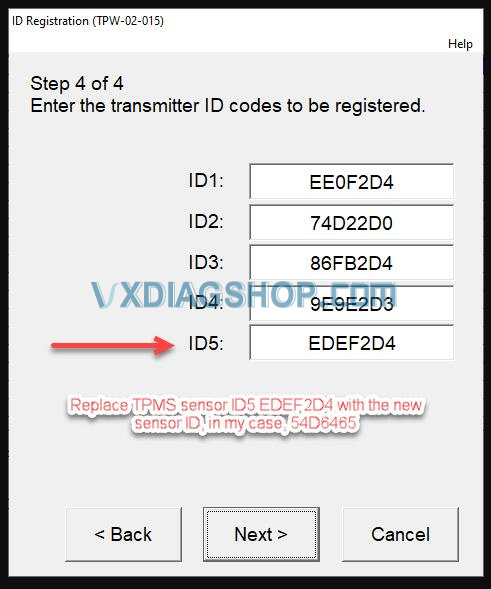
Registering (programming/relearning) the new TPMS sensor in the tire ECU: Inside Techstream’s “Tire Pressure Monitor” screen, double-click the “Utility” button on the left-side panel, and then double-click the “ID Registration” button. Then, follow Techstream screens to complete the registration (programming/relearning) of the new TPMS senor in the tire ECU database, as shown below:

Program Lexus LS460 07-09 TPMS with Techstream 7

Program Lexus LS460 07-09 TPMS with Techstream 8

Program Lexus LS460 07-09 TPMS with Techstream 9

Program Lexus LS460 07-09 TPMS with Techstream 10

Program Lexus LS460 07-09 TPMS with Techstream 11

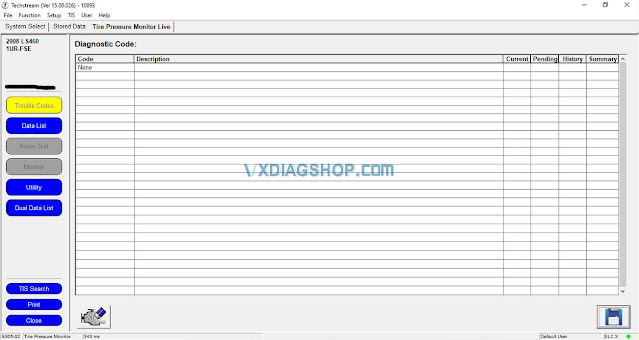
Clearing the trouble code and verifying that the new TPMS sensor is working: Inside Techstream’s “Tire Pressure Monitor” screen, double-click the “Trouble Codes” button on the left-side panel and then clear Code C2125. Double-click “Data List” button on the left-side panel to verify that the new TMPS sensor (ID5 54D6465) has been registered (programmed/relearned) and is showing the correct tire pressure (i.e., 33.7 PSI in my case). Please see the illustrating photos below. Turn off the engine ignition and disconnect Techstream from the car. The replacement of the bad TPMS sensor has been completed.

Program Lexus LS460 07-09 TPMS with Techstream 12

Program Lexus LS460 07-09 TPMS with Techstream 13

Program Lexus LS460 07-09 TPMS with Techstream 14

Done.


www.vxdiagshop.com

2024/06/17

Add Toyota Raize 2020 Smart Key by VXDIAG and Techstream

It is a Toyota Raize 2020. The customer wants to add a new spare smart key to it.  4A HitagAES smart key.

Add Toyota Raize 2020 Smart Key by VXDIAG and Techstream 1

4A HitagAES status “already locked”. The customer purchased a new key (the key looks exactly the same as the original, both internally and externally). The new one had the status “already locked”, the same picture with the ID47 Hitag3 keys on the Tank (and all cars of the same platform), which did not interfere with programming this key to the car.
Everything is clear with the key. Let’s move on.
We use through TechStream 18 and a techstream cable (vxdiag vcx nano Toyota or Mangoose JLR, no MINI VCI cheap cables). Choose the Toyota Raize 2019-2021 model and there is nothing there.

Add Toyota Raize 2020 Smart Key by VXDIAG and Techstream 2

Add Toyota Raize 2020 Smart Key by VXDIAG and Techstream 3

neither Body, nor Immo, nor enrty&start function.


Try to do it through Tank. Choose a Tank body M900 engine 1kr and year of manufacture 2016-2018.

Add Toyota Raize 2020 Smart Key by VXDIAG and Techstream 4

Add Toyota Raize 2020 Smart Key by VXDIAG and Techstream 5

Here we choose Body and then Utilities.


Go to Body, everything is fine, the module responds, then go to Utilities and select “add Key” from the list. If you select “add new key” nothing will work.
Well, that’s it, we operate according to the instructions. With the ignition on, turn off all additional devices, leave one door open – bring the attached key to the button, the car beeps – then bring the new key and ! click next!

Then the car will click the locks. You can all click Exit to complete the procedure or click Next to program the next key.
That’s it, the key is ready. Everyone is happy.

Add Toyota Raize 2020 Smart Key by VXDIAG and Techstream 6

www.vxdiagshop.com