Showing posts with label VXDIAG multi tool. Show all posts

2021/11/04

VXDIAG "Update License Failed Error Code:0” Solution

Here comes the working solution to vxidag multi vci (the big device) update license failure.

An error occurs when trying to update firmware and license. Error Update License Failed, Retry! Error Code:0″
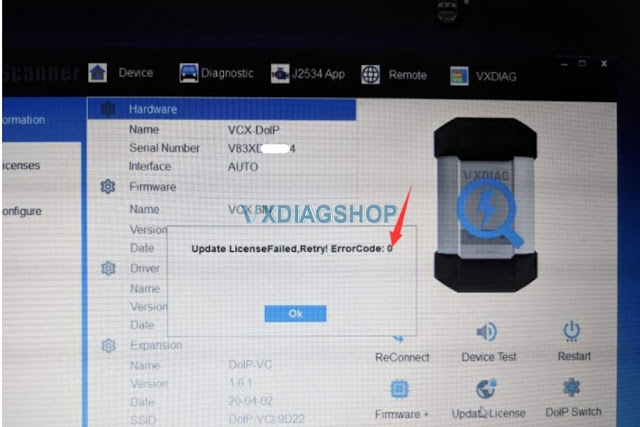
VXDIAG "Update License Failed Error Code:0 1

Vxdiagshop.com solution:

First of all, check your VCI and DoIP firmware version.
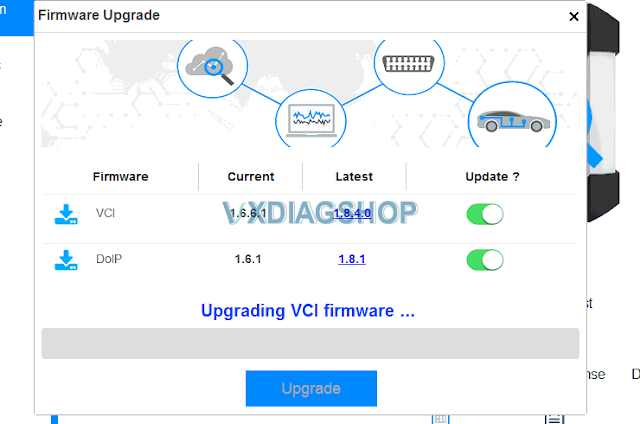
VXDIAG "Update License Failed Error Code:0 2

We see the VCI still use old version VCI and DoIP firmware version 1.6.  You have to update both versions to 1.8 (VCI 1.8.4.0 and DoIP 1.8.1).

Then update license.

If not working,  change network connection or another WiFi hotspot.

Contact us if all the above failed.

2021/03/17

VXDIAG Multi Tool RunCommand Error After Add DoIP License

 Here is the working solution to vxdiag multi tool (with serial number V71XN**** ) "RunCommand Error" after adding DoIP license to the scanner.


* JLR Pathfinder, Porsche PIWIS3, Benz or BMW DoIP license can be added to V71XN**** vcx plus scanner now.


vxdiag-multi-tool-run-command-error-1

vxdiag-multi-tool-run-command-error-2
Solution:

The error was caused by low firmware version.

First run the firmware VCI patch 

https://mega.nz/file/XUwCQSYT#vOUDZlpntsuAidMT2sjsXhM0Qs8y6aGa2JLd2zZrSSw

Then update firmware in VX manager. It works no problem.


2019/11/28

VXDIAG Multi Tool Benz and BMW Software Update to V2019.12

VXDIAG Benz and BMW Multi Tool release new software version in November 2019.


VXDIAG Benz Software V2019.12
Compatible device: VXDIAG Benz C6 , VXDIAG Full and VXDIAG VCX Plus BMW/Benz 1-in 1
Software Version: Xentry V2019.12 in HDD or SSD format
With DTS Monaco software
Multi-Language: Bulgarian, Danish, Greek, Spanish, French, Italian, Korean, Polish, Romanian, Serbo-Croatian, Swedish, Chinese, Czech, German, English, Finnish, Hungarian, Japanese, Dutch, Portuguese, Slovenian, Turkish
Compatible computer: LENOVO T420 T440 X201, DELL E5420 E6420, Panasonic CF53 54 31.
Update Method: by purchasing new HDD/SSD or send back old HDD/SSD to update free
Vxdiag Benz 2019 12 Software 1
Vxdiag Benz 2019 12 Software 2

VXDIAG BMW ISTA-D ISTA-P Software
Software version: 
ISTA-D 4.18.20
ISTA-P 3.66.100
ISTA-D Language:
English/ Chinese
ISTA-P Language:
English, Chinese, Czech, Dutch, French, German, Greek, Indonesian, Italian, Japanese, Korean, Polish, Portuguese, Russian, Spanish, Swedish, Thai, Turkish
Compatible device: VXDIAG Full, VXDIAG BMW Multi Tool
Update Method: by purchasing new HDD/SSD or send back old HDD/SSD to update free
Vxdiag Bmw 2019 12 Software 0
Vxdiag Bmw 2019 12 Software 1
Vxdiag Bmw 2019 12 Software 2
Vxdiag Bmw 2019 12 Software 3

2019/10/28

VXDIAG Cloud Diagnosis Server Back to Work

VXDIAG Cloud Diagnosis service was under maintenance and now it resumes normal operation.

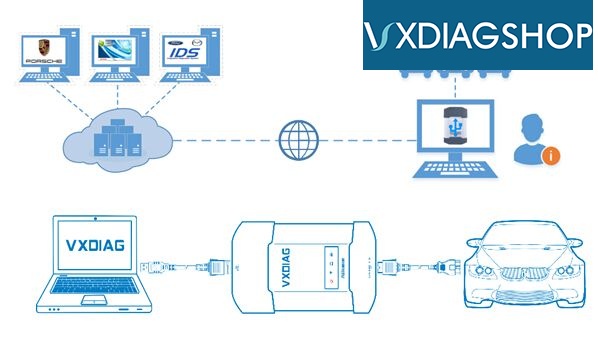
What is  Cloud Diagnosis?
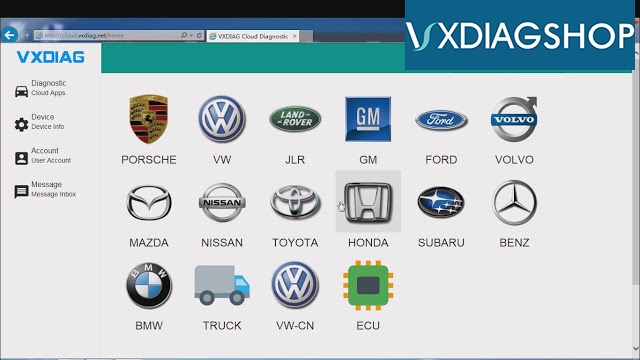
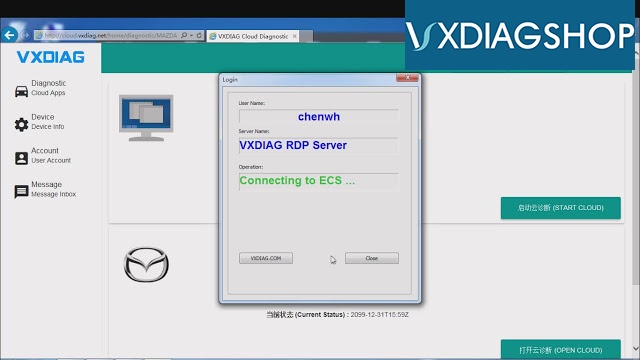
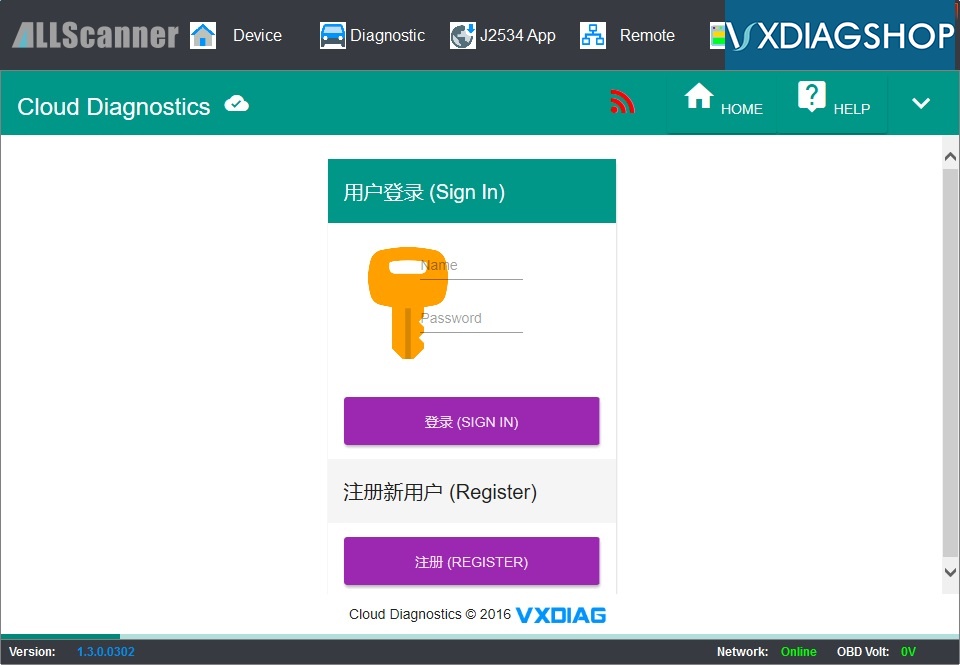
You don’t have to install any OEM software for vxdiag vcx nano/multi tool on PC. You can login cloud diagnostic server and diagnose your car directly online after connecting interface to laptop and car.
It is convenient for those who have difficulty in installing OEM software on virtual machine.
vxdiag-cloud-diagnostics-1
vxdiag-cloud-diagnostics-6
vxdiag-cloud-diagnostics-7
VXDIAG Cloud Diagnostics laptop requirements: Win 7, Win 8 or Win 10 OS systems (Win XP is not supported); Explorer 11 or Google chrome
(For login cloud diagnostic server http://cloud.vxdiag.net)

How to set up VXDIAG Cloud Diagnostic?
http://blog.vxdiagshop.com/2018/11/23/use-vxdiag-cloud-diagnostics-function/

Is it necessary to use VXDIAG Cloud Diagnosis?
Cloud Diagnosis is not necessary now.
1)
Cloud Diagnosis is made to help those who have difficulty in setup software on VMware (old Ford IDS, GDS2 requires VMware installation)
But now newer version software (IDS 112 above, GDS2 2019 above) can be installed on native machine directly. It is much easier than VMware. Does not require cloud diagnosis anymore.
2) Benz Xentry, BMW ISTA software can not be operated through Cloud Diagnosis
3) Cloud diagnosis is slower aboard (IP issue)

But if you need Cloud Diagnosis, please contact us with your order number, we'll provide login account for free.
Email: sales@vxdiagshop.com
Skype: vxdiag.com
Whatsapp: 0086-18064450969
vxdiag-cloud-diagnostics-5
Related post:
How to install VXDIAG Ford IDS V112 Software without VMware
Install VXDIAG VCX NANO GM V2019.02 Software on native machine

2019/02/25

VXDIAG Multi Tool with 10 boot systems information

Allscanner company has launched a VXDIAG Multi tool with 10 boot systems. Software including: HONDA / GM / VW / FORD / MAZDA / TOYOTA / PIWIS / Subaru / VOLVO / BMW / BENZ.

Current software version: 
Toyota  Techstream 13.00.022
Honda HDS      3.101.011
FORD   IDS  112
GM       tech2win 16.02.24, GDS2 2018
VOLVO  VIDA  2014D
JLR   SDD   153
VW  ODIS     4.3.3
MAZDA IDS   112
Benz  XENTRY  2018.12
BMW   ISTA 4.14.14
PORSCHE   PIWIS 18.1
All software are loaded into a 2TB HDD.
The HDD tested ok with laptops like LENOVO T420 T440 X201, DELL E5420 E6420, Panasonic CF53 54 31.

10 boot systems:
vxdiag-9-boot-system-1 vxdiag-9-boot-system-2 vxdiag-9-boot-system-3 vxdiag-9-boot-system-4 vxdiag-9-boot-system-5 vxdiag-9-boot-system-6 vxdiag-9-boot-system-7 vxdiag-9-boot-system-8 vxdiag-9-boot-system-9 vxdiag-9-boot-system-10 vxdiag-9-boot-system-11 vxdiag-9-boot-system-12

www.vxdiagshop.com

2018/11/18

VXDIAG Multi Tool Subaru SSM-III Scanner Review

I have the VXDIAG Subaru off vxdiagshop.com. The only time it came in handy was when i used it to recalibrate the steering angle sensor. The software was a pain to get setup and working properly.

It definitely does more than a regular scanner (FreeSSM cable), but I rarely use those features. In fact, you don’t need a scanner at all to access DTCs and ABS codes. Just plug the diagnostic connectors together and do a couple other things that I can’t remember and the codes will flash in the gauge cluster.
It just depends on if you think having complete access to all the systems in the car is worth it. It’s nice to have when I need it. I had a VDC code that was for the steering angle sensor. Rather than go to the dealer, I just busted out the knock off SSM and calibrated it in the driveway.
Some things I couldn’t get to work. I tried to reprogram a new key with it, but you need a code from the dealer. I also messed up my TPMS. I was messing around and accidentally cleared the calibration. To recalibrate them you need a special tool that puts the sensors into learning mode. I never could find a reasonably priced tool that was verified to work with my sensors.
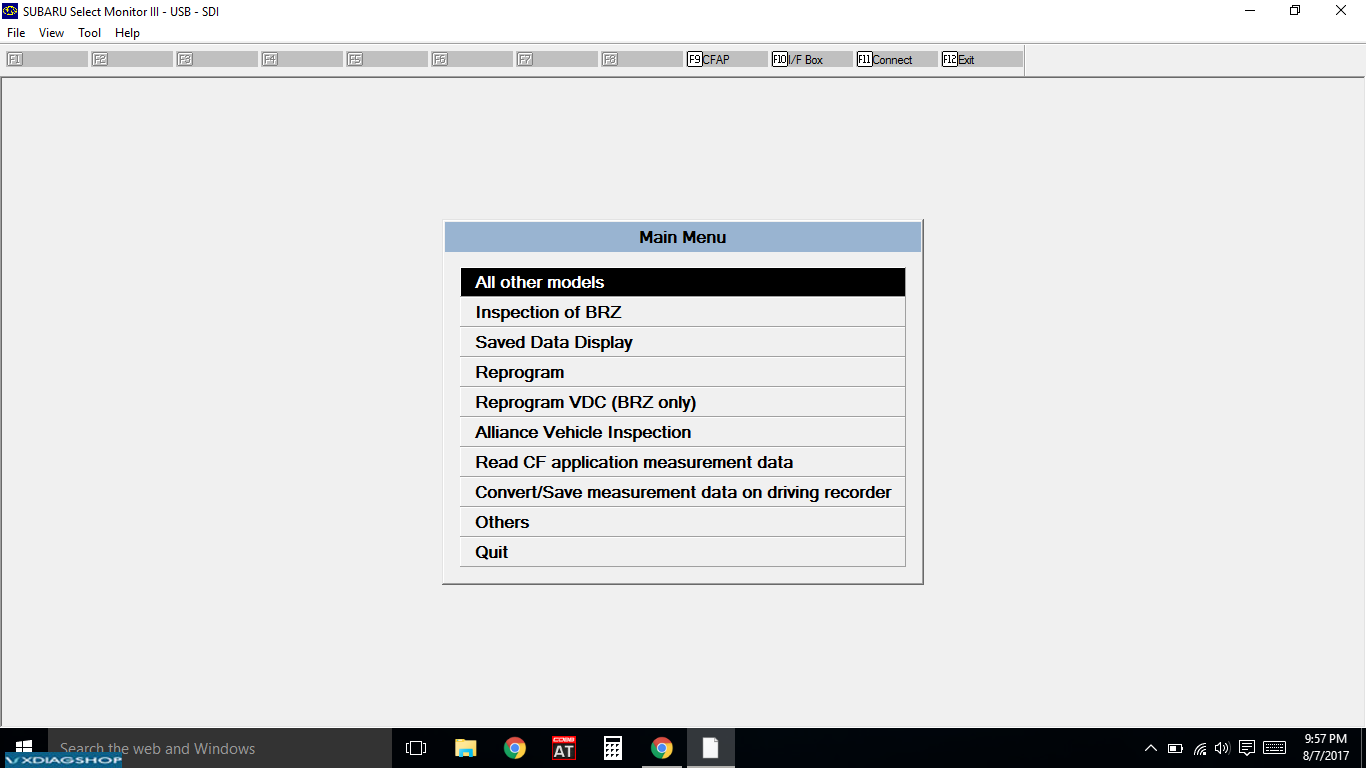
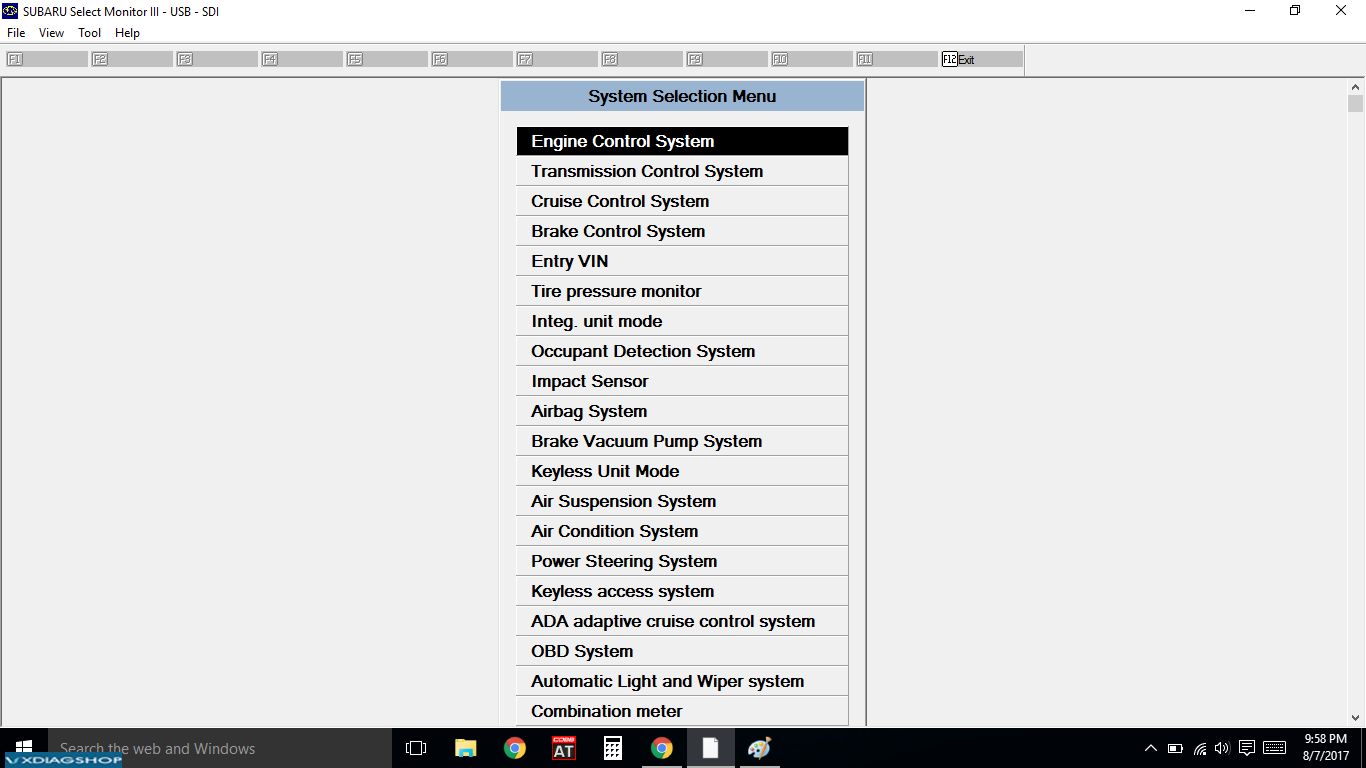
So, if you feel all the features are worth it then you’ll like it. At this point it’s just a novelty for me. I haven’t used it in a long, long time. I posted up a screen shot of the menu for SSM III, so you can see all the different things you can access.
Another thing to consider is that it is a pain to get to work. SSM requires a code to gain access. I had to search all over the internet to figure out how to get it working properly. It’s been so long I can’t remember exactly how I did it. I still get error codes when trying to connect to my car, but it connects just fine.
Subaru-SSM-3-review-1
Subaru-SSM-3-review-2

2018/11/14

Method of register VXDIAG Benz Xentry / DAS Diagnostics

Today, share the method of registering Allscanner VXDIAG Mercedes-Benz Xentr/DAS Diagnostics with everyone

The method applies to:
VXDIAG multi tool Benz & BMW
Allscanner VXDIAG Benz

Xentry/DAS registration steps:

Install the computer driver
Then register Mercedes software
(two MB software is registered in the same way)

Open local disk C:
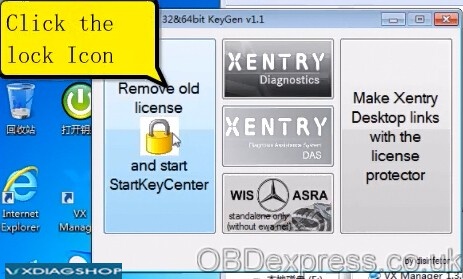
Open KEY application
Click on the lock icon


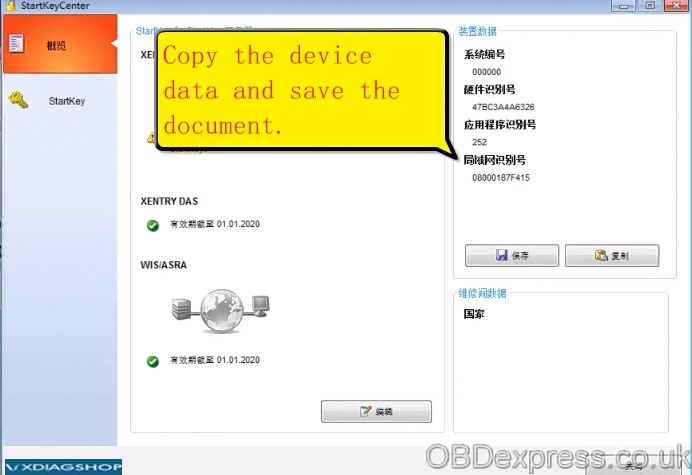
Copy the device data and save data in a new .txt

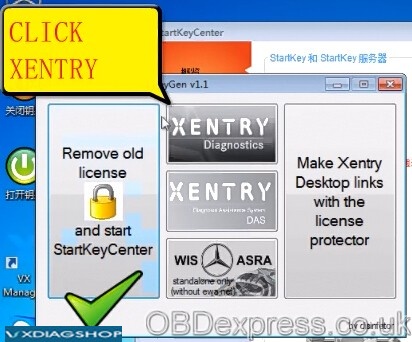
Click on XENTRY Diagnostics

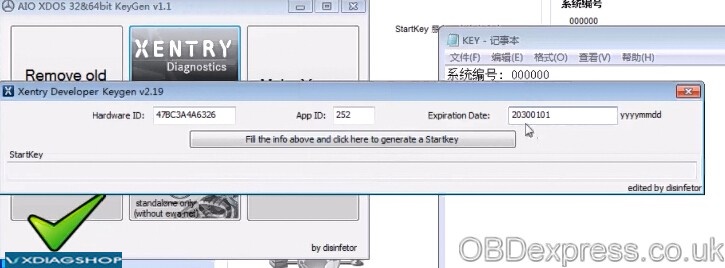
Copy the hardware id to register software

Change the expiration date to 2030

Click on “Fill the info above and click here to generate a starkey”
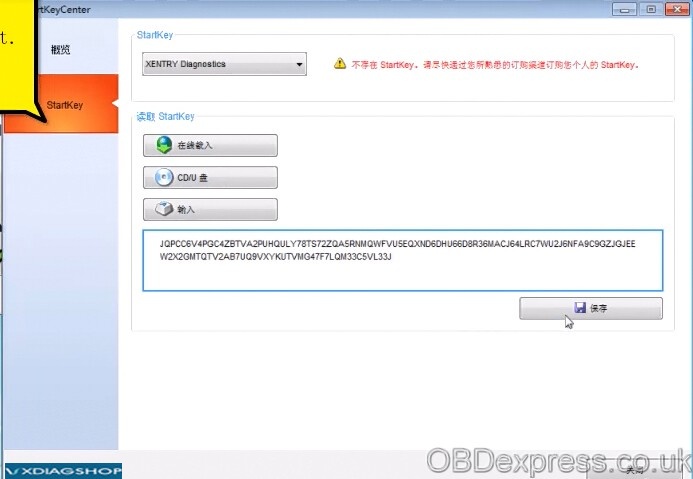
Copy the starkey and save data

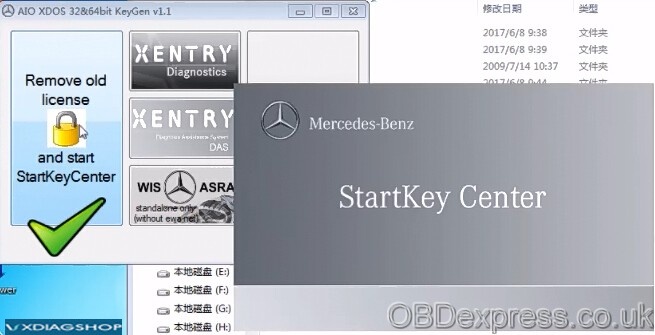
Go to Starkey center
Enter Starkey and save it

Close Starkey center

Open local disk C:
Open KEY saved application, then ok


Open VX Manager


Open Mercedes Pass Thur (Xentry diagnostics)


Now you can select a model to have a diagnostic test or do coding/programming
vxdiagshop.com