Showing posts with label FDRS. Show all posts

2024/07/26

Set up VXDIAG Ford and FDRS for 2024 Maverick

Here comes the user review of vxdiag vcx nano Ford and FDRS on a 2024 Ford Maverick.


“FDRS is the software Ford Dealerships use for Programming and Diagnosis on all Fords (specifically 2018+). I am using the VXDIAG VCX NANO FORD OBD2 adapter. It is $89 on vxdiagshop.com. You must install VX MANAGER to install the driver for this OBD2 ADAPTER so it works for FDRS.   The driver for FDRS is in the download for the VX manager. I tried to download the VX manager beta and it would not let me because antivirus was kicking in but it let me install the latest release non beta. It’s working fine for me I followed the instructions.

I also bought a 2 day FDRS/IDS subscription for $50 from www.motorcraftservice.com . If I use FDRS again in the future I will have to purchase another 2 day license. You must have internet connection to use FDRS (at least for the first time). Low voltage can disrupt processes so you have to make sure you aren’t dropping below 12V at the bottom right. A trickle charger is recommended.

Here are some pictures I took of some of the toolbox options FDRS shows in the PCM, BCM, BECMB, AWD on my 2024 Maverick. This is pretty cool to see what can be done with FDRS and to see what the dealership technicians are seeing. Most processes are very easy to accomplish because of the detailed step by step instructions provided in the software. It was very easy to add the wireless keypad through FDRS!  It can also be used to upgrade any of the module firmware.  If there is a recall that is fixed by new firmware, Ford will do the upgrade for free. If there is a major bug that does not cause a safety issue then Ford may upgrade the firmware for free. But if there is a feature enhancement or minor bug fix, Ford will allow the dealers to do an upgrade but they will charge the customer. ”

VXDIAG Ford and FDRS for 2024 Maverick 1

VXDIAG Ford and FDRS for 2024 Maverick 2

VXDIAG Ford and FDRS for 2024 Maverick 3

VXDIAG Ford and FDRS for 2024 Maverick 4

VXDIAG Ford and FDRS for 2024 Maverick 5


2024/06/07

VXDIAG FDRS Program Ford Maverick Wireless Keypad


How-to: program a Wireless Keypad on a Ford Maverick MY 2024 using vxdiag vcx nano Ford scanner and FDRS software.


If you add the wireless battery powered keypad you must use FDRS (or go to the dealer)!


Buy a two day subscription for $50 on motorcraftservice.com. You MUST use a different OBD reader than the ELM327 adapter for FORScan! The cheapest options are a used Ford VCM II for about $150 or the VXDIAG VCX NANO for FORD for $89 on vxdiagshop.com. You may need to download specific drivers for the J2534 OBD adapter you are using. There are not many options for OBD adapters and most of the options are very expensive...thousands of dollars.

FDRS will be useful in the future for anything key programming related and for the other things FORScan cannot accomplish. Many people were not able to get Ford Dealerships to honor that cheap of an install. Ford Accessories Install prices are very misleading.. Several dealerships wanted over $100 for just the install.  Many shops are using the exact same software and they pay thousands for the OBD adapter and subscriptions.

The driver for FDRS is in the download for the VX manager. If you try to download the VX manager beta and it would not let you because antivirus was kicking in but it let you install the latest release non beta. It's working fine if follow these instructions below.
VXdiag instructions

FDRS is somewhat challenging to get set up. The servers can be iffy at first, you must have internet access and you must log into an active Ford account as an independent user. Here is a link below to help with getting FDRS set up.

FDRS HOW TO

After getting FDRS setup and connected to your vehicle, you now can set up your wireless keypad. You will start by choosing Toolbox. Then BCM. Then choose Remote Keyless Entry Pad. Now just follow the instructions until they are complete.

VXDIAG FDRS Program Ford Maverick Wireless Keypad


2022/08/09

Where to Get VXDIAG VCX NANO Ford Online Account?

To do Ford online module flashing and immobilizer programming with vxdiag vcx nano Ford or VCX SE Ford, you have to access Ford online account.


Ford OEM IDS/FJDS/FDRS online subscription is required in this case. We have customers asking where to get the online subscription. Here’s the clue.

Download and install FDRS software from here. You will need a license to run this software and can be purchased here (2-day FDRS license cost $50)

Download IDS, FJDS, FDRS and purchase online subscription here

https://www.motorcraftservice.com/

365 day IDS/FDRS Software License = $900.00 per license
30 day IDS/FDRS Software License = $300.00 per license
2 day IDS/FDRS Software License = $150.00 per license
365 day FJDS/FDRS Software License = $899.00 per license
30 day FJDS/FDRS Software License = $200.00 per license
2 day FJDS/FDRS Software License = $50.00 per license

Users will get Ford online subscriptions from 3rd party suppliers from forums as well, i.e MHHAUTO.


IDS vs FJDS vs FDRS

Integated Diagnostic Software (IDS) – The factory Ford Motor Company vehicle diagnostic software provides complete dealership level vehicle diagnostic coverage for all 1996 to present Ford, Lincoln and Mercury vehicles. IDS is a flexible diagnostic tool that utilizes standard computing platforms to work with Ford’s VCM, VCM II, VCMM and VMM devices. The IDS software license includes time based access to the IDS software, software udpates and calibration files.


Ford J2534 Diagnostic Software (FJDS) – The factory Ford Motor Company vehicle diagnostic tool designed for use with J2534 compatible Vehicle Communications Interfaces (VCI). FJDS software provides module reprogramming software (FMP) that covers 1996 to present Ford, Lincoln and Mercury module reprogramming functions, plus complete dealership level diagnostic software for all 2018 to present Ford and Lincoln vehicles. FJDS is a flexible diagnostic tool that utilizes standard computing platforms to work with Ford’s VCM II or J2534 compatible devices. The FJDS software license includes time based access to the FJDS software, software updates and calibration files.


Ford Diagnostic & Repair System (FDRS) – The next generation factory Ford Motor Company vehicle diagnostic Software designed for use with VCM II, VCMM and J2534 compatible Vehicle Communications Interfaces (VCI). FDRS provides complete dealership level vehicle diagnostic coverage for some 2018 and forward vehicles. FDRS provides superior capabilities, is more user-friendly and provides more diagnostic tools than IDS. The cloud-based system ensures the technician is provided the latest software every time FDRS logs into the Ford network.

Get VXDIAG VCX NANO Ford Online Account 1

Get VXDIAG VCX NANO Ford Online Account 2

Get VXDIAG VCX NANO Ford Online Account 3

Get VXDIAG VCX NANO Ford Online Account 4

Get VXDIAG VCX NANO Ford Online Account 5

As for how to set up FDRS with vxdiag, check instructions here

How to Set up VXDIAG VCX NANO Ford and FDRS for F150 ECM Programming?

2022/03/21

VXDIAG Ford FDRS Program Mustang 2021 Proximity

Here is a quick guide on how to program a new key to a Ford Mustang Mach E year 2021 using vxdiag J2534 interface and FDRS software program.


Tools required:

VXDIAG VCX NANO Ford J2534 passthru

Ford FDRS online subscription

2 keys to be programmed

VXDIAG Ford FDRS Program Mustang 2021 Proximity 1

VXDIAG Ford FDRS Program Mustang 2021 Proximity 2

Here we have a new key and the factory proximity smart key

You need ford vcm2 or other compatible tools for FDRS.
There is a list of them on Ford’s website.
You might need a dealer login that case obviously a dealer can do it or a dealer tech.

VXDIAG Ford FDRS Program Mustang 2021 Proximity 3

I am logged in as a dealer here. Check: How to set up FDRS with VXDIAG VCX NANO for Ford?
All I’ve done is plugged it in and I hit Read vehicle, it’s been reading for around 10 seconds.

VXDIAG Ford FDRS Program Mustang 2021 Proximity 4


it’s pulling every single module in the car and this car is i believe it has 37 modules.


It looks at code and checks software versions in every module.

the car doesn’t have to be on for this but if it’s not it won’t actually read all the modules.

We just read some of them.  I think it’s about half maybe a little more read with the car off and the rest need to require the car to be on.

VXDIAG Ford FDRS Program Mustang 2021 Proximity 5

What we’re going to do is i’m going to go ahead and put this key in the backup slot right here.

We’re in it’s basically showing if we have any codes and it’s showing all the part numbers here.

So anything in orange we have what they call DTC’s which are just a stored code.

It shows some information on the side here which is also an oasis.

VXDIAG Ford FDRS Program Mustang 2021 Proximity 6

VXDIAG Ford FDRS Program Mustang 2021 Proximity 7

Go ahead and continue it shows your battery voltage right here. By the way at the bottom right which is helpful again, it shows codes here shows all the tests you

can do here so what we’re going to go ahead and do is just type in the search bar in the top right when type PATS  passive anti-theft system

VXDIAG Ford FDRS Program Mustang 2021 Proximity 8

VXDIAG Ford FDRS Program Mustang 2021 Proximity 9

we’re gonna hit download.  FDRS downloads all modules individually.

It doesn’t take very long usually though if you have a good WiFi connection.

It’s gonna connect to the car real quick.

Check how many keys are programmed and then you just do what we want to do or

whether it asks what we want to do count, erase, program, lost or initialization if you replace it

VXDIAG Ford FDRS Program Mustang 2021 Proximity 10

VXDIAG Ford FDRS Program Mustang 2021 Proximity 11

We count keys, it tells us there are actually two keys.

Here we select Program Key 

Put it in the backup slot we already did

VXDIAG Ford FDRS Program Mustang 2021 Proximity 12

VXDIAG Ford FDRS Program Mustang 2021 Proximity 13

It’s in the bcm lights flash that means it’s programmed

Now it says three keys and takes this new key out

VXDIAG Ford FDRS Program Mustang 2021 Proximity 14

It’s working you can hear the door locks and here’s the first key.

See they both work now so perfect that’s how quick it is for a dealer to program a key.

Super fast and enjoy.

www.vxdiagshop.com

http://blog.vxdiagshop.com/2022/03/22/program-mustang-2021-proximity-with-vxdiag-j2534-and-fdrs/

2022/03/06

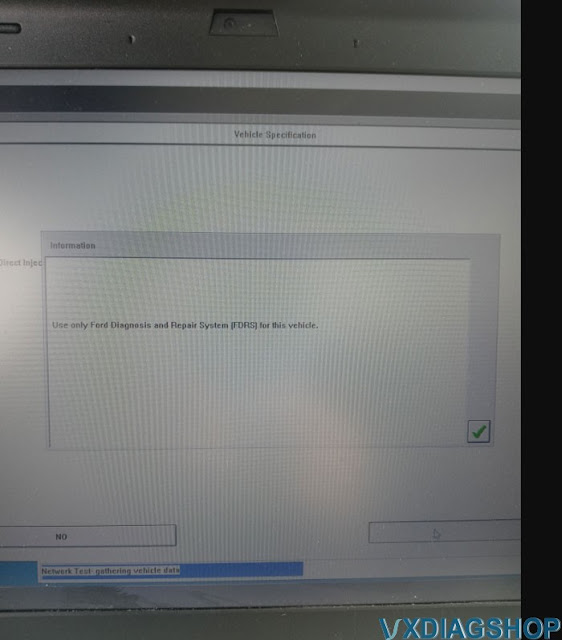
VXDIAG Ford IDS 2020 Ford Explorer Error Use FDRS?

Problem:
My vxdiag vcx nano Ford IDS V124 failed to communicate with a 2020 Ford Explorer. It says ‘use only Ford Diagnosis and Repair System (FDRS) for this vehicle.’  Any idea how to make it work?

VXDIAG Ford IDS 2020 Ford Explorer Error Use FDRS

Solution:

As the IDS says, you have to use FDRS on this vehicle.

Ford Diagnostic & Repair System (FDRS) – The next generation factory Ford Motor Company vehicle diagnostic Software designed for use with VCM II, VCMM and J2534 compatible Vehicle Communications Interfaces (VCI). FDRS provides complete dealership level vehicle diagnostic coverage for some 2018 and forward vehicles. FDRS provides superior capabilities, is more user-friendly and provides more diagnostic tools than IDS. The cloud-based system ensures the technician is provided the latest software every time FDRS logs into the Ford network.

Ford vehicles by model year supported on FDRS

  • Bronco 2021
  • Bronco Sport 2021
  • EcoSport 2018-2021
  • Edge 2021
  • Escape 2020-2021
  • Expedition 2018-2021
  • Explorer 2020-2021
  • F-150 2021
  • Mustang 2021
  • Mustang Mach-E 2021
  • Ranger 2019-2021
  • SuperDuty 2020-2021
  • Transit 2020-2021
  • Transit Connect 2019-2021


Lincoln vehicles by model year supported on FDRS

  • Aviator 2020-2021
  • Corsair 2020-2021
  • Nautilus 2021
  • Navigator 2018-2021


VXDIAG VCX NANO Ford J1534 has been tested working without problem with FDRS.

Check guide here to set up vxdiag with FDRS:

https://www.vxdiagshop.com/service/program-ford-f150-ecm-with-vxdiag-vcx-nano-and-fdrs.html