Showing posts with label VXDIAG Volvo VIDA. Show all posts

2024/11/18

How to Install VXDIAG Volvo VIDA 2014 on Win10?

Here we share one of our customers’ working experience of installing VIDA on Windows 10 and using the VXDIAG VCX SE Pro 3 in 1 device.


VIDA

So, I used this pretty old laptop to install VIDA. It’s a 2012 HP EliteBook 8470p. To give it a bit of a boost, I swapped in a cheap SSD and did a fresh Windows 10 install. Yeah, the laptop is ancient, but after the upgrade, it runs smoothly. I mainly use it with Subaru Select Monitor (you know, Subaru’s diagnostic software) to diagnose Subaru vehicles.

When it came to installing VIDA, I followed some detailed steps that I found on a forum, and honestly, it went pretty smoothly. The coolest thing? Microsoft Edge now has an IE11 mode built right in, so I didn’t have to bother with installing any IE11 extensions. You just go into “Settings > Default Browser > Allow sites to load in IE mode” and boom, done! I even added an IE mode button to the toolbar in Edge to make it quicker to fire up VIDA next time. Super handy!

VXDIAG

Before buying the VXDIAG device, I did a bit of research. Yeah, there were mixed reviews. Some people were like, “it’s great,” while others had issues. But, you know how the internet is—sometimes you just have to try it yourself to see what’s real. So, I figured, why not? Plus, vxdiagshop.com had a nice first-time discount, so I grabbed the VXDIAG VCX SE Pro 3 in 1.

When the device arrived… err, it didn’t exactly work right off the bat. Tried restarting the laptop, reconnecting the device a few times, but nope—no luck. At this point, I was starting to think I’d bought a dud.

Install VXDIAG Volvo VIDA 2014 on Win10

In the end, I reached out to the VXDIAG support team. They got back to me pretty quickly and walked me through troubleshooting step by step. Turns out, I’d messed up the installation process. Whoops! But with their help, I got the latest version of VX Manager installed and updated the firmware. And finally—success! The device started working just fine.

Oh, and by the way, I also went through a bunch of tutorials on their website. They were super detailed, covering everything from setup to troubleshooting. It really left a good first impression and helped me understand more about the device.


Small Issues & Wrap-up

There’s this one minor thing—every two months, the VXDIAG device needs its license renewed through VX Manager. It’s not a big deal though. You just press the update button, and that’s it.

All in all, despite a few bumps in the road, I managed to get everything sorted out with some help from customer support and a bit of hands-on troubleshooting. It really reinforced the idea that sometimes you just gotta try things out for yourself to see how well they work. And honestly, this whole experience turned out to be a pleasant surprise, kind of like a lucky dip that paid off!

2020/07/06

VXDIAG VCX NANO Volvo VIDA 2015A Installation Guide

Easy steps to install VIDA 2015A software with vxdiag vcx nano for Volvo scanner.

Operating system: 
Windows 7 operating system (32-bit or 64 bit)


Main Steps:
1.Install Setup
2. Install patch
3. Install VX Manager driver
4. Run VIDA software


Procedure:
1. Install setup
Create a new folder “2015a” on desktop
install-vxdiag-vida-2015a-1

Copy all files from software CD to folder “2015a”
install-vxdiag-vida-2015a-2

Go to C://2015a/Install/DVD/Vida_dvdheader/Main and run setup.exe
install-vxdiag-vida-2015a-3
VIDA 2015A setup is preparing the installshield wizard
install-vxdiag-vida-2015a-4

Choose VIDA All-in-one, press NEXT
install-vxdiag-vida-2015a-5

Select software language, press Next
install-vxdiag-vida-2015a-6

Select destination location C:/VIDA/, press Next
Accept license agreement
VIDA installation in progress. Wait until the installation process is completed.
install-vxdiag-vida-2015a-7

Select connection type: VCC intranet and Close
install-vxdiag-vida-2015a-8

InstallShield Wizard Complete. Select restart computer later and press Finish.


2. Install Patch 
Open “2015a”folder
install-vxdiag-vida-2015a-9

Run 2015A+ NEW+ Patch (1)
install-vxdiag-vida-2015a-10

Press Install
Restart PC.

3. Install VX Manager 
Run VX Manager software CD or download VX Manager from official website
install-vxdiag-vida-2015a-11

Open VX Manager 1.6.2
Press Next
install-vxdiag-vida-2015a-12
Select VIDA program to install and press Next
install-vxdiag-vida-2015a-13

Install VX Manager driver succeed, press Finish.
install-vxdiag-vida-2015a-14
Check vcx nano information
install-vxdiag-vida-2015a-15
install-vxdiag-vida-2015a-16
Make sure Passthru and VIDA license are enabled
Update VXDIAG VCI firmware to latest version
install-vxdiag-vida-2015a-17

install-vxdiag-vida-2015a-18
VCI upgrade complete.

4. Run VIDA software
Run Vida All-in-One software on desktop
install-vxdiag-vida-2015a-19

Enter User name: 1 and press LOG IN
Choose communication tool as VXDIAG
install-vxdiag-vida-2015a-20
Identify VIN
Complete vehicle information, transmission, steering, body style etc information
install-vxdiag-vida-2015a-21

Perform diagnostic function.

2020/03/30

How to Solve VXDIAG VCX NANO Volvo “VIDA Not OK”

Problem:
I tried to install vxdiag volvo vida 2014d software on both Windows 7 32bit and 64bit operating system, both failed me and gave same error ”
One or more of the components you choose did not install.
The information shown below can be found in the log file, located in the C:/VIDA/System/Log/directory
Security ok
VIDA Not OK”
vida-not-ok
Possible reason:
Disk C does not have enough space for vida installation.

Solution:
Release disk C space or get a new laptop to install VIDA.

2019/04/11

VXDIAG Volvo VIDA 2014D Login Failed Error Solution

Problem:
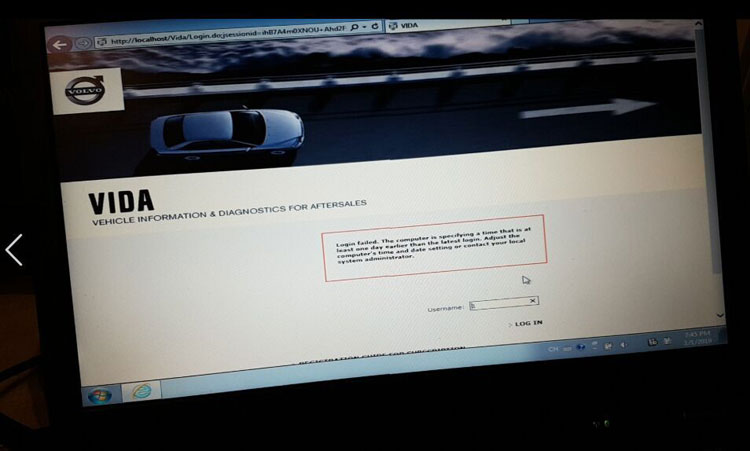
When I run the VIDA 2014D software for VXDIAG VCX NANO scanner, it gave an error and failed to login.
"Login Failed.
The computer is specifying a time that is at least one day earlier than the latest login.Adjust the computer's time and data setting or contact your local system administrator."
volvo-dice-login-failed
VXDIAGSHOP Solution:
Download and extract Volvo VIDA patch
Free Download VXDIAG Volvo VIDA Patch 
Run patch directly
Problem solved.

Related post:
Free Download Volvo VIDA 2014D for VXDIAG VCX NANO