2025/05/15

How to Solve VXDIAG VCX NANO No Device No WiFi Issue?

Problem:

VXDIAG VCX NANO Toyota WiFi scanner, the vx manager cannot detect the VCI (No device), the computer cannot recognize the WiFi, the red light is on, and the blue light is flashing.  How to fix it?

VXDIAG VCX NANO No Device No WiFi  1

VXDIAG VCX NANO No Device No WiFi  2

Solution:

If your VCX SE, VCX NANO, VCX DoIP devices have the same issue, it indicates a hardware failure and requires factory repair.

If your VXDIAG device shows no device but able to connect with WiFi, follow the solution here

VXDIAG VCX SE No Device Solution

2025/05/14

VXDIAG VCX SE JLR Defender 2021 VCI Not Detected Solution

Problem:

Trying to diagnose a 2021 Land Rover Defender DoIP model using VXDIAG VCX SE JLR device with PATHFINDER software, but the software fails to recognize the device and cannot establish communication with the vehicle. How to resolve this issue?

VXDIAG VCX SE JLR Defender 2021 VCI Not Detected 1

If had an error VCI connection not detected, this error indicates that the required Bosch VCI driver is not installed.

Install Bosch VCI Driver marked red arrow below.

VXDIAG VCX SE JLR Defender 2021 VCI Not Detected 2

 If the software crashes upon launch despite driver installation, insufficient system memory may be the cause.

2025/05/13

VXDIAG Benz 2023.09 Xentry Login Failed Solution

Problem:

VXDIAG VCX SE Benz was bought in 2024 with 2023.09 Xentry (with Truck Pack). Cannot work on this computer and scan cars.

When i am working it stops the process of working in the middle of work.
Error the login failed.

 VXDIAG Benz 2023.09 Xentry Login Failed  1

 VXDIAG Benz 2023.09 Xentry Login Failed  2

 VXDIAG Benz 2023.09 Xentry Login Failed  3

Solution:

VXDIAG Benz has two versions of xentry HDD/SSD:

1. Latest version xentry without truck, 2025.03 in May 2025.

2.2023.09 version xentry with truck pack.


If you choose 2023.09 version software, don’t forget to update VXDIAG C6 driver regularly.

After updating C6 driver, it scans the vehicle without problem.

VXDIAG Benz 2023.09 Xentry Login Failed  4

VXDIAG Benz 2023.09 Xentry Login Failed  5


2025/05/12

VXDIAG Benz 2025.03 Xentry Keeps Loading Solution

Problem:

Got the VXDIAG VCX SE Benz VCI and 2025.03 xentry. Tested it on a Mercedes GLK W204, but xentry diagnosis software keeps loading (stuck on data is loaded page) and does not proceed. How to fix it?

VXDIAG Benz 2025.03 Xentry Keeps Loading 1

Solution:

Entered the wrong login xentry offline user name and password.

VXDIAG Benz 2025.03 Xentry Keeps Loading 2

There is correct xentry offline login info:

User name: 1

Password:  1


Starting from version 2024.12, the login account username and password have been changed.


www.vxdiagshop.com

2025/05/08

VXDIAG Honda HDS Software Update to 3.105.043

VXDIAG 2TB hard drive/solid drive released new Honda HDS software version 3.105.043.


Software information:

HDS + i-HDS

Honda Diagnostic System HDS: 3.105.043
i-HDS software version: 1.010.008
Installer version: 1.010.006 PE

J2534ReWrite
Multi-language: English, Portuguese, Spanish,, French, Indonesian, Korean, Thai, Turkish, Vietnamese, Chinese.

Select VCI as VXDIAG.

Support for Honda/Acura Models 2005-2021: Diagnose a wide range of Honda/Acura vehicles from 2005 to 2021, enhancing your diagnostic capabilities.

VXDIAG Honda HDS Software Update to 3.105.043 1

VXDIAG Honda HDS Software Update to 3.105.043 2

Honda HDS Functions List:

* Reading and decoding fault codes from control blocks memory

* Deleting fault codes

* Displays system current parameters in digital form

* Combined displaying of data

* Management of executive devices

* Logs keeping – writing and keeping of digital parameters in memory

* Special functions – changing of permissible settings of blocks, programming etc.

VXDIAG Honda HDS Software Update to 3.105.043 3

The software does not include online account. if you want do ecu programming, you must need online account. Offline programming is not possible.

NOTE:

Only the 2TB hard drive/solid drive version has this software update; there is no separate software download link available.

VXDIAG VCX FD DoNET Connection via WiFi Hotspot

VXDIAG VCX FD series scanners also support DoNET remote diagnostics. The confiaguration is similar as VCX SE series.

Here we will show how to set up DoNET connection for VCX FD via WiFi Hotspot.


Configure WiFi Hotspot connection

The procedure is similar to VCX SE.

Please connect VCI to vehicle or power supply.

VXDIAG VCX FD DoNET Connection via WiFi Hotspot 1

Open [Settings -Wifi -Hotspot], Turn on Hotspot and set the name and password as: DiagOnNet.

NOTE:

It should be noted that VXDIAG works with 2.4GHz DoNET remote connections and does not appear to recognize 5GHz connections.

VXDIAG VCX FD DoNET Connection via WiFi Hotspot 2

Press the button (Fn) for 3 seconds to enter NetConfig mode, wait about 30 seconds to hear the buzzer, then the network is successfully connected.

Configure network connection successfully

After the device is successfully connected to the Internet, the home page will display information including the device serial number, voltage, network, and speed.


Share [Remote ID]

Click on [Remote ID] to copy the ID and send it to the server, and wait for the server to start remote.


Next is VX Manager operation

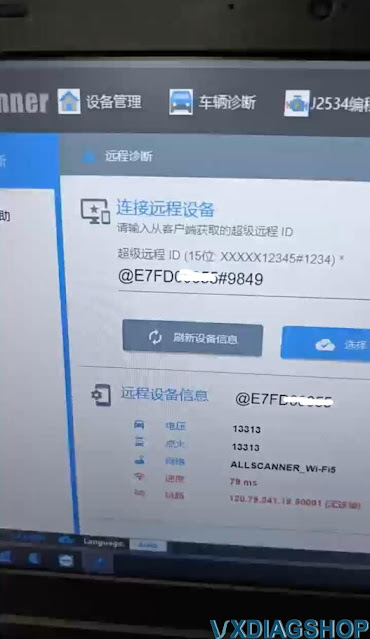
  1. Open the VX Manager device management software and click on “Remote”.
  2. View remote device information

Input the correct [Remote ID] and click [Connect Device], you can see that the client device has been connected normally.
VXDIAG VCX FD DoNET Connection via WiFi Hotspot 3

VXDIAG VCX FD DoNET Connection via WiFi Hotspot 4

VXDIAG VCX FD DoNET Connection via WiFi Hotspot 5

VXDIAG VCX FD DoNET Connection via WiFi Hotspot 6

After the remote connection is successful, the VX Manager software will automatically restart, and you can see that the device information has been read through the DoNET remote interface.

VXDIAG VCX FD DoNET Connection via WiFi Hotspot 7

2025/05/06

VXDIAG Nissan V241 Error Not Support Version Solution

Problem:

Failed to start VXDIAG VCX SE Nissan Consult iii plus V241 software from patch.  It reported an error “not support version”.

VXDIAG Nissan V241 Error Not Support Version

Solution:

Download new patch for Consult3 plus V241.

Run software from the new patch. It will be fine.

Loader.exe