Car model: GM Corvette C6
Device: VXDIAG VCX Nano GM with USB cable not Wifi
Error:
Won’t connect to the car
Can’t get the licensee to load
How to solve?
Problem with WI-Fi unit, is that the Nano needs to be connected to the car so the nano has power to begin with. Also, OBDII port needs to be powered up, so on a C5, car has to be in run postion before the OBDII has power itself.
Because of that, even on the Wifi unit I have, I still use it with a cable so the laptop powers up the nano to begin with, and don't have to worry about the OBDII power instead..
When you load it make sure you run the installed updates from tech2win.
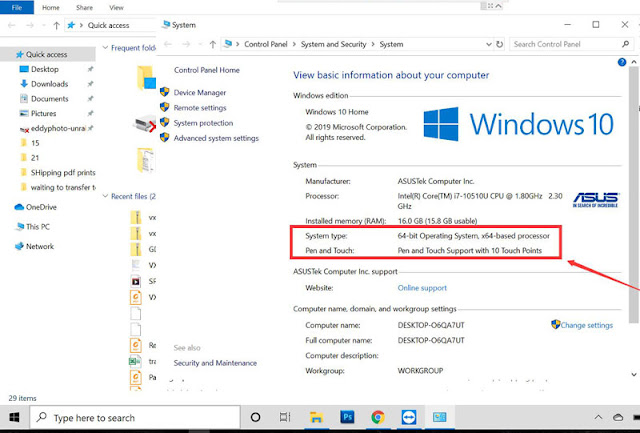
You also cant use a 64bit OS system it has to to be a 32bit device. The newer units (if bought on amazon) are 32bit and cant run from a Vm image that is 32bit OS.
I had the same issue. I pulled out a old laptop and installed win10 32bit and ran the updated add-ons from tech2win.
Load VX manager first, plug in the Nano, and get it working in VX manager. Hence click on firmware icon to update the firmware, then click on licence icon to install the licenses.
Now with the VX manager open and the nano plugged in, now load that auto install.exe of Tech2win to load it from the White disc that came with the Nano to your machine. Hence the autoinstall.exe will need to over ride some VX manager files when it installs, so VX manager has to be open with the Nano connected/being seen in VX manager when you load tech2 win auto install from the disc. Installing tech2 win, with VX manager not open and the nano not plugged into the machine will end up with install problems every time with Win 64bit system.
Lastly, if you are loading in the Newer VX manager, you have to go in and install the needed programs from inside VX manager (no long load into VX manger from the white disc). So Tech2, GDS2 and SPS have to be installed from within VX manager. If you check in VX manager and these are loaded already, uninstall and reload them from VX manager again if you are having problems. When you have done these three reloads, go back in the licence tab in VX manager and make sure you are showing licences for all three of these. If not, then go back to the main page and click on the licence ion to update the licences on the refreshed installed. I bring this up, since if you are using the last right hand top tab in VX manager to download the latest VX manager, you will have to install Tech2win/gds2/SPS from within VX manager (will still use the white disc to install Tech2win to the laptop to get the the desk top icon.
Now the glitch with A/C Delco TBS.
If you are using the older VX manager and older firmware on the Nano, when you get the screen to install the Bosch Tech2win driver and GDS2 in TBS (will be a pop up screen), you want to skip these installs each time you use TBS.
If you are using the latest VX manager and latest Nano firmware, then you want to install these two Bosch drivers from TBS instead.
Trust is, for TBS now, you want to be using the latest VX manager and firmware. When you load the two Bosch drivers, it going to to load another program that is needed to get the Nano to work (TBS changed about a year ago, and its this third driver that loads with the Bosch drivers that is needed to get the Nano to work with the system.
http://www.vxdiagshop.com/service/vxdiag-gm-not-connect-corvette-c6-solution.html

VXDIAG VCX NANO, VCX SE, VCX Plus, VCX DoIP multi diagnostic tool software and hardware support from vxdiagshop.com

2020/04/17
VXDIAG Toyota Techstream V15 Activation Key Solution
Problem:
What is the activation key of the vxdiag vcx nano toyota techstream 15.00.026?
I have tried many system winxp, win7, win10, all ask for the license key.

Cause:
Didn't install the patch. It does not require a activation key if install the patch.
Solution:
Download & install techstream 15.00.026 software and patch again. And run software from patch.
Software
https://mega.nz/#F!SAR3Qa7B!N61Ikd1HKEodTiwpODLXKQ
Patch
https://mega.nz/#F!7VZzBQgZ!wO9Fjk0gfZF-tfv6zQAqzw
What is the activation key of the vxdiag vcx nano toyota techstream 15.00.026?
I have tried many system winxp, win7, win10, all ask for the license key.

Cause:
Didn't install the patch. It does not require a activation key if install the patch.
Solution:
Download & install techstream 15.00.026 software and patch again. And run software from patch.
Software
https://mega.nz/#F!SAR3Qa7B!N61Ikd1HKEodTiwpODLXKQ
Patch
https://mega.nz/#F!7VZzBQgZ!wO9Fjk0gfZF-tfv6zQAqzw
2020/04/16
OEM Porsche PIWIS III Recovery Password
Problem:
I got the OEM Porsche tester iii with 128G PIWIS SSD. There was something wrong with the Dell laptop.
So i changed my own laptop and insert SSD. But the system display BitLocker driver encryption error page and require to enter recovery key to access Startup Settings.
What is the recovery key?


Possible reason:
The OEM Porsche PIWIS3 should only work with the DELL E7450 Laptop in default.
Because each PIWIS III Tester is registered with each E7450 Laptop before delivery.
Once you change a new laptop, the SSD is decrypted and formatted.
In this case, you cannot use the SSD anymore nor send back laptop for repair.
SSD is not for sale alone.
Solution:
If dell laptop has problem , don't change laptop, get the laptop fixed by local dealership or send back the laptop to us to repair.
If you have changed a new laptop, contact your seller to buy a U disk.
Contact factory to authorized the piwis 3 account and download PIWIS iii to the U disk. Then install the disk to Dell computer.
www.vxdiagshop.com
I got the OEM Porsche tester iii with 128G PIWIS SSD. There was something wrong with the Dell laptop.
So i changed my own laptop and insert SSD. But the system display BitLocker driver encryption error page and require to enter recovery key to access Startup Settings.
What is the recovery key?


Possible reason:
The OEM Porsche PIWIS3 should only work with the DELL E7450 Laptop in default.
Because each PIWIS III Tester is registered with each E7450 Laptop before delivery.
Once you change a new laptop, the SSD is decrypted and formatted.
In this case, you cannot use the SSD anymore nor send back laptop for repair.
SSD is not for sale alone.
Solution:
If dell laptop has problem , don't change laptop, get the laptop fixed by local dealership or send back the laptop to us to repair.
If you have changed a new laptop, contact your seller to buy a U disk.
Contact factory to authorized the piwis 3 account and download PIWIS iii to the U disk. Then install the disk to Dell computer.
www.vxdiagshop.com
VXDIAG GM Tech2Win Windows 10 64bit Review
Here's the working experience of one of our customers:
Background:
The VXDIAG GM Tech2Win software is recommended to installed on Windows 7 32-bit system.
But the customer does not have a Win7 laptop, but a Windows 10 64bit laptop. He had error when set Tech2win up on win10 but finally worked it out.
Vehicle Model:
2004 Chevrolet Corvette
Experience:
Got my vxdiag VcX Nano for GM today ahead of schedule. I am trying to install the software I need, mainly the Tech 2 software since the vehicle I intend to use this on is a 2004 corvette,, and I have a problem. i keep being told to install the VX Driver MDI 1.2.0.0330.exe from my disk but my disc doen't have that file. If I go through the VX Manager it starts to install the tech 2 software then tells me the MMI driver hasn't been installed and it shuts down.. I have looked on your website on the download page and don't see a MDI or MMI driver. What am i supposed to do?
I running a Win10 64bit laptop.
I seem to have gotten vx manager and gm tech2win installed, at least I don't get errors when I start them. the only problem now is gmtech2win isn't communicating with the car, vx manager sees the nano and the voltage from the obd port which I thought meant it was seeing the port, but when I go to gmtech2win it runs but won't communicate with car.
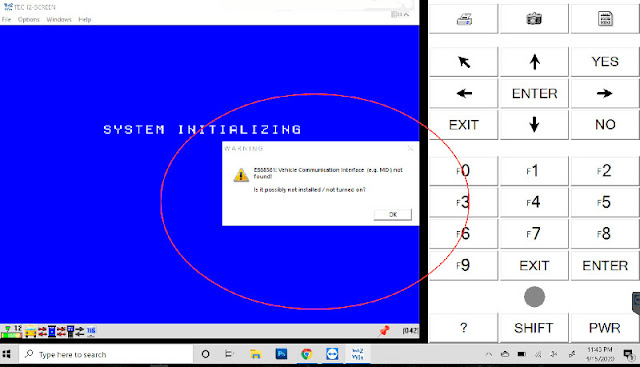
I have been able to get VX Manager working and seeing my nano. When I plug the nano into my obd2 port VX Manager shows the voltage coming through the port.. But when I run GM Tech2Win it can't communicate with the car. (the little icon on the bottom left has red X's on the arrows going to the car from the mdi and from the mdi to the tech2 but good arrows going from the tech2 to the computer) what am I missing?
Solution & Result:
I actually got it working, turned out my issue I think was Windows Defender where I had to go in and disable real time protection and then reinstall everything, now it seems to be working fine.
http://blog.vxdiagshop.com/2020/04/16/vxdiag-gm-tech2win-windows-10-working-experience/
Background:
The VXDIAG GM Tech2Win software is recommended to installed on Windows 7 32-bit system.
But the customer does not have a Win7 laptop, but a Windows 10 64bit laptop. He had error when set Tech2win up on win10 but finally worked it out.
Vehicle Model:
2004 Chevrolet Corvette
Experience:
Got my vxdiag VcX Nano for GM today ahead of schedule. I am trying to install the software I need, mainly the Tech 2 software since the vehicle I intend to use this on is a 2004 corvette,, and I have a problem. i keep being told to install the VX Driver MDI 1.2.0.0330.exe from my disk but my disc doen't have that file. If I go through the VX Manager it starts to install the tech 2 software then tells me the MMI driver hasn't been installed and it shuts down.. I have looked on your website on the download page and don't see a MDI or MMI driver. What am i supposed to do?
I running a Win10 64bit laptop.


I have been able to get VX Manager working and seeing my nano. When I plug the nano into my obd2 port VX Manager shows the voltage coming through the port.. But when I run GM Tech2Win it can't communicate with the car. (the little icon on the bottom left has red X's on the arrows going to the car from the mdi and from the mdi to the tech2 but good arrows going from the tech2 to the computer) what am I missing?
Solution & Result:
I actually got it working, turned out my issue I think was Windows Defender where I had to go in and disable real time protection and then reinstall everything, now it seems to be working fine.
http://blog.vxdiagshop.com/2020/04/16/vxdiag-gm-tech2win-windows-10-working-experience/
2020/04/13
VXDIAG GM GDS2 Database Update to 2020.02
VXDIAG VCX NANO and multi tool GM GDS2 software database released to 2020.02.
Free Download GM GDS2 2020.02 Software & Database
https://mega.nz/#F!jN4lSYaA!5Q_p4sZEySxLu6HVPP418A
File including


Free Download GM GDS2 2020.02 Software & Database
https://mega.nz/#F!jN4lSYaA!5Q_p4sZEySxLu6HVPP418A
File including


How to Update VXDIAG Porsche Tester III to V38.900?
Question:
What is the latest PIWIS software of vxdiag tester iii? How can i update software to latest version?
Vxdiagshop.com solution:
The latest VXDIAG PIWIS III software goes to 38.900.000 (Till April 2020)
What’s new in PIWIS III 38.900?
38.900 with for the experts the developer/engineering mode activated to code without passing through the Porsche server.
Older software version 38.400 with unlimited activation, with a full engineering menu. You can install a fresh version, 38.900 (the engineering menu has been cut down). Equipment tested, ready to go.

Language: English, US English, German, French, Italian, Spanish, Japanese, Chinese, Russian, Portuguese
Operating system: Lenovo T440P Laptop Windows 7
How to Update VXDIAG Porsche Tester III?
Software comes in HDD format.
Update method: by sending back the 240G SSD (users need to bear the shipping fee ) or purchasing a new SSD.
www.vxdiagshop.com
What is the latest PIWIS software of vxdiag tester iii? How can i update software to latest version?
Vxdiagshop.com solution:
The latest VXDIAG PIWIS III software goes to 38.900.000 (Till April 2020)
What’s new in PIWIS III 38.900?
38.900 with for the experts the developer/engineering mode activated to code without passing through the Porsche server.
Older software version 38.400 with unlimited activation, with a full engineering menu. You can install a fresh version, 38.900 (the engineering menu has been cut down). Equipment tested, ready to go.

Language: English, US English, German, French, Italian, Spanish, Japanese, Chinese, Russian, Portuguese
Operating system: Lenovo T440P Laptop Windows 7
How to Update VXDIAG Porsche Tester III?
Software comes in HDD format.
Update method: by sending back the 240G SSD (users need to bear the shipping fee ) or purchasing a new SSD.
www.vxdiagshop.com
2020/04/09
VXDIAG VW ODIS and JLR SDD Pathfinder in Win10 64bit
Allscanner VXDIAG full version multi tool Jaguar Land Rover SDD Pathfinder and VAG ODIS software update to Windows 10 64bit system. Software comes in 2TB HDD/SSD format.
Latest software version in 2TB HDD/SSD:
Porsche PIWIS II 18.100.000
VAG ODIS 5.16 PostSetup 9.06
HDD/SSD Operating system:
Windows 7 32bit
GM GDS2/Tech2Win
Porsche PIWIS II
Subaru SSM III
Toyota Techstream
Honda HDS
Windows 7 64bit
Volvo VIDA
Mercedes Benz Xentry
BMW ISTA+ ISTA-P
Windows 10 64bit
JLR SDD and Pathfinder


VAG ODIS


Latest VXDIAG software language list:
Ford/Mazda IDS Languages:
Chinese, Czech, Danish, Dutch, Finnish, French, German, Greek, Hungarian, Italian, Japanese, Norwegian, Polish, Portuguese, Romanian, Russian, Slovenian, Spanish, Swedish, Thai, Turkish
VW ODIS Languages:
English, Czech, Danish, German, Greek, Spanish, Finnish, French, Hungarian, Croatian, Italian, Japanese, Korean, Netherlands, Polish, Portuguese, Russian, Slovenian, Swedish, Turkish, Romanian, Chinese
JLR SDD Languages:
English, Spanish, French, Italian, Netherlands, Portuguese, Russian, Japanese, Korean, Chinese
JLR DoIP Pathfinder Languages:
English, German, French, Spanish, Italian, Japanese, Korean, Netherlands, Portuguese, Russian, Chinese
GM GDS2 Languages:
English, Spanish, French, Italian, Portuguese, Netherlands, Russian, Arabic, Japanese, Chinese, Vietnamese
GM Tech2win language: English
Toyota Techstream Languages: English, Japanese
Volvo VIDA Languages:
2015A: English, Japanese
2014D: English, French, Spanish, Swedish, Portuguese, Chinese
Porsche piwis2 Languages:
English, French, German, Italian, Spanish, Japanese, Russian, Portuguese, Netherlands
Porsche PIWIS3 Languages:
English, German, French, Italian, Spanish, Japanese, Chinese, Russian, Portuguese, Netherlands
Subaru SSM3 Languages:
English, German, Spanish, French, Italian
BMW ISTA Languages:
ISTA-D: English
ISTA-P: English, Chinese, Czech, Dutch, French, German, Greek, Indonesian, Italian, Japanese, Korean, Polish, Portuguese, Russian, Spanish, Swedish, Thai, Turkish
BENZ Xentry Languages:
Bulgarian, Czech, Danish, German, Greek, English, Spanish, Finnish, French, Hungarian, Italian, Japanese, Korean, Dutch, Polish, Portuguese, Romanian, Russian, Croatian, Slovenian, Swedish, Turkish, Chinese
Honda HDS Languages:
English, Italian, Japanese, French, Spanish, Thai, Greek, Polish, German, Russian, Vietnamese, Norwegian, Hungarian, Turkish
www.vxdiagshop.com
Latest software version in 2TB HDD/SSD:
Porsche PIWIS II 18.100.000
VAG ODIS 5.16 PostSetup 9.06
JLR SDD V159 (NEW)
Mercedes Xentry 2020.03 (NEW)
BMW ICOM ISTA+/ISTA-D 4.18.20 ISTA-P 3.66.100
Honda HDS 3.102.54.0
Toyota Techstream 15.00.026 (NEW)
GM GDS2 2019.04
Ford/Mazda IDS V117 (NEW)
Subaru SSM3 2018.10
Volvo VIDA 2014D
JLR Pathfinder v277 (NEW)
Mercedes Xentry 2020.03 (NEW)
BMW ICOM ISTA+/ISTA-D 4.18.20 ISTA-P 3.66.100
Honda HDS 3.102.54.0
Toyota Techstream 15.00.026 (NEW)
GM GDS2 2019.04
Ford/Mazda IDS V117 (NEW)
Subaru SSM3 2018.10
Volvo VIDA 2014D
JLR Pathfinder v277 (NEW)
HDD/SSD Operating system:
Windows 7 32bit
GM GDS2/Tech2Win
Porsche PIWIS II
Subaru SSM III
Toyota Techstream
Honda HDS
Windows 7 64bit
Volvo VIDA
Mercedes Benz Xentry
BMW ISTA+ ISTA-P
Windows 10 64bit
JLR SDD and Pathfinder


VAG ODIS


Latest VXDIAG software language list:
Ford/Mazda IDS Languages:
Chinese, Czech, Danish, Dutch, Finnish, French, German, Greek, Hungarian, Italian, Japanese, Norwegian, Polish, Portuguese, Romanian, Russian, Slovenian, Spanish, Swedish, Thai, Turkish
VW ODIS Languages:
English, Czech, Danish, German, Greek, Spanish, Finnish, French, Hungarian, Croatian, Italian, Japanese, Korean, Netherlands, Polish, Portuguese, Russian, Slovenian, Swedish, Turkish, Romanian, Chinese
JLR SDD Languages:
English, Spanish, French, Italian, Netherlands, Portuguese, Russian, Japanese, Korean, Chinese
JLR DoIP Pathfinder Languages:
English, German, French, Spanish, Italian, Japanese, Korean, Netherlands, Portuguese, Russian, Chinese
GM GDS2 Languages:
English, Spanish, French, Italian, Portuguese, Netherlands, Russian, Arabic, Japanese, Chinese, Vietnamese
GM Tech2win language: English
Toyota Techstream Languages: English, Japanese
Volvo VIDA Languages:
2015A: English, Japanese
2014D: English, French, Spanish, Swedish, Portuguese, Chinese
Porsche piwis2 Languages:
English, French, German, Italian, Spanish, Japanese, Russian, Portuguese, Netherlands
Porsche PIWIS3 Languages:
English, German, French, Italian, Spanish, Japanese, Chinese, Russian, Portuguese, Netherlands
Subaru SSM3 Languages:
English, German, Spanish, French, Italian
BMW ISTA Languages:
ISTA-D: English
ISTA-P: English, Chinese, Czech, Dutch, French, German, Greek, Indonesian, Italian, Japanese, Korean, Polish, Portuguese, Russian, Spanish, Swedish, Thai, Turkish
BENZ Xentry Languages:
Bulgarian, Czech, Danish, German, Greek, English, Spanish, Finnish, French, Hungarian, Italian, Japanese, Korean, Dutch, Polish, Portuguese, Romanian, Russian, Croatian, Slovenian, Swedish, Turkish, Chinese
Honda HDS Languages:
English, Italian, Japanese, French, Spanish, Thai, Greek, Polish, German, Russian, Vietnamese, Norwegian, Hungarian, Turkish
www.vxdiagshop.com
2020.03 Xentry Online Programming "A Fault Has Occurred"
As titled, possible to use the latest 2020.03 xentry software with vxdiag benz c6 to perform online programming?
Vxdiagshop.com engineer solution:
XENTRY since 2019.09 version stops downloading programming files from online server.
SCN coding goes fine. It's just the programing of control units - it find's new software for it, online update server is not accessible, but when you agree to update the module it then throws this error:
"A fault has occurred!"

2019.12, 2020.03 and up software cannot do online programming anymore. Whenever you use vxdiag c6 or sd connect c4 multiplexer.
If you need to do Mercedes online programming:
1) Choose xentry software 2019.09 version previously.
2) Use newer software (2019.09 up) with daimler server license.
3) configure the retail data storage (RDS) in the config assist (Cannot guarantee. You are at your risk.)
looking for a file ConfigAssist.exe.config. looking for a string <setting name="OnlineUpdate_PageAvailable" serializeAs="String"> <value>false</value> . false change to True
www.vxdiagshop.com
Vxdiagshop.com engineer solution:
XENTRY since 2019.09 version stops downloading programming files from online server.
SCN coding goes fine. It's just the programing of control units - it find's new software for it, online update server is not accessible, but when you agree to update the module it then throws this error:
"A fault has occurred!"

2019.12, 2020.03 and up software cannot do online programming anymore. Whenever you use vxdiag c6 or sd connect c4 multiplexer.
If you need to do Mercedes online programming:
1) Choose xentry software 2019.09 version previously.
2) Use newer software (2019.09 up) with daimler server license.
3) configure the retail data storage (RDS) in the config assist (Cannot guarantee. You are at your risk.)
looking for a file ConfigAssist.exe.config. looking for a string <setting name="OnlineUpdate_PageAvailable" serializeAs="String"> <value>false</value> . false change to True
www.vxdiagshop.com
2020/04/07
VXDIAG Latest Diagnostic Software in April 2020
Latest version VXDIAG diagnostic software in April 2020.
Porsche PIWIS II 18.100.000
VAG ODIS 5.16 PostSetup 9.06
JLR SDD V159 (NEW)
Mercedes Xentry 2020.03 (NEW)
BMW ICOM ISTA+/ISTA-D 4.18.20 ISTA-P 3.66.100
Honda HDS 3.102.54.0
Toyota Techstream 15.00.026 (NEW)
GM GDS2 2019.04
Ford/Mazda IDS V117 (NEW)
Subaru SSM3 2018.10
Volvo VIDA 2014D
JLR Pathfinder v277 (NEW)
Porsche Porsche PIWIS III 38.600.000
Note: PIWIS III and JLR Pathfinder requires specific vxdiag scanners.
Latest vxdiag software can be downloaded free here:
2020/04/02
How to Solve VXDIAG JLR SDD Http Error 500?
Question:
I failed to run JLR SDD software no matter connect or disconnect vxdiag vcx nano adapter with vehicle.
Got the VX Manager and JLR driver installed. It passes self test. Software refuse to run. Any clue on this?


Solution:
VX Manager driver is well installed but the SDD software has been been correctly installed.
Install SDD software again.
Follow video guide to install SDD
Subscribe to:
Posts (Atom)