2023/09/13

VXDIAG Techstream Works on 2023 Lexus GX460

VXDIAG VCX NANO Toyota Techstream cable was confirmed working with latest Lexus GX460.


Here comes the latest review of vcx nano user:

“All the negative reviews have one common thing…user error. Anyone using Techstream knows you need an old junk computer that you disable the anti-virus software and keep it off the internet. Software works perfectly, unit arrived with the most recent firmware.

Software V18 works fine. Upgrade the FW before, if needed.

Worked PERFECT on a 2023 GX460, 2022 GX460, 2017 GX460, 2019 GX460 and a 2007 GX470.

MUCH better than the cheap cable that I previously purchased.

This worked right out of the gate and I reprogrammed my TPMS sensors and I turned off the seatbelt warnings.

This one has my seal of approval.”

VXDIAG Techstream Works on 2023 Lexus GX460


2023/09/12

VXDIAG VCX SE BMW Firmware Error No Voltage Solution

Problem:

I set up ista-d 4.39.20 software with vxdiag vcx se BMW scanner, but it won’t communicate with any vehicle. Only display ICOM firmware status icon and no voltage input. Any solution?

VXDIAG VCX SE BMW Firmware Error No Voltage

Possible reason:
No voltage= device is no recognized by vx manager.
Firmware status icon= ICOM driver issue.

VXDIAGSHOP Solution:
Connect VCX SE with vehilce and laptop.
Reinstall BMW ICOM driver.

VXDIAG VCX SE BMW Firmware Error No Voltage solution 1
Update firmware.
If still not working, Restart device and try again.

VXDIAG VCX SE BMW Firmware Error No Voltage 2
Feedback:
I tried to connect device, reinstall ICOM driver and Restart, now it works.

VXDIAG VCX SE BMW Firmware Error No Voltage 3

VXDIAG VCX SE BMW Firmware Error No Voltage 4

2023/09/10

GMC 2500 P0633 Fault Code Solved by VXDIAG and SPS2

It is a Gmc 2500 2011 Canadian model.  The client got a key from the dealer but cannot get that security light closing after 10min.

Error code: P0633.  He tried test unpluging battery one night, still not working.

DTC P0633 shows up active and the vehicle does not start because the new key is not programmed to the vehicle.

GMC 2500 P0633 Fault Code Solved by VXDIAG and SPS2

Suggestion:

VXDIAG VCX SE or VCX NANO interfaces will do the job for you. You have to be sure to select the model for GM vehicles.

In order to program the new key (as a first or master key, because you don’t have the original master key) you need to put the PCM in learn mode, and this is only possible through SPS2 programming.

After that, you can program any additional keys without the need of SPS2 programming.


Feedback:


He paid for one VIN 2 years use of SPS2 and got the vxdiag tech2 clone.

Finally when you lost a key don’t touch anything before getting all the tool you need vxdiag tech2win and register to sps2.

2023/09/07

VXDIAG JLR Pathfinder Change JLR Car Configuration Guide

JLR Tutorial: how to change Car Configuration with JLR Pathfinder software.

Credit to DK joniur member ecuprojekt. You are at your own risk.
 
Interfaces that work with PATHFINDER:
 
The manual applies to cars after 2017 on the DoIP protocol. This manual show you, how to use software PATHFINDER to do vehicle configuration change for Jaguar and Land Rover cars.
 
The first thing we need to do is to prepare a computer with JLR PATHFINDER software and Internet access.
We perform vehicle identification at this time the software will download the CCF (Car Configuration File) from DFSM Server.
VXDIAG JLR Pathfinder Change JLR Car Configuration 1

VXDIAG JLR Pathfinder Change JLR Car Configuration 2

VXDIAG JLR Pathfinder Change JLR Car Configuration 3
At this point, minimize an app to the system taskbar,, the file we need has been downloaded from the DFSM server. The car configuration file is saved in the following location:
VXDIAG JLR Pathfinder Change JLR Car Configuration 4

Run the CCF Tools program, select “Read VBF” at the bottom left of the program, select the file “number_vin.vbf” from the location given above. After proper loading of the VBF file with the car configuration, a window with parameters should appear.
VXDIAG JLR Pathfinder Change JLR Car Configuration 5
Change the parameters we are interested in then save the file without changing the name and in the same original location. After saving the modified configuration file, go back to
the PATHFINDER diagnostic application:
VXDIAG JLR Pathfinder Change JLR Car Configuration 6
Choose Service -> Select CCF -> Trun ignition on -> Next -> Copy from AS BUILT ->Next
VXDIAG JLR Pathfinder Change JLR Car Configuration 7
DISCLAIMER !!! We are not responsible for the actions described in this manual.
www.vxdiagshop.com

2023/09/06

GMC Sierra 2500 THEFT LOCKED Solved by SPS2

Problem:

I have a 2022 GMC Sierra 2500.

I replaced the radio with used one from ebay. It displayed THEFT LOCKED.


Solution:

I have the dealer software SPS2 and vxdiag vcx nano gm scanner. So I went to program it with that. It asked to insted USB drive into PC which I did.

It then transferred all the new software to the USB drive. It then said its safe to remove and programming completed.

Now the headached, I cannot get it to do anything when I insert into with of the 2 USB drives under the climate control. Just display theft locked and does not load any software.


UPDATE:

I removed the theft lock using Techline Connect diagnostics. Just need to know how to updated the sofwtare now, its already on the USB drive but does nothing when I plug it into vehicle

2nd update, I cleaned the usb connector at back of the interface and it detected the drive immediately, It detected the software update and took 30 minutes to install.

2023/09/04

VXDIAG VCX SE ODIS License Invalid Solution

Problem:

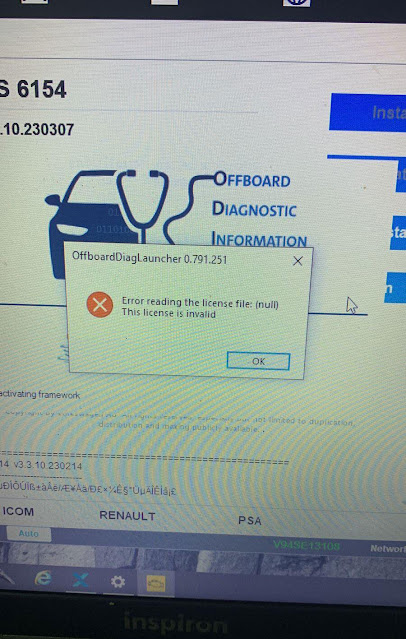
I tried to use ODIS 7.2.1 software with vxdiag vcx se pro, it said license invalid and asked me to update VCI. Then i tried to install/update 6154 driver, but it displayed another error reading license file. Any suggestion?

VXDIAG VCX SE ODIS License Invalid 1

VXDIAG VCX SE ODIS License Invalid 2

Solution:

1.The invalid license is usually caused by missing corresponding software license.

Check available license in ‘Licenses’ area

VXDIAG VCX SE ODIS License Invalid 3

If cannot see your license, contact vxdiagshop.com to add license to your vcx se.

http://www.vxdiagshop.com/wholesale/license/


If don’t have software license, you will get an error reading license file (like in image 2) when installing 6154 driver.

If still get the same error after adding license to the device, update firmware and VCI, then try again.

2023/09/03

Failed to Clone VXDIAG Benz Xentry Software Solution

Problem:

I got the vxdiag vcx benz and xentry hard drive. I can’t close the xentry, when I want to terminate the xentry it doesn’t do anything. Any solution?


Solution: 

1. Press Xentry Diagnostic close icon on desktop marked red image below to close Xentry

Failed to Clone VXDIAG Benz Xentry Software 1

2. You can also run close icon on task bar to close xentry.

Failed to Clone VXDIAG Benz Xentry Software 2

www.vxdiagshop.com

2023/09/01

VXDIAG Benz No 2023 VCI Version Selection Solution

Problem:

I recently got my vxdiag vcx se Benz xentry updated to v2023.06 (through new hard drive). After activating xentry and trying to sync VCI, i cannot see 2023 VCI versions. Tried delete and reinstall vx manager, still the same. Any solution?

VXDIAG Benz No 2023 VCI Version Selection

Solution:

Update Benz C6 driver. 2023 Xentry requires latest driver support.

update c6 driver

Go to Diagnostic tab, Update Benz C6 driver

After update C6 driver, run Xentry recovery tool on the desktop to sync Xentry VCI.

Update firmware/VCI-> Update C6 driver-> Sync VCI.