2025/04/29

VXDIAG 2TB Software and Version List [May 2025]

On April 29, 2025, VXDIAG released an updated software version for their 2TB hard drive/solid drive.

Please check the software list and corresponding versions:


1.BMW ISTA-D 4.50.20 , ISTA-P 68.0.800
2.BENZ Xentry/DAS : 2025.03
3.VW/AUDI ODIS Service V24.01, Engineering V18
4.JLR SDD V167, Pathfander V374
5.Piwis II V18.100.000
6.VOLVO 2014D
7.FORD IDS V130
8.MAZDA IDS V136
9.GM GDS2 2024.05, Tech2win 23.002
10.TOYOTA Techstream V18.00.008
11.HONDA HDS V3.105.043
12.SUBARU SSM3 V1.57.71.8 (2019.4 ), SSM4 V28.6.0 (2022.1)
13.NISSAN Consult3 Plus v240.10
14.PEUGEOT Diagbox v9.85
15.RENAULT Clip v237


BMW ISTA-D update to 4.50.20, Benz Xentry update to 2025.03, VAG ODIS S update to 24.0.1 and SDD software update to V167.

If you need to buy HDD/SDD separately, contact

WHATSAPP: 86-18064450969

Mazda MDARS Not Detect VXDIAG VCX Nano Solution

Problem:

How to set up Mazda MDars and VXDIAG VCX Nano Mazda scanner and make it work together? I got MDars software installed and subscription activated, VCX software installed, but it does not recognize VCX Nano.


Possible solution:

To use MDARS with vcx nano, you need to delete IDS vci driver, install Passthru driver in Vx Manager.

Select device as Passthru instead of vxdiag.

VXDIAG VCX FD for Ford/Mazda is recommended, because the VCX NANO does not support CAN FD protocol. It may not connect with the latest models even if you have an MDARS subscription.

Mazda MDARS Not Detect VXDIAG VCX Nano

MDARS is used on Mazda 7th generation vehicles starting with the following all new models:

2025- CX-70

2023- CX-50

2021- CX-5

2024-CX90

2022-2023 MX-30

2020- CX-30

2024- MX-5

2021-2023 CX-9

2019- Mazda3

2025/04/26

How to Switch MB Pro M6 to VXDIAG VCX SE Benz?

Problem:

The VXDIAG VCX SE Benz device is connected to both the laptop and the vehicle. The VX Manager detects the device information and voltage, but the C6 connection icon is missing.

Switch MB Pro M6 to VXDIAG VCX SE Benz 1

Solution:

During remote troubleshooting, we discovered that his system has the Super MB Star M6 (the same as MB SD C4 DoIP) driver installed, causing a conflict with the VXDIAG VCI.

Switch MB Pro M6 to VXDIAG VCX SE Benz 2

How to switch from M6 device to VXDIAG Benz device?

Find “M6-C6” program under SOFT folder. Disable M6 device.

Switch MB Pro M6 to VXDIAG VCX SE Benz 3

You can now use the VXDIAG Benz device.

Sync Xentry VCI to the corresponding version.

Switch MB Pro M6 to VXDIAG VCX SE Benz 4

VCX SE Benz and software is ready to use.

2025/04/25

Download ODIS S 25.0.1 for VXDIAG VCX SE 6154

Good news !!! New ODIS (Offboard Diagnostic Information System) Service 25.0.1 software was tested working with VXDIAG 6154 interfaces.


Compatible devices:

VXDIAG VCX SE 6154, VXDIAG VCX DoIP with ODIS license, VAS6154A etc.

Operating system: Windows 10 or more.

Multi-language: Czech, English, German, Spanish, French, Italian, Japanese, Korean, Dutch, Polish, Danish, Thai, Hungarian


Select device type as VAS 6154.

Don’t need to update 6154 driver in the VX Manager.

vxdiag vcx se 6154 odis s 25 software 1

ODIS 25.0.1 Software download

Latest version of ODIS-S 25.0.1 with home online/offline switch.

Put on the desktop, and ODIS must be installed on drive “C”. This method works great.

vxdiag vcx se 6154 odis s 25 software 2

The software comes with offline patch (launcher) to bypass online connection.

vxdiag vcx se 6154 odis s 25 software 3

ODIS 25.0.1 Software Display:

vxdiag vcx se 6154 odis s 25 software 4

vxdiag vcx se 6154 odis s 25 software 5

vxdiag vcx se 6154 odis s 25 software 6

2025/04/23

VXDIAG DTS Monaco WiFi LAN Connection Grey Out Solution

Problem:

VXDIAG VCX SE Benz DTS Monaco 8.13 software WiFi or LAN connection greyed out. When connected with USB, it is normal.
But when connected via Wi-Fi, the menu options are grayed out.

VXDIAG DTS Monaco WiFi LAN Connection Grey Out

Solution:

This is normal. The DTS menu can only be used properly when connected via USB.

2025/04/21

VXDIAG VCX SE Benz Not Connect with 2000 W210?

Problem:

VXDIAG VCX SE Benz and 2023.09 Xentry did not communicate with a MY200 Mercedes W210. Any idea?

VXDIAG VCX SE Benz Not Connect with 2000 W210 1

VXDIAG VCX SE Benz Not Connect with 2000 W210 2

Solution:

This is an old model with 38-pin round adapter.

VXDIAG Benz scanner can only do 16-PIN standard models. It does not work on older k-line models.

Use C4/C5 device instead.

2025/04/20

VXDIAG VCX SE BMW E-sys 3.70 Error LDE Solution

Problem:

Got the VXDIAG VCX SE BMW and ISTA 4.50 software hard drive. Tried to open the E-sys 3.70 software on the desktop. It reported an error “Err= LDE .Please contact support.” Any solution?

VXDIAG VCX SE BMW E-sys 3.70 Error LDE

Solution:

2025.03 VXDIAG BMW Software List:

VXDIAG BMW WIN10 system
ISTA-D 4.50.20

Database 4.50.21
ISTA-P 68.0.800
ETK2019.12
KSD2
E-SYS 3.40
BMWAi  4.4
INPA 5.00

winkfp 5.3.1

NCS 4.0.1


E-sys Version 3.40 is free to use; other versions need to be bought from the official source.

Launcher PRO 3.7.0.315 isn’t free. There are some hacked versions floating around, that still requires a PC HWID specific activation code.

2025/04/18

VXDIAG Benz Software Update to 2025.03

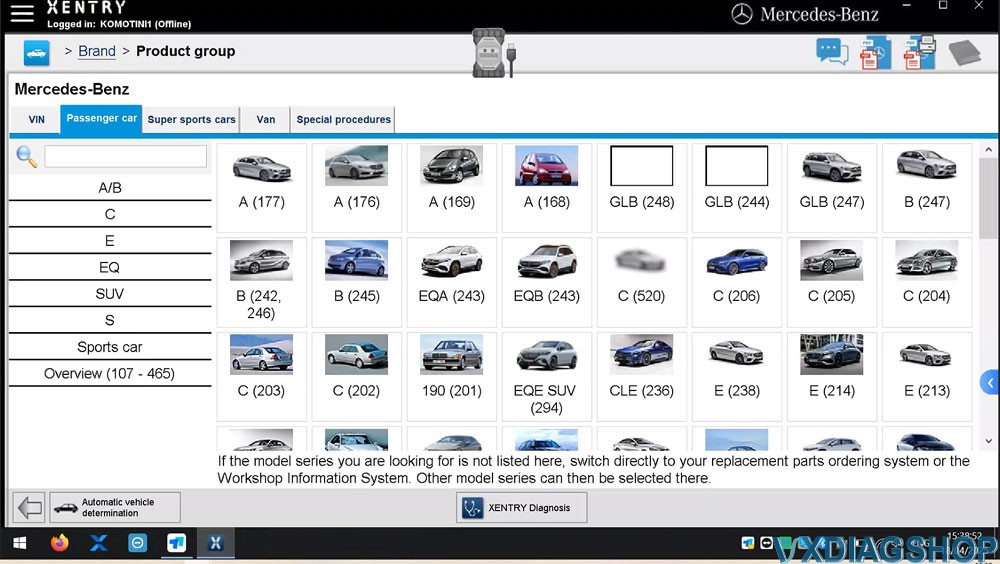
VXDIAG released new Mercedes Benz Xentry Software V2025.03 in April 2025.


2025.03 VXDIAG Benz Software List:


Xentry/DAS : 2025.03
DTS Monaco V8.13, 9.02
Starfinder 2022 /2020/2008
WIS 2021.4
EPC 2018.11

Compatible with Zenzefi license.


No need to update Benz C6 driver. Sync with 202409 VCI version.

VXDIAG Benz Software Update to 2025.03 1

2025.03 VXDIAG Benz software display

VXDIAG Benz Software Update to 2025.03 2

VXDIAG Benz Software Update to 2025.03 3

VXDIAG Benz Software Update to 2025.03 4

VXDIAG Benz Software Update to 2025.03 5

VXDIAG BMW Update Software 2025.03

VXDIAG BMW (VCX SE, VCX DoIP Multi Tool) software update to 2025.03 version in April 2025.


2025.03 VXDIAG BMW Software List:

VXDIAG BMW WIN10 system
ISTA-D 4.50.20

Database 4.50.21
ISTA-P 68.0.800
ETK2019.12
KSD2
E-SYS 3.40
BMWAi  4.4
INPA 5.00

winkfp 5.3.1

NCS 4.0.1


Need to update BMW ICOM driver in vx manager to use the new version software.

VXDIAG BMW Update Software 2025.03 1

ISTA+ 4.50.20 software display:

VXDIAG BMW Update Software 2025.03 2

VXDIAG BMW Update Software 2025.03 3

VXDIAG BMW Update Software 2025.03 4